


web planner ignoring 2nd point and profile
Solved
I start the plan. I add point #1 in Linz, Austria (place is irrelevant)
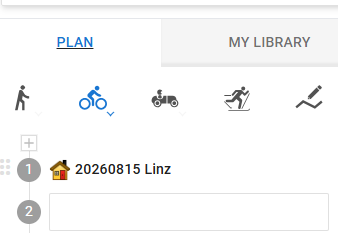
I click on the #2 textbox, then click on some point, any point on the map, near or far, doesn't matter, but nothing is added to the #2 textbox, and no route is plotted.
Point #1 in Linz, is slightly off the road, although may be irrelevant to this bug, because if I click any 2 close together points in same map view, a straight line is drawn, ignoring the touring bike profile, or any profile.
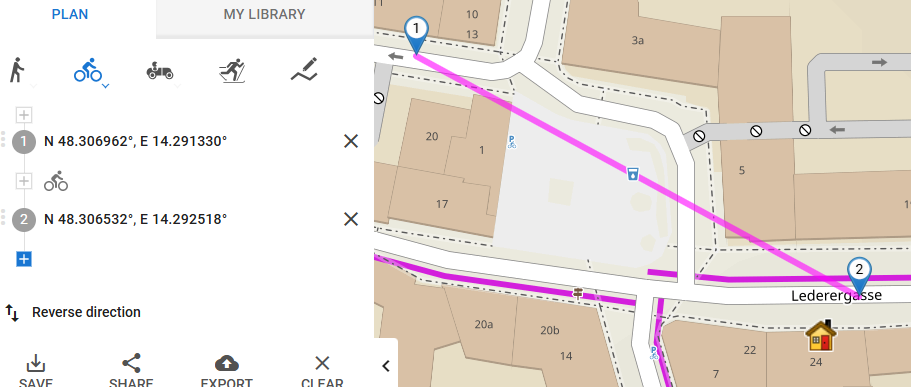
Nothing I can do results in any valid route. Something weird has broken just very recently.
Browser is Vivaldi 7.7.3851.48 on Chromium Version 142.0.7444.167 on Windows 11.
 The same problem
After more testing, if I start with a full page refresh (ctrl+F5), and add point #1 directly to the route instead of adding an existing point from My Library, a calculation is correctly performed. Once not working, even if I then delete that point from the route, further calculations are as per original post. PS. there is some specific issue/ problem with the recent My Library points I chose, because a test with a different, older, My Library point works. I've exported a point from My Library which caused the reported issue. The point was added with specific hand-entered coordinates, if useful info.
After more testing, if I start with a full page refresh (ctrl+F5), and add point #1 directly to the route instead of adding an existing point from My Library, a calculation is correctly performed. Once not working, even if I then delete that point from the route, further calculations are as per original post. PS. there is some specific issue/ problem with the recent My Library points I chose, because a test with a different, older, My Library point works. I've exported a point from My Library which caused the reported issue. The point was added with specific hand-entered coordinates, if useful info.
Hi Andrew,
sorry for the inconvenience and thanks for reporting the issue. The devs have been notified.
Hi Andrew,
sorry for the inconvenience and thanks for reporting the issue. The devs have been notified.
Andrew, the issue should be fixed. Could you please test it? Thanks
Andrew, the issue should be fixed. Could you please test it? Thanks
Thanks Michal - confirmed fixed. Quite weird combination of factors to cause the bug?
I notice the "progress line/ marquee" along the top never stops. I think that is new:-
Thanks Michal - confirmed fixed. Quite weird combination of factors to cause the bug?
I notice the "progress line/ marquee" along the top never stops. I think that is new:-
Replies have been locked on this page!