


Track Info Panel should be configurable
I asked about this somewhere a long time ago: the Track Info Panel is currently unchangeable in terms of the size and order of the information. And not always ideal.
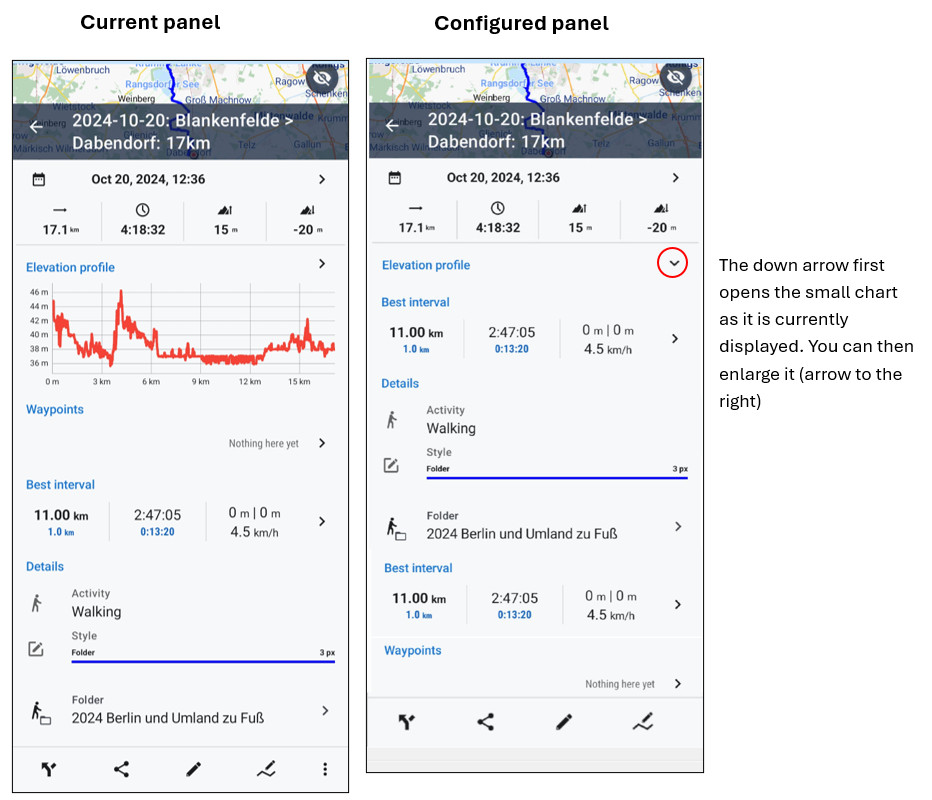
In flat regions, for example, it is not ideal that the elevation profile, which takes up a lot of space, always appears first. I also rarely need the waypoints.
I would therefore like to be able to configure the panel:
- Change order
- Show/hide items
For example, the elevation chart could only be shown by clicking on the small arrow on the right.
Either generally in the settings, or it would be even better (especially now with the new library) if this could be set for each folder. So I could always display the altitude diagram in holiday folders when you are in the mountains, but not in folders for flat regions.
For an example, see screenshot.
 I like this idea
If I understand your suggestion correct, one have to click on a small arrow to show the elevation profile. I don't like the idea to click a small arrow to show it. When wearing a glove or its rainy etc. this is just painful. I often use the elevation profile during my long trekking tours and like it as it is. Why don't click the Arrow to hide it?
If I understand your suggestion correct, one have to click on a small arrow to show the elevation profile. I don't like the idea to click a small arrow to show it. When wearing a glove or its rainy etc. this is just painful. I often use the elevation profile during my long trekking tours and like it as it is. Why don't click the Arrow to hide it?
Replies have been locked on this page!