


Segment Labels
Solved
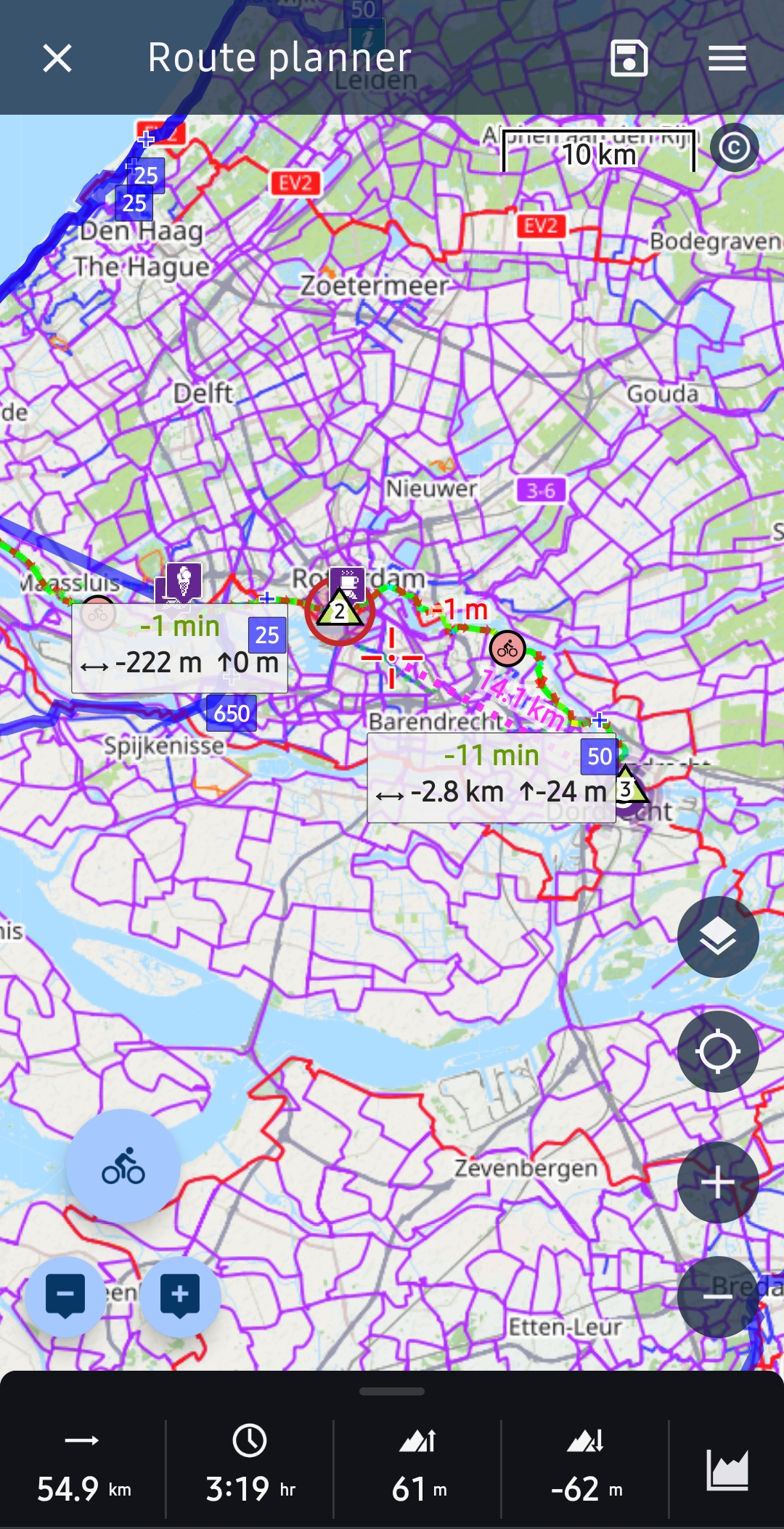
Ive not used Locus over the winter due to injury, but back and planning routes again but have got what I think are segment labels on the planner. How do i turn them off? They clutter the map making it hard to see your route and have meaningless into in that I cannot see bears any relation to my route
Files:
Screenshot_2026...
 The same problem
Hi Jon,
Thank you for your question. The labels you see above the map represent two alternative routes provided by the route planner. If you do not wish to calculate alternative routes, please go to Settings -> Navigation -> Router Settings and disable the Alternative Routes option.
Marek, Locus team
Hi Jon,
Thank you for your question. The labels you see above the map represent two alternative routes provided by the route planner. If you do not wish to calculate alternative routes, please go to Settings -> Navigation -> Router Settings and disable the Alternative Routes option.
Marek, Locus team
Thanks Marek, thats a relief. I didn't think to search in that menu!
Thanks Marek, thats a relief. I didn't think to search in that menu!
Hi Jon,
Thank you for the information. If you have any questions in the future, please do not hesitate to contact us!
Marek, Locus team
Hi Jon,
Thank you for the information. If you have any questions in the future, please do not hesitate to contact us!
Marek, Locus team
Replies have been locked on this page!