


Kompass rendering on new app
Not a Problem
I recently transitioned to the new app from classic (thanks for the 1-year silver loyalty gift) and I moved my precious kompass maps to the maps folder. Unfortunately there are some random rendering issue as some parts become shaded randomly. Occasionally the problem goes away by zooming in and out, but the shading reappears in other areas
Files:
Screenshot_2026...
 The same problem
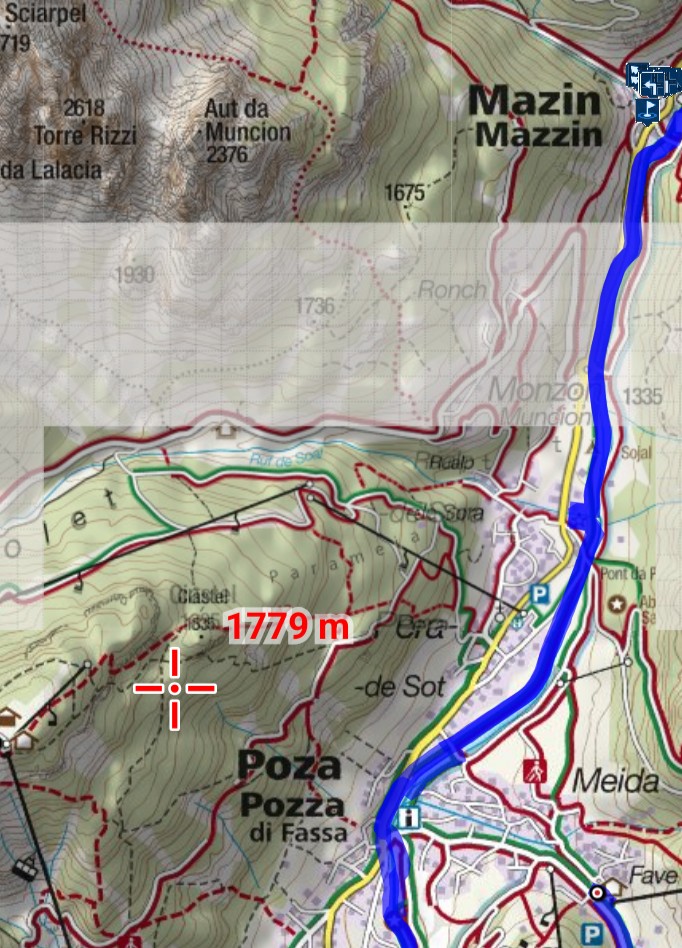
Also, no such problem with the classic version which I still have installed
Also, no such problem with the classic version which I still have installed
I found the solution I am reporting it in case it helps. I had purchased several Kompass maps when it was possible. To display them, for some reason, I only need to select one of them, even if not the correct one for the area. The shading shown on the screenshot appears in LM4 only if I select the wrong one; after selecting the correct the rendering is perfect. For some reason this is not needed in LM3
I found the solution I am reporting it in case it helps. I had purchased several Kompass maps when it was possible. To display them, for some reason, I only need to select one of them, even if not the correct one for the area. The shading shown on the screenshot appears in LM4 only if I select the wrong one; after selecting the correct the rendering is perfect. For some reason this is not needed in LM3
Hi Andrea,
please make sure you have activated automatic loading of raster maps:
- settings> maps > offline maps > raster maps > automatic map loading > select "auto-load maps of identical source only".
Hi Andrea,
please make sure you have activated automatic loading of raster maps:
- settings> maps > offline maps > raster maps > automatic map loading > select "auto-load maps of identical source only".
Replies have been locked on this page!