


Question about the displayed area
Answered
Hello,
I have a question. I have drawn a track as the boundary of a large area. However, when I zoom out, I see an area that I did not draw myself.
The blue line shows the correct boundary of the area. As you can see, the track line cuts off a part of the area when zoomed out. When I zoom in further, the track and the area appear to be correct again.
Because of this, I cannot properly see the entire correct area when zoomed out.
How can I make sure that the complete area is displayed correctly when I zoom out? Or am I perhaps doing something wrong?
I hope you understand what I mean. 😊
Thank you in advance!
Files:
Screenshot_2026...
 The same question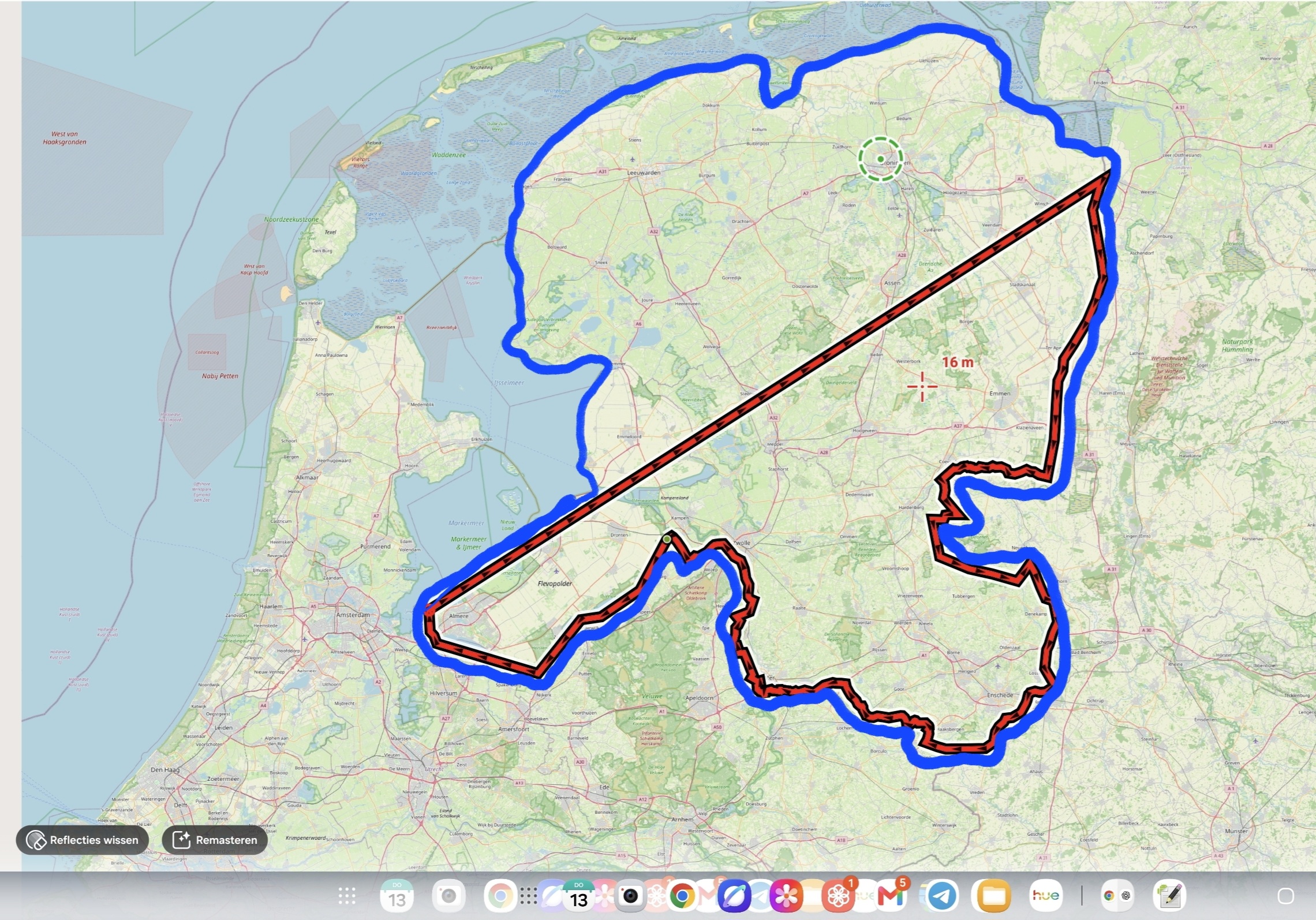
Set the zoom level to e.g. 6 so that the track is not simplified at bigger zooms. This measure is there for performance reasons. Short tracks are not simplified at all or at zoom 22 (default). Such a huge track as yours is visually simplified in bigger zooms unless you change it in the expert settings.
Set the zoom level to e.g. 6 so that the track is not simplified at bigger zooms. This measure is there for performance reasons. Short tracks are not simplified at all or at zoom 22 (default). Such a huge track as yours is visually simplified in bigger zooms unless you change it in the expert settings.
Hi Jelle,
could you please send a GPX of the track? Thanks
Hi Jelle,
could you please send a GPX of the track? Thanks
Thank you for your response. Please find the GPX file attached.
I created this file using QGIS and then converted it to a KML file so that I could import it into Locus Map Pro.
Thank you for your response. Please find the GPX file attached.
I created this file using QGIS and then converted it to a KML file so that I could import it into Locus Map Pro.
Thanks for the sample. Open the expert settings and reset the zoom level at which the track simplification should start. More info: https://docs.locusmap.app/doku.php/manual:advanced:customization:config#tracks_routes.
Thanks for the sample. Open the expert settings and reset the zoom level at which the track simplification should start. More info: https://docs.locusmap.app/doku.php/manual:advanced:customization:config#tracks_routes.
Thanks for your answer. I have found the Expert settings now. There are a lot of settings there, and I have also looked at the information on the website.
Unfortunately, I don't fully understand how I should adjust these settings.
Could it be that my track or line contains too many points?
Thanks for your answer. I have found the Expert settings now. There are a lot of settings there, and I have also looked at the information on the website.
Unfortunately, I don't fully understand how I should adjust these settings.
Could it be that my track or line contains too many points?
Set the zoom level to e.g. 6 so that the track is not simplified at bigger zooms. This measure is there for performance reasons. Short tracks are not simplified at all or at zoom 22 (default). Such a huge track as yours is visually simplified in bigger zooms unless you change it in the expert settings.
Set the zoom level to e.g. 6 so that the track is not simplified at bigger zooms. This measure is there for performance reasons. Short tracks are not simplified at all or at zoom 22 (default). Such a huge track as yours is visually simplified in bigger zooms unless you change it in the expert settings.
Realy realy thanks, I understand it now 😁 It works.
Realy realy thanks, I understand it now 😁 It works.
Replies have been locked on this page!