


Gaps in planned routes
In Progress
Hi folks,
I noticed since a while issues with internal LoRouter.
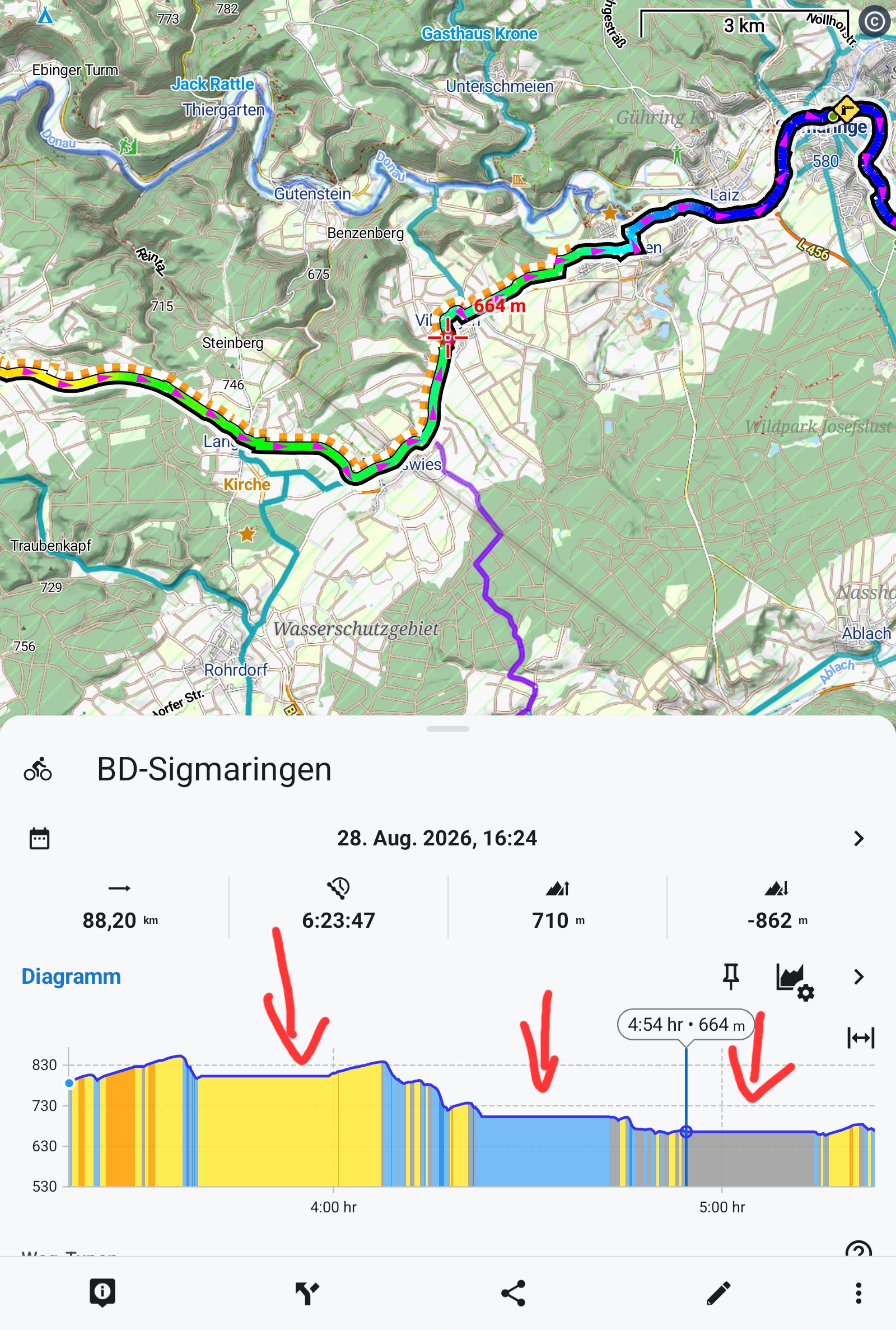
There are strange gaps or plateaus in the route where the cursor in the diagram just jumps from start to end.
When sharing such a route with my wife's Garmin edge, the route is said invalid.
Files:
Screenshot_2026...
 The same problem
Hi Walther,
when you set "time" on the X-axis of the chart, the router displays these plateaus based on some time estimation. Change the X-axis to "distance" and the plateaus will disappear:
As for the Garmin problem - how do you send the route to the Garmin Edge?
I've tested this procedure: Share as GPX > Open in app > select Garmin Connect > Save. No problem:
Hi Walther,
when you set "time" on the X-axis of the chart, the router displays these plateaus based on some time estimation. Change the X-axis to "distance" and the plateaus will disappear:
As for the Garmin problem - how do you send the route to the Garmin Edge?
I've tested this procedure: Share as GPX > Open in app > select Garmin Connect > Save. No problem:
Hi Michael,
oups my fault. I don't know when and why I changed the x-axis. Thanks for pointing this out.
As to Garmin, I avoided to use Garmin Connect, because it does'nt work offline and uses Google Maps.
I used instead a pair of apps gexporter/gimporter on Android and the Garmin Edge respectively which allows to send the route directly to the device without Connect.
https://github.com/gimportexportdevs/gimporter
It worked all the time.
When displaying the track immediately when received, it opens correctly.
But when I save it in on Garmin Edge and then try to open it, the track is invalid.
Tracks from other sources, for instance from Quäldich.de work flawlessly.
This is why I thought that something has been changed in Locus, perhaps some new xml-extensions to the gpx scheme.
Hi Michael,
oups my fault. I don't know when and why I changed the x-axis. Thanks for pointing this out.
As to Garmin, I avoided to use Garmin Connect, because it does'nt work offline and uses Google Maps.
I used instead a pair of apps gexporter/gimporter on Android and the Garmin Edge respectively which allows to send the route directly to the device without Connect.
https://github.com/gimportexportdevs/gimporter
It worked all the time.
When displaying the track immediately when received, it opens correctly.
But when I save it in on Garmin Edge and then try to open it, the track is invalid.
Tracks from other sources, for instance from Quäldich.de work flawlessly.
This is why I thought that something has been changed in Locus, perhaps some new xml-extensions to the gpx scheme.
Hi Walther,
nothing has changed in the GPX export in Locus Map for several years.
Please try exporting the GPX from Locus Map as a route - check this option in the export dialog:
Hi Walther,
nothing has changed in the GPX export in Locus Map for several years.
Please try exporting the GPX from Locus Map as a route - check this option in the export dialog:
Replies have been locked on this page!