


Hello,
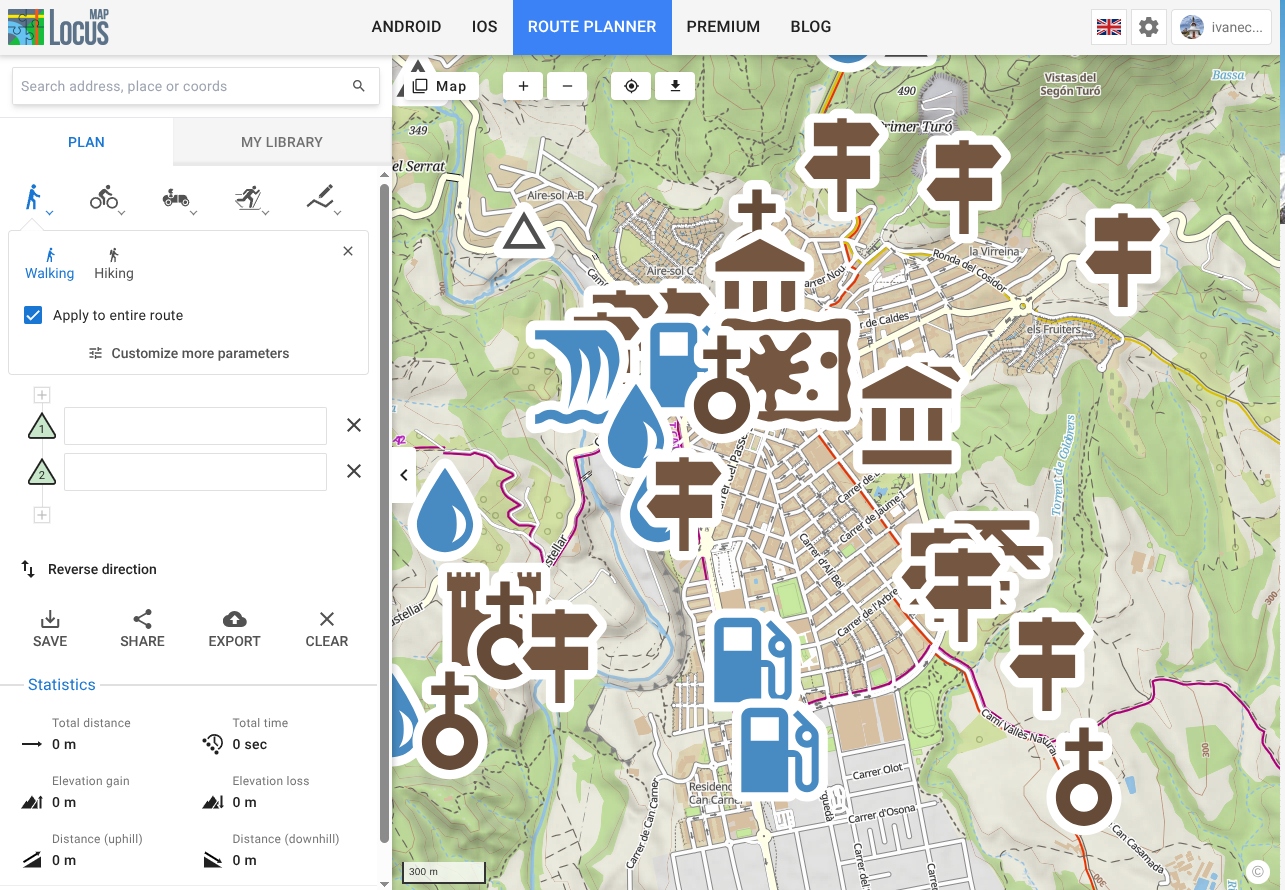
Please take a look at the attached image.
The problem occurs in Brave 1.94.121 (official version) (x86_64) running on Linux Mint 22.3.
I've also tested it in Firefox and Chrome: both display the icons at their normal size.
Could you please take a look at this? With the icons like this, it becomes unusable.
Thanks, and best regards.
Joan
 The same problem
Hello,
Please take a look at the attached image.
The problem occurs in Brave 1.94.121 (official version) (x86_64) running on Linux Mint 22.3.
I've also tested it in Firefox and Chrome: both display the icons at their normal size.
Could you please take a look at this? With the icons like this, it becomes unusable.
Thanks, and best regards.
Joan
Hello,
Please take a look at the attached image.
The problem occurs in Brave 1.94.121 (official version) (x86_64) running on Linux Mint 22.3.
I've also tested it in Firefox and Chrome: both display the icons at their normal size.
Could you please take a look at this? With the icons like this, it becomes unusable.
Thanks, and best regards.
Joan
Hello,
Please take a look at the attached image.
The problem occurs in Brave 1.94.121 (official version) (x86_64) running on Linux Mint 22.3.
I've also tested it in Firefox and Chrome: both display the icons at their normal size.
Could you please take a look at this? With the icons like this, it becomes unusable.
On the other hand, I don't think it's very appropriate delete a customer's ticket without a word, simply copying it to a forum where I haven't even received a response in two days.
To avoid further duplicates, you can delete the forum thread; I'd prefer to treat this as a support request handled as a ticket between the provider and the customer.
Best regards.
Hello,
Please take a look at the attached image.
The problem occurs in Brave 1.94.121 (official version) (x86_64) running on Linux Mint 22.3.
I've also tested it in Firefox and Chrome: both display the icons at their normal size.
Could you please take a look at this? With the icons like this, it becomes unusable.
On the other hand, I don't think it's very appropriate delete a customer's ticket without a word, simply copying it to a forum where I haven't even received a response in two days.
To avoid further duplicates, you can delete the forum thread; I'd prefer to treat this as a support request handled as a ticket between the provider and the customer.
Best regards.
Hi,
thank your for the report, the devs have been informed. Meanwhile, please use Chrome or Firefox.
Hi,
thank your for the report, the devs have been informed. Meanwhile, please use Chrome or Firefox.
Hi,
We tested the issue with the same SW configuration and didn't observe any problems. I’d recommend checking for changes to your hardware since the last system update—for instance, whether the graphics card driver or another key component has changed. You could try reverting the change if necessary. If it never worked for you in the first place, then the only option is to tinker with the settings. This is most probably not a problem on our end.
Hi,
We tested the issue with the same SW configuration and didn't observe any problems. I’d recommend checking for changes to your hardware since the last system update—for instance, whether the graphics card driver or another key component has changed. You could try reverting the change if necessary. If it never worked for you in the first place, then the only option is to tinker with the settings. This is most probably not a problem on our end.
Hello. Thank you for your reply.
FYI:
I’ve now tested this on two completely different machines.
The Linux machine mentioned earlier, and now on a Windows 10 Pro 22H2 machine, with two versions of Brave: 1.94.121 and the recently updated 1.95.101.
The problem occurs on all of them.
I haven’t updated anything significant on these systems. To be precise, I haven’t updated anything at all on the Windows machine for months. I’ve only updated Brave now, just to check.
I find it curious that browsers using the same Chromium engine (I’ve tested – on Linux – Chrome, Chromium, Ungoogled Chromium and Edge) display the icons at the correct size.
Now that I’ve thought about it, I’d say it’s some sort of issue with Brave itself. The only thing I can’t explain is that the icons look fine in your installation of Brave. Cookies, cached data… I’ve cleared everything, everywhere.
I’ll try rolling back to an earlier version of Brave to see what happens.
Best regards,
Hello. Thank you for your reply.
FYI:
I’ve now tested this on two completely different machines.
The Linux machine mentioned earlier, and now on a Windows 10 Pro 22H2 machine, with two versions of Brave: 1.94.121 and the recently updated 1.95.101.
The problem occurs on all of them.
I haven’t updated anything significant on these systems. To be precise, I haven’t updated anything at all on the Windows machine for months. I’ve only updated Brave now, just to check.
I find it curious that browsers using the same Chromium engine (I’ve tested – on Linux – Chrome, Chromium, Ungoogled Chromium and Edge) display the icons at the correct size.
Now that I’ve thought about it, I’d say it’s some sort of issue with Brave itself. The only thing I can’t explain is that the icons look fine in your installation of Brave. Cookies, cached data… I’ve cleared everything, everywhere.
I’ll try rolling back to an earlier version of Brave to see what happens.
Best regards,
Hi,
also try switching on or off hardware acceleration, browser plugins, etc.
Hi,
also try switching on or off hardware acceleration, browser plugins, etc.
Replies have been locked on this page!