


Tap and hold to display all OSM data for the place, not just address
Gathering feedback
settings > Controlling > Map screen > Tap and hold to display address
existing behavior- for example
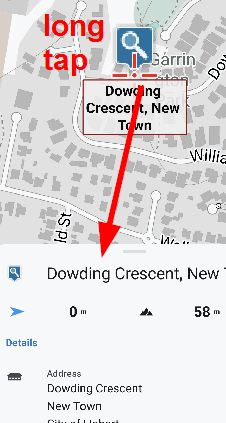
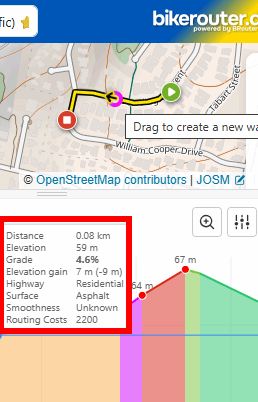
My suggestion is to display ALL the OSM metadata around that address/ point. This is now implemented in BRouter-web, example below. This would allow, for example, surface, smoothness, highway metadata to be instantly displayed instead of having to create a "dummy-test" route.
 I like this idea
That would be great, of course. Right now, I use Favorites to do an OSM object query.
I often use this to retrieve data that Locus doesn't display. For example, whether a parking spot is free for only 2 hours.
The data could be displayed in the window that pops up.
An additional field called “OSM Object Query.” When I click on it, the data is retrieved and displayed.
That would be great, of course. Right now, I use Favorites to do an OSM object query.
I often use this to retrieve data that Locus doesn't display. For example, whether a parking spot is free for only 2 hours.
The data could be displayed in the window that pops up.
An additional field called “OSM Object Query.” When I click on it, the data is retrieved and displayed.
To add it to your favorites, simply enter this link. Then select the location using the center of the screen and click on your OSM favorite in the Favorites section.
https://www.openstreetmap.org/query?lat={mapLat}&lon={mapLon}#map={mapZoom}/{mapLat}/{mapLon}
To add it to your favorites, simply enter this link. Then select the location using the center of the screen and click on your OSM favorite in the Favorites section.
https://www.openstreetmap.org/query?lat={mapLat}&lon={mapLon}#map={mapZoom}/{mapLat}/{mapLon}
The link for the retrieval could be placed here.
“OSM Metadata Retrieval”
The link for the retrieval could be placed here.
“OSM Metadata Retrieval”
Replies have been locked on this page!