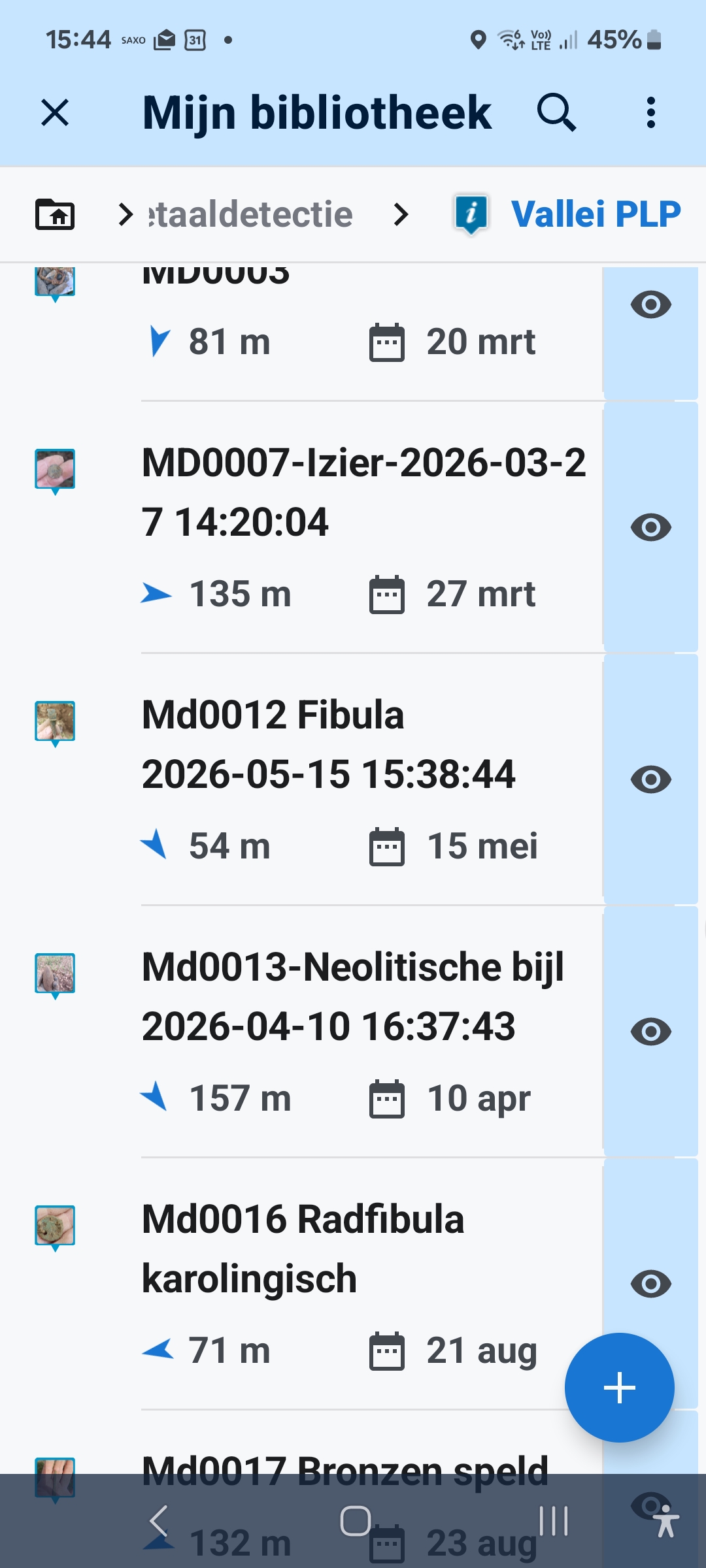
Size of thumbnails

Paul De Bie shared this question 6 hours ago
Need Answer

Hi, would it be possible to make the size of the thumbnails of pictures bigger? Especially in the list view of points. But if possible akso on the map.

Tia

Paul

Replies (2)

photo
2

Please don’t make them any bigger on the map! If you have lots of photos, they’re already taking up too much space. If you want to see the photo, you can just click on the thumbnail.

This comment is in trash! Restore
photo
1

I do need to see the photos bigger, especially when zoomed in. And yes there a lot of photos for a small surface because this is a metal detection and archeology project where every object needs to be positioned. It could be an option that the user could set like "none/small/medium/big".
I now use the magnifying glass (which is part of Locus) but even then it is not big enough.

This comment is in trash! Restore
photo
1

I just noticed that it is actually possible: Settings -> Points and Tracks -> Point Icon Size. There’s a slider that lets you enlarge your points—as well as the thumbnails—up to 300%. Perhaps that will be sufficient for you.


However, please note that all of your own points, including icons, will be scaled up accordingly.

This comment is in trash! Restore
photo
1

But then it looks pretty wild... 😎

Files: 300%.jpg
This comment is in trash! Restore
photo
photo
1

Please do not enlarge

This comment is in trash! Restore
Leave a Comment
 
Attach a file
You can't vote. Please authorize!