


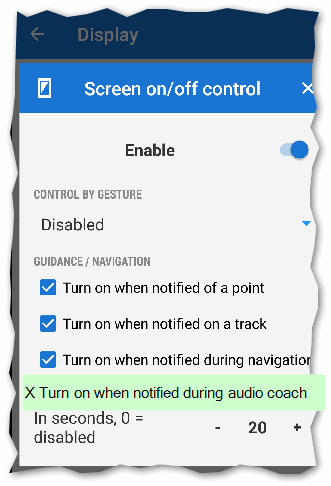
It would be nice if the audio trainer could light up the phone display for several seconds as an "event". Ideally in locked state. It would be best if you were on a bike when you started the circuits.
CZ: Bylo by pěkné kdyby audio trenér uměl jako "událost" rozsvítit na několik vteřin display telefonu. Ideálně v zamknutém stavu. Hodilo by se to třeba na kole při najíždění okruhů.
 I like this idea
good idea +1
perhaps with a little delay of announcement, because map view need a short time to get right direction after "screen on"
good idea +1
perhaps with a little delay of announcement, because map view need a short time to get right direction after "screen on"
But what happens if the phone is in my pocket(that's why is easy to use audio coach with bluetooth headphones) and the screen goes on every 30 minutes ? It's a good chance that one of the buttons are automatically pressed and maybe navigation is messed up or something.
But what happens if the phone is in my pocket(that's why is easy to use audio coach with bluetooth headphones) and the screen goes on every 30 minutes ? It's a good chance that one of the buttons are automatically pressed and maybe navigation is messed up or something.
Replies have been locked on this page!