


How to get rid off the 'log trackable' entry
Answered
Hi,
I did a wrong klick and so I have this message (task) in the list of the logs manager. I don't want to interact with trackables. How can I delete this entry?
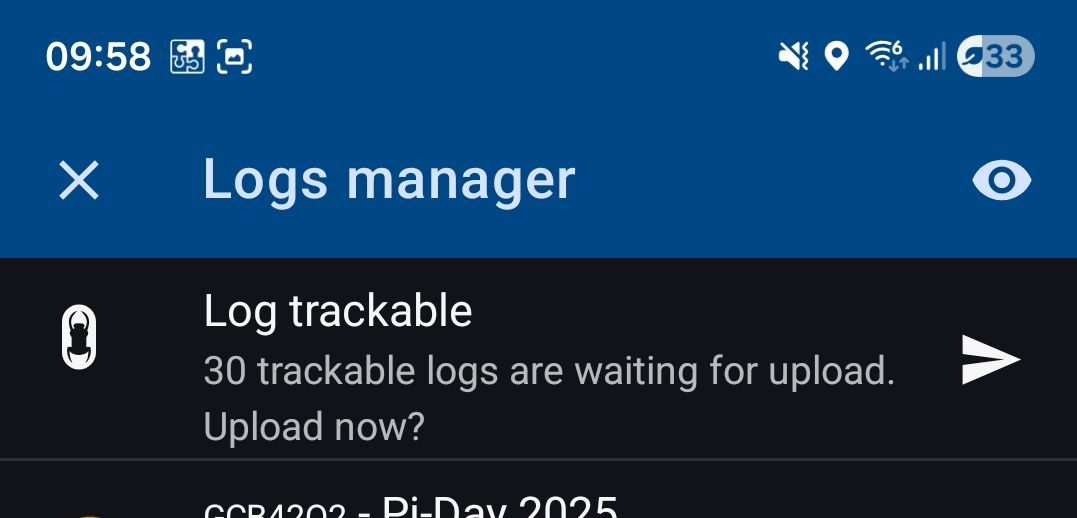
Thanks in advance,
Wolfgang
 The same question
Hi Wolfgang,
go to settings > geocaching and tap "Delete field notes":
Hi Wolfgang,
go to settings > geocaching and tap "Delete field notes":
Hi Michal,
I deleted now all over 16000 drafts but this had no effect on the trackables entry. It disappears when no new Geocache draft is available, but when I log a new one the entry comes always back - this behavior was the same before deleting all 16000 drafts.
Wolfgang
Hi Michal,
I deleted now all over 16000 drafts but this had no effect on the trackables entry. It disappears when no new Geocache draft is available, but when I log a new one the entry comes always back - this behavior was the same before deleting all 16000 drafts.
Wolfgang
I've consulted with the app devs and I've been told the only way to get rid of it is to upload the trackable logs.
They promised to add an option to delete the pending trackable logs in the next app version.
I've consulted with the app devs and I've been told the only way to get rid of it is to upload the trackable logs.
They promised to add an option to delete the pending trackable logs in the next app version.
That's great, then I will wait for the next beta instead of pushing them out.
BTW if there is only a "Log trackable" in the list it is not visible. If there is a cache in the logs too, then the trackable entry is back again in the list.
That's great, then I will wait for the next beta instead of pushing them out.
BTW if there is only a "Log trackable" in the list it is not visible. If there is a cache in the logs too, then the trackable entry is back again in the list.
Replies have been locked on this page!