


Improve the layout of the route planner in the landscape mode
I use locus for all my planning and library management of thousands of gpx files…you are still far ahead in that.
I use another program for following tracks.
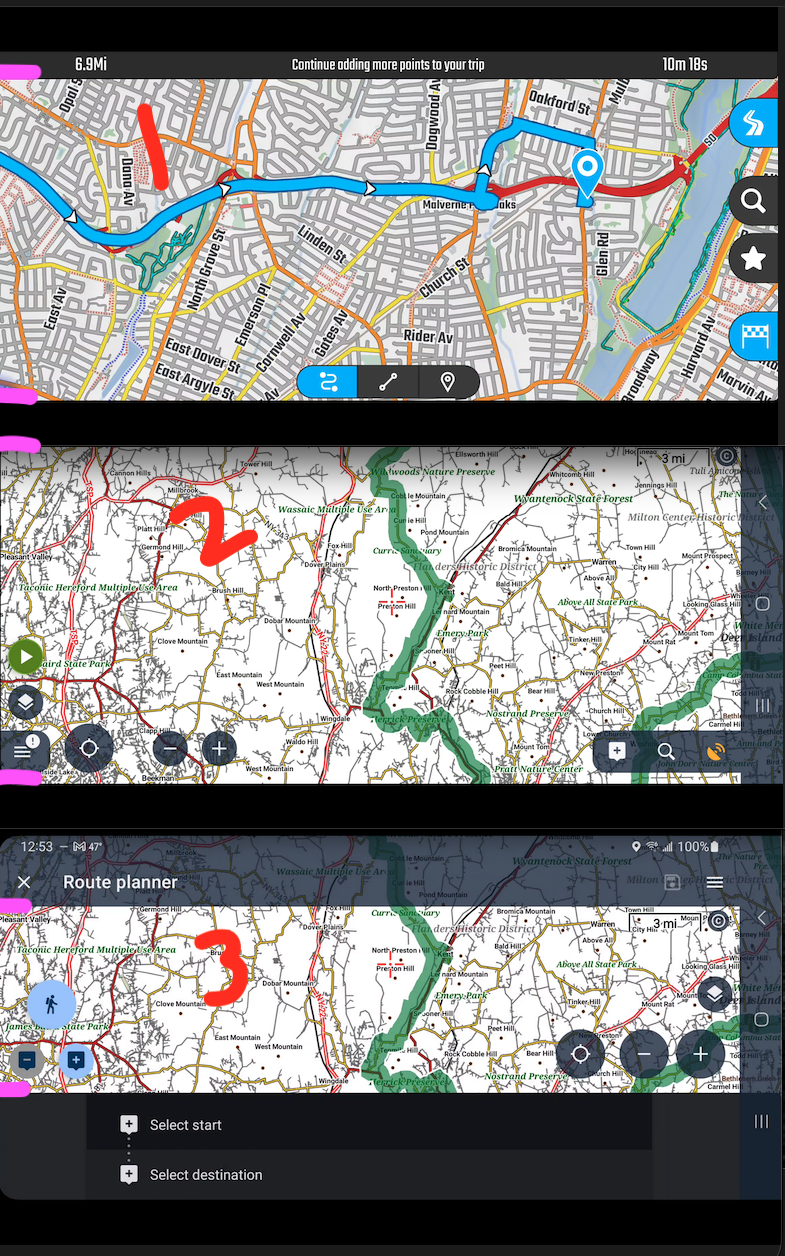
1. Here is that programs planner and this is a screen grab from full screen on a 32” monitor using scrcpy on a m3 Mac.
I do not use your planner because you seemed to have stopped making it better and the map info without openandromaps and themes is not great so I continue to use your main app in this manner.
2. Here is your map:
3. Here is your map in trip planner:
You made trip planner for portraint. As you can see, in landscape this becomes useless because of all the shading and menu layers obscuring the screen. Can you clean that up and make it look like your map and have the lower part in a pop up tab that can be hidden to not obscure screen real estate???
 I like this idea
I also don't use the web planner because there are no OpenAndroMap maps and themes available.
I also don't use the web planner because there are no OpenAndroMap maps and themes available.
to be fair I have never seen openandromaps on anything except mobile...with only Cartograph paid version getting them in to both win/nac desktop apps...but nobody has them in a browser. The ability to zoom back and still see small trails falls off on locus 4 between 1-2 miles....on the browser based locus single map more like .25-.5/mile and because of no theme things are much harder to actually see making locus' web planner sub-optimal...that's why I enjoy the keyboard and stylus and big monitor running off the phone.
to be fair I have never seen openandromaps on anything except mobile...with only Cartograph paid version getting them in to both win/nac desktop apps...but nobody has them in a browser. The ability to zoom back and still see small trails falls off on locus 4 between 1-2 miles....on the browser based locus single map more like .25-.5/mile and because of no theme things are much harder to actually see making locus' web planner sub-optimal...that's why I enjoy the keyboard and stylus and big monitor running off the phone.
Replies have been locked on this page!