


Custom icons of points should receive the icon of the folder to which they are moved.
You can assign icons to both folders and points.
I have created many quick points, including for OSM mapping (e.g. to map missing objects).
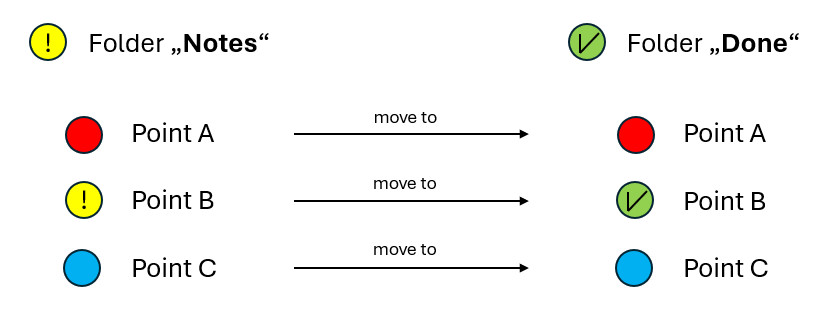
I store a quick point called "note x" in my "notes" folder. This folder has a yellow icon.
After completing the task, I move the point to the "done" folder. This folder has a green icon with a tick.
I would like the moved point to automatically receive the green icon of the "done" folder.
This only works if the quick point has the same icon as the "notes" folder. Then, after moving it, it will be changed to the green icon.
If the quick point has a different icon than the original folder ("notes"), it will remain the same after moving. I then have to change it afterwards, which is annoying.
Can this be adjusted? If not, it would be nice if this option could be implemented.
See schematic diagram:
 I like this idea
Hi,
icons created within a certain folder inherit the icon from the folder if it is not customized. When you move such a point to another folder, its icon changes according to the target folder - it inherits the icon again. If you customize a point's icon, it never changes when moving between folders. That is a feature, not a bug.
Hi,
icons created within a certain folder inherit the icon from the folder if it is not customized. When you move such a point to another folder, its icon changes according to the target folder - it inherits the icon again. If you customize a point's icon, it never changes when moving between folders. That is a feature, not a bug.
Replies have been locked on this page!