


Split-Screen: space between information- and guidance bars
Solved
If using Split-screen mode on a Xiaomi Redmi Note 13 Pro to display two apps next to each other and starting Guidance in Locus:
There's an unwanted space between top information bar and guidance bar. In both cases: if apps are horizontal or vertical arranged.
If displaying Locus sole, there's no such space, both bars are connected - ok.
Btw: if apps are arranged vertical the name of the guided Waypoint just consists of "..."
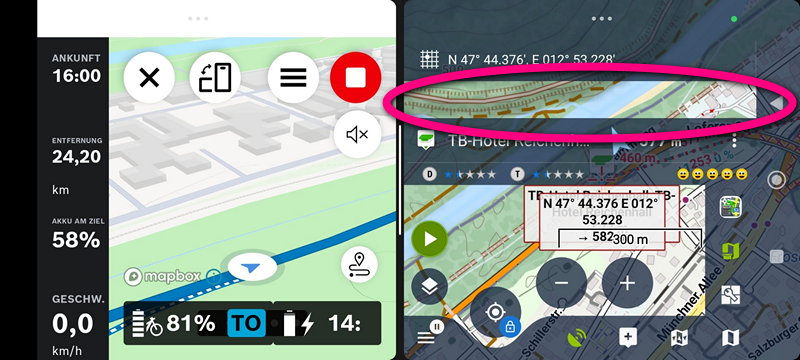
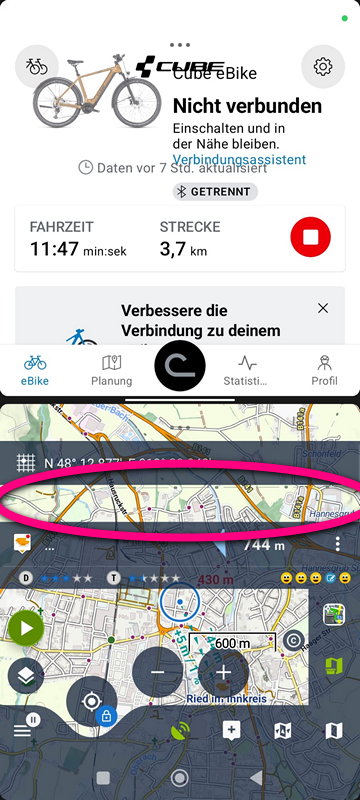
 The same problem
Hi Sonny,
what version of Android OS do you have?
Hi Sonny,
what version of Android OS do you have?
Android 16
Android 16
Sonny, we are sorry for the inconvenience, but we are unable to simulate the issue. The closest device to yours that we have, the Redmi Note 10 Pro running Android 13, displays split-screen correctly, as do all our other devices running Android 16. Therefore, we consider this to be a bug of the particular Xiaomi phone you have (but no one else with this type has confirmed it yet).
Sonny, we are sorry for the inconvenience, but we are unable to simulate the issue. The closest device to yours that we have, the Redmi Note 10 Pro running Android 13, displays split-screen correctly, as do all our other devices running Android 16. Therefore, we consider this to be a bug of the particular Xiaomi phone you have (but no one else with this type has confirmed it yet).
Actually it is not my phone but those of a friend. Myself has as Redmi Note 10 Pro@Android 13 as well, and no problem with split-screen as you wrote. Do you have at least an educated guess if the bug could be caused by an accidental edit within settings (incl. expert settings) within Locus?
Actually it is not my phone but those of a friend. Myself has as Redmi Note 10 Pro@Android 13 as well, and no problem with split-screen as you wrote. Do you have at least an educated guess if the bug could be caused by an accidental edit within settings (incl. expert settings) within Locus?
Both Android developers are monitoring this thread and neither of them has mentioned that this could be caused by the app configuration. I.e., no setting turns on the empty spaces between panels. Nevertheless, you may provide a backup of your friend's app setup for a test.
Both Android developers are monitoring this thread and neither of them has mentioned that this could be caused by the app configuration. I.e., no setting turns on the empty spaces between panels. Nevertheless, you may provide a backup of your friend's app setup for a test.
One additional Info: Old Locus 3 on the same phone doesn't have this split-screen issue
One additional Info: Old Locus 3 on the same phone doesn't have this split-screen issue
Hi, please remove the flag "Not a problem". It is a problem if people are using modern Xiaomi-phones! Yesterday I tested it on another Redmi phone (Xiaomi Redmi Note 13 Pro+) running older Android 15 - the same problem like the Redmi before with Android 16.
But also no problem on this phone if using Locus Classic. So there seems to be some design element which has been introduced/altered in Locus 4 compared to Locus 3 causing this issue on some phones.
Regarding the sub-issue of just displaying "..." instead of at least parts of waypoint-name in vertical split-screen: This is also a problem on Samsung-phone @ Android 16
Hi, please remove the flag "Not a problem". It is a problem if people are using modern Xiaomi-phones! Yesterday I tested it on another Redmi phone (Xiaomi Redmi Note 13 Pro+) running older Android 15 - the same problem like the Redmi before with Android 16.
But also no problem on this phone if using Locus Classic. So there seems to be some design element which has been introduced/altered in Locus 4 compared to Locus 3 causing this issue on some phones.
Regarding the sub-issue of just displaying "..." instead of at least parts of waypoint-name in vertical split-screen: This is also a problem on Samsung-phone @ Android 16
Hi,
we have finally succeeded in simulating the issue and we found a solution. Please wait for the net app version.
Hi,
we have finally succeeded in simulating the issue and we found a solution. Please wait for the net app version.
Replies have been locked on this page!