


WMS layer content is rendered with a white backdrop
Hi Team, not sure this exact issue was already covered, but a few existing i reviewed have nothing to do with this strange behavior.
BDL the service of Polish Forestry Service recently updated what/how they serve the layer information. The URL to the WMS remained the same, but instead of solid polygons, now they present just the contours in a style that matches how their web/apk maps show that layer.
https://mapserver.bdl.lasy.gov.pl/ArcGIS/services/WMS_BDL_Mapa_turystyczna/MapServer/WMSServer (i've added it to Locus library some years ago, the only difference i see, is they now advertise it with https://)
While in their Web and APK maps the layer in particular (Obszar Zanocuj w Lesie - areas where it is allowed to spend a night or two) is showing correctly, Locus unfortunately has a wierd issue of adding opaque white background to that layer. Luckily we have the visibility slider, and with ~25%-50% it's usable, but whole base map looks like extra opacity filter is applied.
Initially i contacted them, to inquiry what changes they did which could cause this. That was over a week ago, with no reply (in other cases they were fast and responsive) but since them i tried playing around with those layers using a browser and it seems like some strange issue with PNG transparency on Locus instead. Could it be the case?
Attaching some screenshots + png saved directly from arcgis map viewer https://www.arcgis.com/apps/mapviewer/index.html but it's the same when vising BDL original geoportal: https://www.bdl.lasy.gov.pl/portal/mapy?t=0&ll=17.574198,50.910188&scale=72224&map=8,1.0&layers=0,1,2,3,4,5,6,7,8,9,10,13,14,15,16&basemap=1&extwms=&hist= (or direct PNG https://mapserver.bdl.lasy.gov.pl/ArcGIS/rest/services/Mapa_turystyczna/MapServer/export?dpi=96&transparent=true&format=png8&bbox=1942563.4364594803%2C6594558.707572808%2C1970138.0944133205%2C6616285.93286284&bboxSR=102100&imageSR=102100&size=1443%2C1137&layers=show%3A1%2C2%2C3%2C4%2C5%2C6%2C7%2C8%2C9%2C10%2C13%2C14%2C15%2C16&f=image)
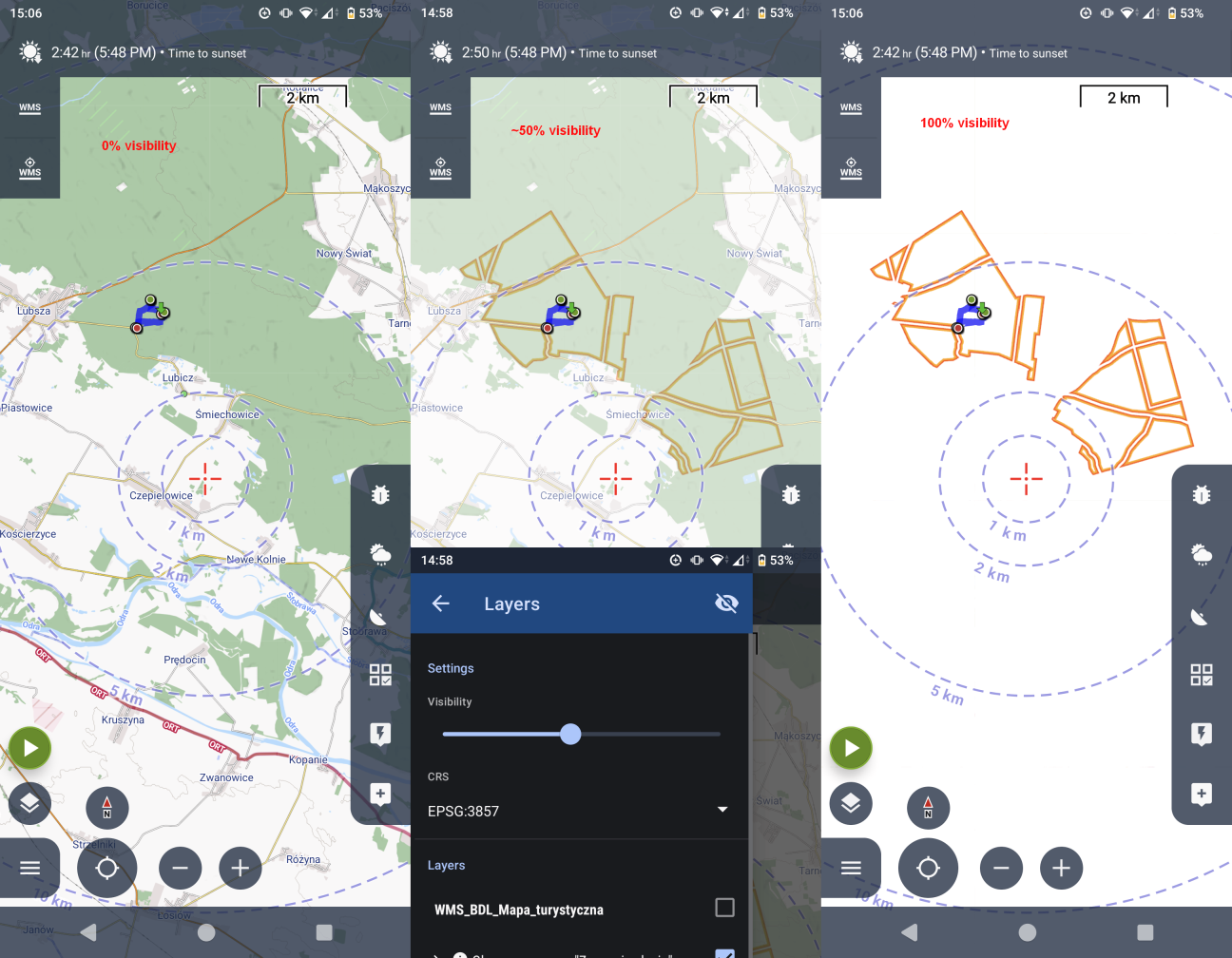
+ rechecked using most recent beta (Friday 13th, no luck...)
+ attached wms service capabilities
 The same problem

Hmm... ok, when i change the format in that export URL... the resulting image of course has no transparency... if that's the problem then it's really silly 😅
But in this case, there are some historic topics already:
- https://help.locusmap.eu/topic/transparency_of_wms_layers
- https://help.locusmap.eu/topic/27650-wms-select-image-file-format
+ upon checking that WMS service capas, the image/bmp is listed first for GetMap requests. Again this would be silly, but seems realistic this could be what changed (list of those formats is not alphabetic)... unfortunately i never captured old capas to compare.
Hmm... ok, when i change the format in that export URL... the resulting image of course has no transparency... if that's the problem then it's really silly 😅
But in this case, there are some historic topics already:
- https://help.locusmap.eu/topic/transparency_of_wms_layers
- https://help.locusmap.eu/topic/27650-wms-select-image-file-format
+ upon checking that WMS service capas, the image/bmp is listed first for GetMap requests. Again this would be silly, but seems realistic this could be what changed (list of those formats is not alphabetic)... unfortunately i never captured old capas to compare.
Hi,
I'm testing this WMS and it works correctly to me, interesting.
If you are using Beta version, do you know how to enable logging to file (long click on the main menu button)? In the log (generated to the "app/logs" directory should be visible full url to the WMS service ... to verify the request. But I'm checking the logic and app should correctly request semi-transparent PNG file.
Sorry to leaving some investigation to you. Feel free to share the logs with me to analyze if needed.
Hi,
I'm testing this WMS and it works correctly to me, interesting.
If you are using Beta version, do you know how to enable logging to file (long click on the main menu button)? In the log (generated to the "app/logs" directory should be visible full url to the WMS service ... to verify the request. But I'm checking the logic and app should correctly request semi-transparent PNG file.
Sorry to leaving some investigation to you. Feel free to share the logs with me to analyze if needed.
Ah... logs... 🫣 of course... no worries, somehow i haven't thought about it (instead i itched to jump into code directly)
I grabbed some, attached an excerpt from reinitialization of the map (i cleaned up cache too somewhere along the way).
However one thing that is painfully obvious is that the URLs contain `TRANSPARENT=FALSE` param. Changing this by hand makes all the difference!
http://mapserver.bdl.lasy.gov.pl/arcgis/services/WMS_BDL_Mapa_turystyczna/MapServer/WMSServer?SERVICE=WMS&VERSION=1.3.0&REQUEST=GetMap&CRS=EPSG%3A3857&FORMAT=image%2Fpng&LAYERS=0%2C3&STYLES=&TRANSPARENT=FALSE&BBOX=1956402.089185%2C6599511.536456%2C1961274.186946%2C6604384.519675&WIDTH=512&HEIGHT=512
But I don't see anything suggesting why the code decided on that, no relevant capabilities dumped, yet 'V' suggests it's already a verbose level.
Ah... logs... 🫣 of course... no worries, somehow i haven't thought about it (instead i itched to jump into code directly)
I grabbed some, attached an excerpt from reinitialization of the map (i cleaned up cache too somewhere along the way).
However one thing that is painfully obvious is that the URLs contain `TRANSPARENT=FALSE` param. Changing this by hand makes all the difference!
http://mapserver.bdl.lasy.gov.pl/arcgis/services/WMS_BDL_Mapa_turystyczna/MapServer/WMSServer?SERVICE=WMS&VERSION=1.3.0&REQUEST=GetMap&CRS=EPSG%3A3857&FORMAT=image%2Fpng&LAYERS=0%2C3&STYLES=&TRANSPARENT=FALSE&BBOX=1956402.089185%2C6599511.536456%2C1961274.186946%2C6604384.519675&WIDTH=512&HEIGHT=512
But I don't see anything suggesting why the code decided on that, no relevant capabilities dumped, yet 'V' suggests it's already a verbose level.
Hmm thanks ... I've double checked the code, and this should not happen at all. It looks like some coruption of map definiton file.
What if you tap on "re-initialize" in the three-dot menu of the WMS map? This should force map to reload it's configuration.
Hmm thanks ... I've double checked the code, and this should not happen at all. It looks like some coruption of map definiton file.
What if you tap on "re-initialize" in the three-dot menu of the WMS map? This should force map to reload it's configuration.
I tried reinitialization and cache clearing before, so this did nothing now too.
HOWEVER - removing the map entierly and adding fresh using exact URL from their page (one with https:// this time) WORKED. Whatever the corruption of metadata could happened it must have happened when they changed the style/meta of their wms service.
1) While this is let's say solved... i sumbled upon another issue - after above successful attempt i wanted to check if it will aslo be fixed when i add this WMS from locus library again. The moment i open Add from library new activity with a search on top appears, the app force closed at first, but at next attempts it just initializes back to back screen on it's own. I hope a trace of that will be visible to you from the logs.
2) I noticed than even if i use https:// link to add that WMS, checking its details later on shows just http:// which is better in this scenario can be a matter of debate, but it's not consistent. I think if https:// works, then the app should just use what the user originally requested, right?
bonus 3) Another thing is (and i hope i'm not going mad) the app decided on its own to change display language to Polish, even though in the settings English is still selected. Looking at screenshots from yesterday and today, it must have happened somewhere inbetween (because whether it's polish or english, its subconscious to understand either way without noticing the change).
Well from the logs i can see what texts the app uses for display, like "text: Working…" yesterday 17:33, then for some reason "text: Wykonuję…" at 18:45
hmm, i'll try reinstalling the app fresh then 🤷♂ sometimes exiting and reentering the car just works i guess... i'll create a separate Problem ticket if this persists then.
I tried reinitialization and cache clearing before, so this did nothing now too.
HOWEVER - removing the map entierly and adding fresh using exact URL from their page (one with https:// this time) WORKED. Whatever the corruption of metadata could happened it must have happened when they changed the style/meta of their wms service.
1) While this is let's say solved... i sumbled upon another issue - after above successful attempt i wanted to check if it will aslo be fixed when i add this WMS from locus library again. The moment i open Add from library new activity with a search on top appears, the app force closed at first, but at next attempts it just initializes back to back screen on it's own. I hope a trace of that will be visible to you from the logs.
2) I noticed than even if i use https:// link to add that WMS, checking its details later on shows just http:// which is better in this scenario can be a matter of debate, but it's not consistent. I think if https:// works, then the app should just use what the user originally requested, right?
bonus 3) Another thing is (and i hope i'm not going mad) the app decided on its own to change display language to Polish, even though in the settings English is still selected. Looking at screenshots from yesterday and today, it must have happened somewhere inbetween (because whether it's polish or english, its subconscious to understand either way without noticing the change).
Well from the logs i can see what texts the app uses for display, like "text: Working…" yesterday 17:33, then for some reason "text: Wykonuję…" at 18:45
hmm, i'll try reinstalling the app fresh then 🤷♂ sometimes exiting and reentering the car just works i guess... i'll create a separate Problem ticket if this persists then.
Hi Jiri,
The problem appears to be solved, the WMS features appear as intended with correct transparency :)
Also I did no experience any more of those mixed language glitches (or at least they were not "in my face" like last time).
There is one thing however. Upon asking, the Forsetry Agency added back the link to relevant local page in feature info response. However it it not a clickable link, as it was previously (before they did the change of that WMS with new appearance). I just want to confirm with you, that for the links to be clickable, then it should be a full <a href ... element, correct?
Thanks, and kind regards!
Hi Jiri,
The problem appears to be solved, the WMS features appear as intended with correct transparency :)
Also I did no experience any more of those mixed language glitches (or at least they were not "in my face" like last time).
There is one thing however. Upon asking, the Forsetry Agency added back the link to relevant local page in feature info response. However it it not a clickable link, as it was previously (before they did the change of that WMS with new appearance). I just want to confirm with you, that for the links to be clickable, then it should be a full <a href ... element, correct?
Thanks, and kind regards!
Hello,
fine, then the fix was on the side of WMS server.
Which links do you miss from the "Capabilities file"? If I look correctly, only what make sense are links to "legend images" and they should be correctly visible.
Hello,
fine, then the fix was on the side of WMS server.
Which links do you miss from the "Capabilities file"? If I look correctly, only what make sense are links to "legend images" and they should be correctly visible.
How solved? "Fix" was NOT on the side of the server! xD
Locus for some unknown reason, just as you realized earlier, decided to request images with TRANSPARENT=FALSE
You suggested to try and re-initialilze that WMS, but as i answered, THIS DID NOT HELP!
What actually helped was to remove, then add this WMS from scratch. But there is still a bug which caused this, i understand it might not be easily reproducible on your end, but there are definitely problems in that area.
Just as I showed with adding WMS with https:// - Locus just decides on its own to degrade to plain http://
Is seems as if you're using a parser (validation? reading params?), then just store the output of the parser (also notice added "?" without any actual params...) instead of originally provided one.
And what i was asking on the side was about this link.
As i understand this is featureinfo capability. I just want to know if the link needs to be "<a href" to be actionable - ie. will Locus render included html elements?
How solved? "Fix" was NOT on the side of the server! xD
Locus for some unknown reason, just as you realized earlier, decided to request images with TRANSPARENT=FALSE
You suggested to try and re-initialilze that WMS, but as i answered, THIS DID NOT HELP!
What actually helped was to remove, then add this WMS from scratch. But there is still a bug which caused this, i understand it might not be easily reproducible on your end, but there are definitely problems in that area.
Just as I showed with adding WMS with https:// - Locus just decides on its own to degrade to plain http://
Is seems as if you're using a parser (validation? reading params?), then just store the output of the parser (also notice added "?" without any actual params...) instead of originally provided one.
And what i was asking on the side was about this link.
As i understand this is featureinfo capability. I just want to know if the link needs to be "<a href" to be actionable - ie. will Locus render included html elements?
Hello,
thank you for the detailed report. I've found and fixed the root cause of the white/opaque backdrop issue.
What happened: the WMS layer structure is saved to disk between sessions. If the list of layers on the server changed (for example after a WMS re-initialise on our side), the saved data became slightly misaligned when read back, and the "use transparent background" flag was silently flipped to false. The result was exactly what you described — all WMS tiles rendered with a white background even though no setting was changed.
So, what was changed:
• The state file format was versioned so the transparency flag is always read from the correct position, regardless of changes to the layer list. Existing saved state (version 1) is upgraded on first load, with transparency forced back to true as a safe default.
• Get Feature Info" popup (the info dialog that appears when you tap the map on a WMS layer) was modernised: it now shows the server's original HTML response, preserving formatting and links, instead of a stripped plain-text table. This anyway does not solve problem you face here, as the GetFeatureInfo link does not have clickable link at all.
The fix will be included in the next Locus Map update.
Hello,
thank you for the detailed report. I've found and fixed the root cause of the white/opaque backdrop issue.
What happened: the WMS layer structure is saved to disk between sessions. If the list of layers on the server changed (for example after a WMS re-initialise on our side), the saved data became slightly misaligned when read back, and the "use transparent background" flag was silently flipped to false. The result was exactly what you described — all WMS tiles rendered with a white background even though no setting was changed.
So, what was changed:
• The state file format was versioned so the transparency flag is always read from the correct position, regardless of changes to the layer list. Existing saved state (version 1) is upgraded on first load, with transparency forced back to true as a safe default.
• Get Feature Info" popup (the info dialog that appears when you tap the map on a WMS layer) was modernised: it now shows the server's original HTML response, preserving formatting and links, instead of a stripped plain-text table. This anyway does not solve problem you face here, as the GetFeatureInfo link does not have clickable link at all.
The fix will be included in the next Locus Map update.
Replies have been locked on this page!