


improved magnifying glass
Hi,
Before version 4.33, I was frequently using the pinch-zoom gesture as a temporary and flexible magnification; this let me easily read small captions (I use a small font size to avoid cluttering the map, but then I can't read all captions in outdoor conditions, sunglasses etc). Pinch zooming has changed in v4.33, now captions use a constant font size during the pinch gesture, so I need another way to magnify the map.
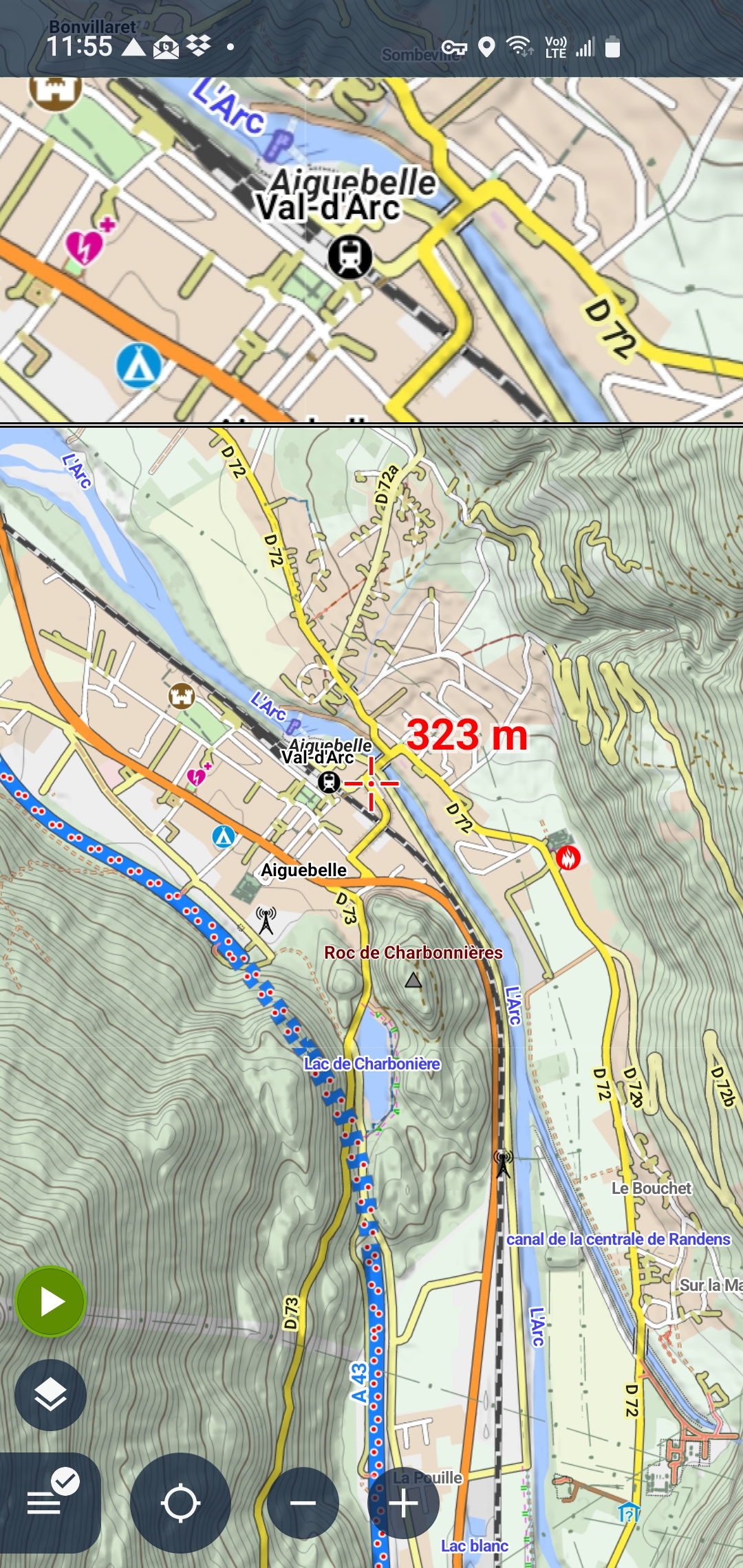
The current magnifying glass feature is not really usable: the glass circle is very small (not wide enough to comfortably read captions), fixed in the middle of the screen. And the magnifying factor can't be adjusted.
I would suggest to replacing it by a split view: a full width view at the top of the screen, with adjustable height, and adjustable magnification factor (by pinch-zooming inside the magnification view). This would be way more useable.
Additionally, an easy toggle using a gesture would be great, as I don't want to clutter the screen with a permanently visible button
 I like this idea
Jerome, in my right panel of buttons I have a quick settings button, and 1 of those toggle buttons is to "magnify all maps". I have this set to toggle between 100% & 250%. Maybe a workaround? These panel buttons can be even further linked to presets if needed.
Jerome, in my right panel of buttons I have a quick settings button, and 1 of those toggle buttons is to "magnify all maps". I have this set to toggle between 100% & 250%. Maybe a workaround? These panel buttons can be even further linked to presets if needed.
Replies have been locked on this page!