


Wrong waypoint projection for geocaching waypoints
Solved
If you try to perform a waypoint projection from a geocaching waypoint, then the resulting waypoint may be wrong - depending where the actual screen center is located.
To reproduce:
1. Place the center of the map anywhere, say to Prague
2. Select a geocache, e.g. https://coord.info/GC2G6T0
3. Open the waypoint menu
4. Select + sign to add a new waypoint
5. Select projection from GC2G6T0 Stage 2 (Stage 1 would do as well)
6. Enter e.g. 200m and 0°
7. Press compute
Note that the created waypoint has been projected from the screen center instead from the selected waypoint.
This bug gave me a hard time in the field until I noticed that the issue is on Locus and not on me.
 The same problem
Yes, it's defaulting to screen center instead of the geocaches coordinates.
Work around is to tap the edit pencil and get the top sliding bar. Drag left until you can select Coordinates. It will be populated with the geocaches coordinates as the starting point and will generate the projection point properly.
Yes, it's defaulting to screen center instead of the geocaches coordinates.
Work around is to tap the edit pencil and get the top sliding bar. Drag left until you can select Coordinates. It will be populated with the geocaches coordinates as the starting point and will generate the projection point properly.
Hi,
if you select the parent geocache on the map, the default "screen center" location for a new WPT projection is OK. If you choose the cache from the Library, tap the "coords" button next to the location picker and the cache coords will be selected as the default:
I've notified the devs about considering a better solution for this, tough.
Hi,
if you select the parent geocache on the map, the default "screen center" location for a new WPT projection is OK. If you choose the cache from the Library, tap the "coords" button next to the location picker and the cache coords will be selected as the default:
I've notified the devs about considering a better solution for this, tough.
Thanks to JohnCNA and Michal for your answers, much appreciated!
Unfortunately, your proposed workarounds do not work:
If you choose the coordinates option from the available selections, you get the coordinates from the actual screen center.
Only if this screen center matches the coordinates of the geocache waypoint exactly, the projection will be correct.
The only reliable workaround is to use option "Choose from map", then select the waypoint from the map, now the start coords for the projection are correct.
But enough about workarounds.
The best solution would simply be to preselect the chosen geocache waypoint when selecting "projection from ..." in the "Add new waypoint menu". Would look like this (replace the Geocache by ist desired waypoint):
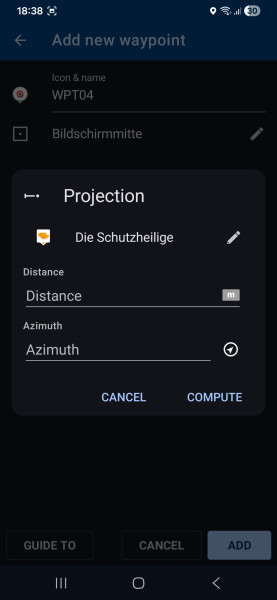
This is the solution we already had for many years ... before the new search selection dialog was introduced.
So in fact this issue is a regression.
Thanks to JohnCNA and Michal for your answers, much appreciated!
Unfortunately, your proposed workarounds do not work:
If you choose the coordinates option from the available selections, you get the coordinates from the actual screen center.
Only if this screen center matches the coordinates of the geocache waypoint exactly, the projection will be correct.
The only reliable workaround is to use option "Choose from map", then select the waypoint from the map, now the start coords for the projection are correct.
But enough about workarounds.
The best solution would simply be to preselect the chosen geocache waypoint when selecting "projection from ..." in the "Add new waypoint menu". Would look like this (replace the Geocache by ist desired waypoint):

This is the solution we already had for many years ... before the new search selection dialog was introduced.
So in fact this issue is a regression.
Hi,
the issue has been fixed. In the new app version, it will pre-select the cache when adding a new WPT to it again.
Hi,
the issue has been fixed. In the new app version, it will pre-select the cache when adding a new WPT to it again.
Replies have been locked on this page!