


Temporarily disable rotation & map centering while saving the track
Completed
I've mentioned in the beta forum but it didn't get any comment, one way or the other. I've created a video of the issue - if rotation or map centering are enabled while saving the track, best of luck if you want to tap on any point along the chart because the map will snap back to your current location, and any rotation is kinda annoying too. Of course, the user can do the temporarily disable rotation & map centering manually, but I can't really see a benefit of either behavior while displaying the map & chart in this workflow.
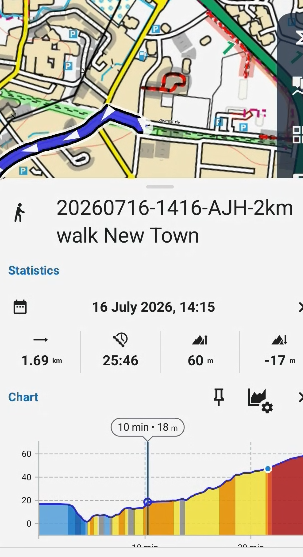
 I like this idea
Agree, it’s really annoying that when you’re looking at the chart and zooming in on a section, the map jumps to your GPS position.
I’d also appreciate it if this function were automatically disabled in that situation.
Agree, it’s really annoying that when you’re looking at the chart and zooming in on a section, the map jumps to your GPS position.
I’d also appreciate it if this function were automatically disabled in that situation.
Thanks for the idea and the video. This is side-effect of the track-screen migration, so more a bug.
Issue should be fixed now, so check the next (Beta) version.
Thanks for the idea and the video. This is side-effect of the track-screen migration, so more a bug.
Issue should be fixed now, so check the next (Beta) version.
4.35.0.4 - map is still rotating; I never saw any improvement - I am touring so don't want to risk later beta APKs.
4.35.0.4 - map is still rotating; I never saw any improvement - I am touring so don't want to risk later beta APKs.
Hello Menion
Recall you said rotation should be locked when a track is being saved? But clearly in this new video https://youtu.be/MedaDINzSCI at the 19 second mark the track is still rotating while being saved.
Hello Menion
Recall you said rotation should be locked when a track is being saved? But clearly in this new video https://youtu.be/MedaDINzSCI at the 19 second mark the track is still rotating while being saved.
fixed in 4.36.1.2 - thanks
fixed in 4.36.1.2 - thanks
Replies have been locked on this page!