


The navigation cursor gets stuck during track navigation

The navigation cursor gets stuck during track navigation
In Progress
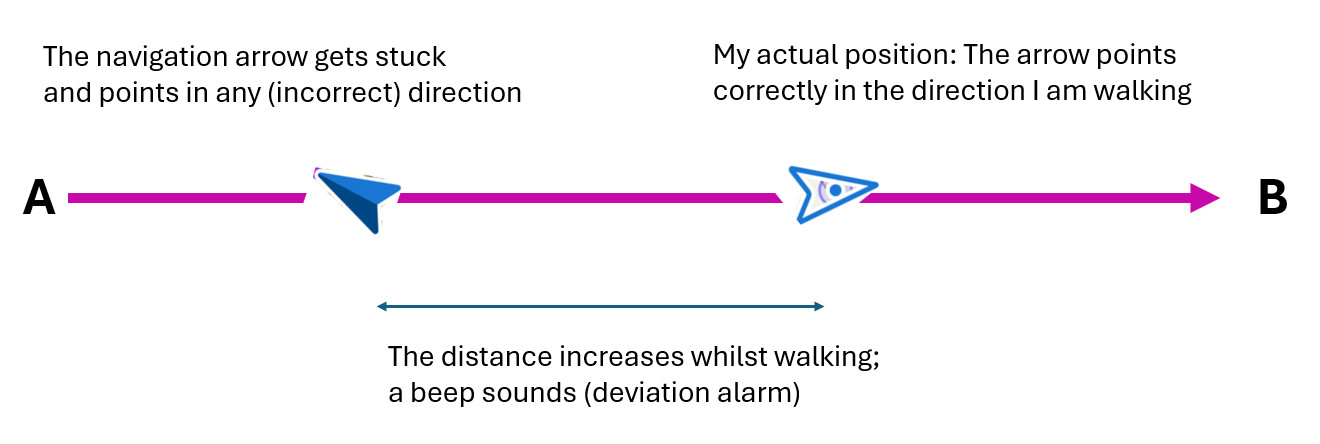
For some time now, I’ve been experiencing a problem where, during track navigation (primarily walking/hiking), the navigation arrow (dark arrow) occasionally gets stuck at a point on the planned route and usually points in the wrong direction, whilst the unfilled cursor arrow (actual position) continues to move correctly with me. This naturally leads to an increasing discrepancy between the two cursor arrows, and once I’ve reached the distance I’ve set, I receive a deviation alert telling me that I’ve strayed from my planned route.
Which, of course, isn’t true, as I’m still on the route; it’s just that the navigation arrow has got stuck.
This usually happens once or several times per trip, mostly when I’ve stopped briefly, but sometimes for no apparent reason. These are ‘normal’ journeys from A to B without any return legs.
If I then switch the GPS off and on again briefly, it works fine again. As it happens quite frequently and beeps every time, it’s a bit annoying. What could be causing this and how can I fix it?
As I don’t have a screenshot and it’s difficult to simulate the situation at home, I’ve drawn up a schematic diagram:
Files:
cursorhaengt.jpg
 The same problem
Hi,
we have worked on a similar issue recently regarding a stuck guiding line during guidance. This bug has been fixed. Please test it on the latest beta version at https://bit.ly/lmVersionsTest. Thanks.
Hi,
we have worked on a similar issue recently regarding a stuck guiding line during guidance. This bug has been fixed. Please test it on the latest beta version at https://bit.ly/lmVersionsTest. Thanks.
Thanks. We'll need an accurate description of all the steps leading to a successful simulation of the issue, then.
Thanks. We'll need an accurate description of all the steps leading to a successful simulation of the issue, then.
Thanks. Now please create a manual backup of your settings and send it here for a test. Thank you.
Thanks. Now please create a manual backup of your settings and send it here for a test. Thank you.
The navigation cursor gets stuck during track navigation
The navigation cursor gets stuck during track navigation
Unfortunately, we still haven't managed to simulate the issue correctly, despite applying your setup. We'll go on investigating the problem further, but without proper reproduction of the issue, we can't do much.
Unfortunately, we still haven't managed to simulate the issue correctly, despite applying your setup. We'll go on investigating the problem further, but without proper reproduction of the issue, we can't do much.
I looked into it again at the weekend and was able to reproduce the problem in several tests. I also made two screen recordings.
The main issue is that, when walking slowly and making sharp changes of direction (turning round), the bright navigation arrow does not reliably turn with you and then points in the wrong direction (sometimes for a long time or permanently) whilst still moving along with you. Sometimes increasing the walking speed helps, but not always.
This happens particularly when I change direction by nearly 180°, i.e. when I walk backwards. For example, when I briefly leave the route by a few metres against the planned direction to read a sign, step off the path, or similar.
(This has nothing to do with the map rotation, which happens immediately when the direction changes. The rotation of the navigation arrow, on the other hand, is delayed or does not happen at all.)
The dark arrow remains on the route; sometimes it also rotates (in the same wrong direction), and sometimes it remains correctly pointing in the intended direction.
When I return to the planned route, both arrows follow me again, with the light-coloured arrow possibly pointing the wrong way. At the next junction, the dark route arrow then remains stationary, whilst the light-coloured navigation arrow continues to follow me, triggering a distance warning.
Here are two screen recordings showing the problem. You can download them via the links. In both, I’m navigating a planned route.
screc01: I’m navigating and walking eastwards. Then I slowly cross to the other side of the road and walk diagonally back towards the track a few metres to the west. Then I turn round again and walk eastwards. The light-coloured navigation arrow doesn’t turn with me and continues to point westwards, but moves eastwards with me. At the next junction, the dark track arrow also turns the wrong way and remains stationary (!). When I continue walking eastwards, the distance alarm is triggered.
screc02: The same thing happens on another road, travelling from north to south.
Just for information, in case it’s relevant: route planning is carried out without navigation instructions.
I’ve been using track navigation regularly when walking or hiking ever since I got Locus, so for about 10 years. This problem never used to occur! It’s only been a few months that I’ve been struggling with it – I think since around April or May this year.
*** Translated with http://www.DeepL.com/Translator (free version) ***
I looked into it again at the weekend and was able to reproduce the problem in several tests. I also made two screen recordings.
The main issue is that, when walking slowly and making sharp changes of direction (turning round), the bright navigation arrow does not reliably turn with you and then points in the wrong direction (sometimes for a long time or permanently) whilst still moving along with you. Sometimes increasing the walking speed helps, but not always.
This happens particularly when I change direction by nearly 180°, i.e. when I walk backwards. For example, when I briefly leave the route by a few metres against the planned direction to read a sign, step off the path, or similar.
(This has nothing to do with the map rotation, which happens immediately when the direction changes. The rotation of the navigation arrow, on the other hand, is delayed or does not happen at all.)
The dark arrow remains on the route; sometimes it also rotates (in the same wrong direction), and sometimes it remains correctly pointing in the intended direction.
When I return to the planned route, both arrows follow me again, with the light-coloured arrow possibly pointing the wrong way. At the next junction, the dark route arrow then remains stationary, whilst the light-coloured navigation arrow continues to follow me, triggering a distance warning.
Here are two screen recordings showing the problem. You can download them via the links. In both, I’m navigating a planned route.
screc01: I’m navigating and walking eastwards. Then I slowly cross to the other side of the road and walk diagonally back towards the track a few metres to the west. Then I turn round again and walk eastwards. The light-coloured navigation arrow doesn’t turn with me and continues to point westwards, but moves eastwards with me. At the next junction, the dark track arrow also turns the wrong way and remains stationary (!). When I continue walking eastwards, the distance alarm is triggered.
screc02: The same thing happens on another road, travelling from north to south.
Just for information, in case it’s relevant: route planning is carried out without navigation instructions.
I’ve been using track navigation regularly when walking or hiking ever since I got Locus, so for about 10 years. This problem never used to occur! It’s only been a few months that I’ve been struggling with it – I think since around April or May this year.
*** Translated with http://www.DeepL.com/Translator (free version) ***
Even at the risk of getting on your nerves: 😉
I’ve been on a hiking holiday in the mountains for two weeks now and have been struggling with this problem every day. The bright arrow keeps failing to turn with me when I turn round or when my direction of travel changes by 180 degrees. Usually, a change in direction of around 145–225 degrees is enough to cause this problem. And this happens all the time when you’re hiking: a quick detour to a viewpoint a few metres off the planned route, an information sign, a sharp hairpin bend, and so on… The light-coloured arrow then moves backwards or points diagonally backwards to the side, and when you’re back on the planned route, the dark blue arrow on the track also turns in the same wrong direction and gets stuck. Navigation then stops working and (if enabled) the warning beep sounds after x metres. Sometimes I have to switch the GPS off and on again several times until the arrow points in the direction I’m moving again.
It’s definitely a bug or issue in Locus, which I’ve never experienced in over 10 years of use and which started sometime in early summer. In other apps, such as Organic Maps, the arrow always turns immediately to face the correct direction of travel. Even at very slow speeds and during 180-degree changes of direction.
I’m also surprised that I seem to be the only one with this problem. Or do they all just cycle or hike at a brisk pace, so they don’t have the problem? It can’t be down to the device either, as I’ve had it for much longer than this behaviour first started occurring.
See screenshot. I’m heading south after having visited the viewpoint just a short while ago – and both arrows are pointing north!
Even at the risk of getting on your nerves: 😉
I’ve been on a hiking holiday in the mountains for two weeks now and have been struggling with this problem every day. The bright arrow keeps failing to turn with me when I turn round or when my direction of travel changes by 180 degrees. Usually, a change in direction of around 145–225 degrees is enough to cause this problem. And this happens all the time when you’re hiking: a quick detour to a viewpoint a few metres off the planned route, an information sign, a sharp hairpin bend, and so on… The light-coloured arrow then moves backwards or points diagonally backwards to the side, and when you’re back on the planned route, the dark blue arrow on the track also turns in the same wrong direction and gets stuck. Navigation then stops working and (if enabled) the warning beep sounds after x metres. Sometimes I have to switch the GPS off and on again several times until the arrow points in the direction I’m moving again.
It’s definitely a bug or issue in Locus, which I’ve never experienced in over 10 years of use and which started sometime in early summer. In other apps, such as Organic Maps, the arrow always turns immediately to face the correct direction of travel. Even at very slow speeds and during 180-degree changes of direction.
I’m also surprised that I seem to be the only one with this problem. Or do they all just cycle or hike at a brisk pace, so they don’t have the problem? It can’t be down to the device either, as I’ve had it for much longer than this behaviour first started occurring.
See screenshot. I’m heading south after having visited the viewpoint just a short while ago – and both arrows are pointing north!
Replies have been locked on this page!