


When connecting Bluetooth device offer to turn on Location too
Solved
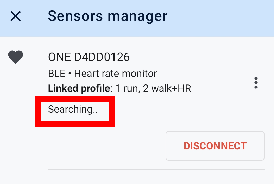
When I tap CONNECT in the Sensors Manager my for heart rate device, Locus will offer to turn on Bluetooth. My experience is that Location must be enabled too, otherwise program exceptions are raised but silently ignored and the the device is never connected with "Searching..." remaining on the screen. Example log when Connect is tapped:
10:45:11.444	E	SE2-a	unable to connect(), socket: XX:XX:XX:XX:DD:01
java.io.IOException: read failed, socket might closed or timeout, read ret: -1
	at android.bluetooth.BluetoothSocket.readAll(BluetoothSocket.java:1526)
	at android.bluetooth.BluetoothSocket.readInt(BluetoothSocket.java:1544)
	at android.bluetooth.BluetoothSocket.connect(BluetoothSocket.java:751)
	at jo.a.run(r8-map-id-5927c483cbd3a164606325e5197e76407ef68de519b6ca62df981a97f3855f15:155)
 The same problem
Hi Andrew,
I've changes this to a problem, more than an idea.
Main question: how are you using Locus Map with HRM sensor connected and no location permission?
Amyway, I've found an option to connect to selected device directly without the scan used today. Scan, that also require location permission, is a safe way that always works. Now, it will be used as fallback if direct connection fail.
Hi Andrew,
I've changes this to a problem, more than an idea.
Main question: how are you using Locus Map with HRM sensor connected and no location permission?
Amyway, I've found an option to connect to selected device directly without the scan used today. Scan, that also require location permission, is a safe way that always works. Now, it will be used as fallback if direct connection fail.
fixed in 3.36.1.2 - thanks - now even faster to connect or just my imagination?
fixed in 3.36.1.2 - thanks - now even faster to connect or just my imagination?
Replies have been locked on this page!