


Seeing the 4.37.0 update available in the store, I grabbed my phone and headed out, feeling quite excited—hoping that everything had finally been resolved.
But my expectations turned to disappointment, and here I am, writing another post.
It was stated that the track would be recorded even at speeds below 2 km/h, yet it’s not recording at all.
A speed of 1.2 km/h is one I have experienced multiple times while breaking trail through snow that reached up to my knees; I believe this pace should still count as a valid record.
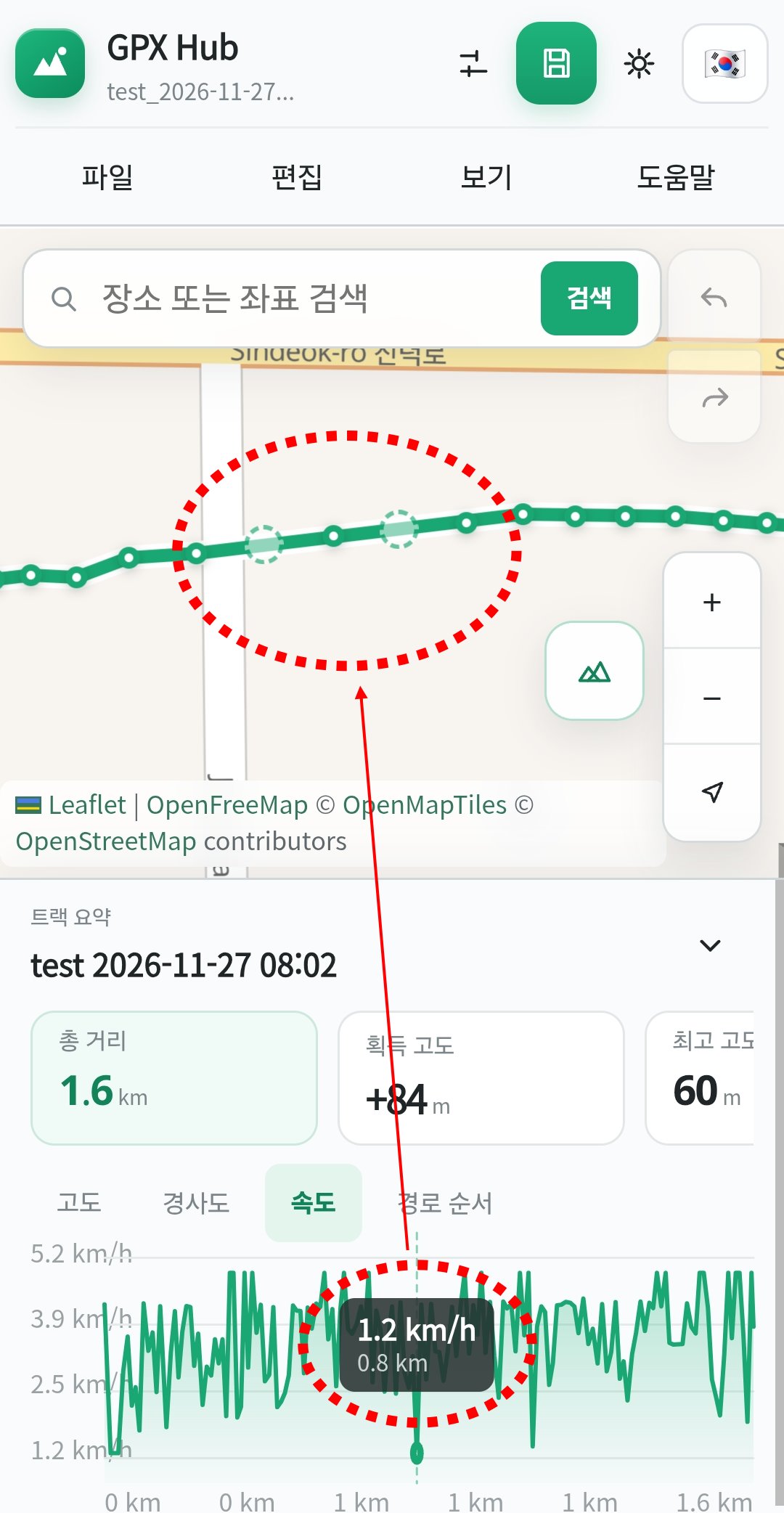
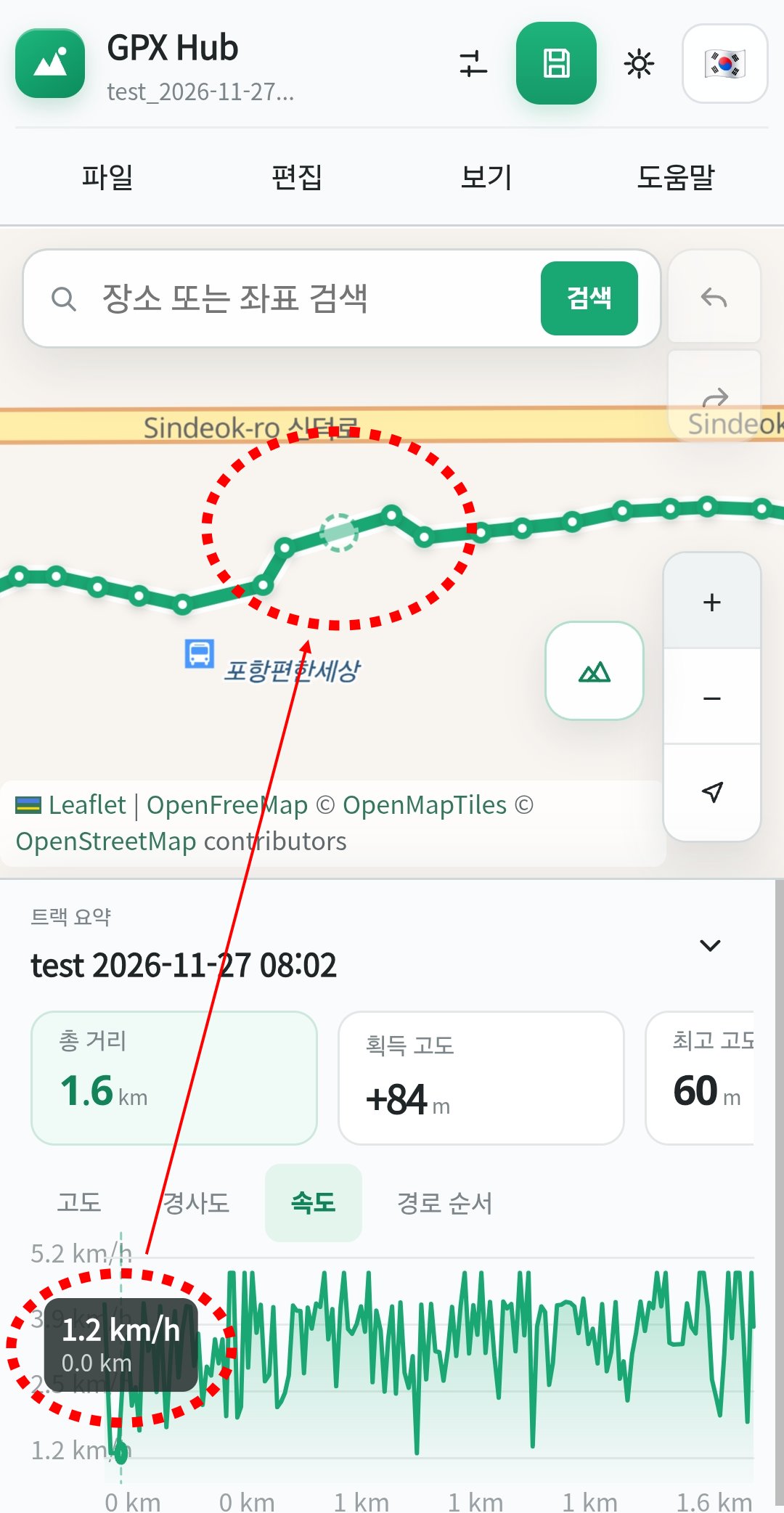
 The same problem

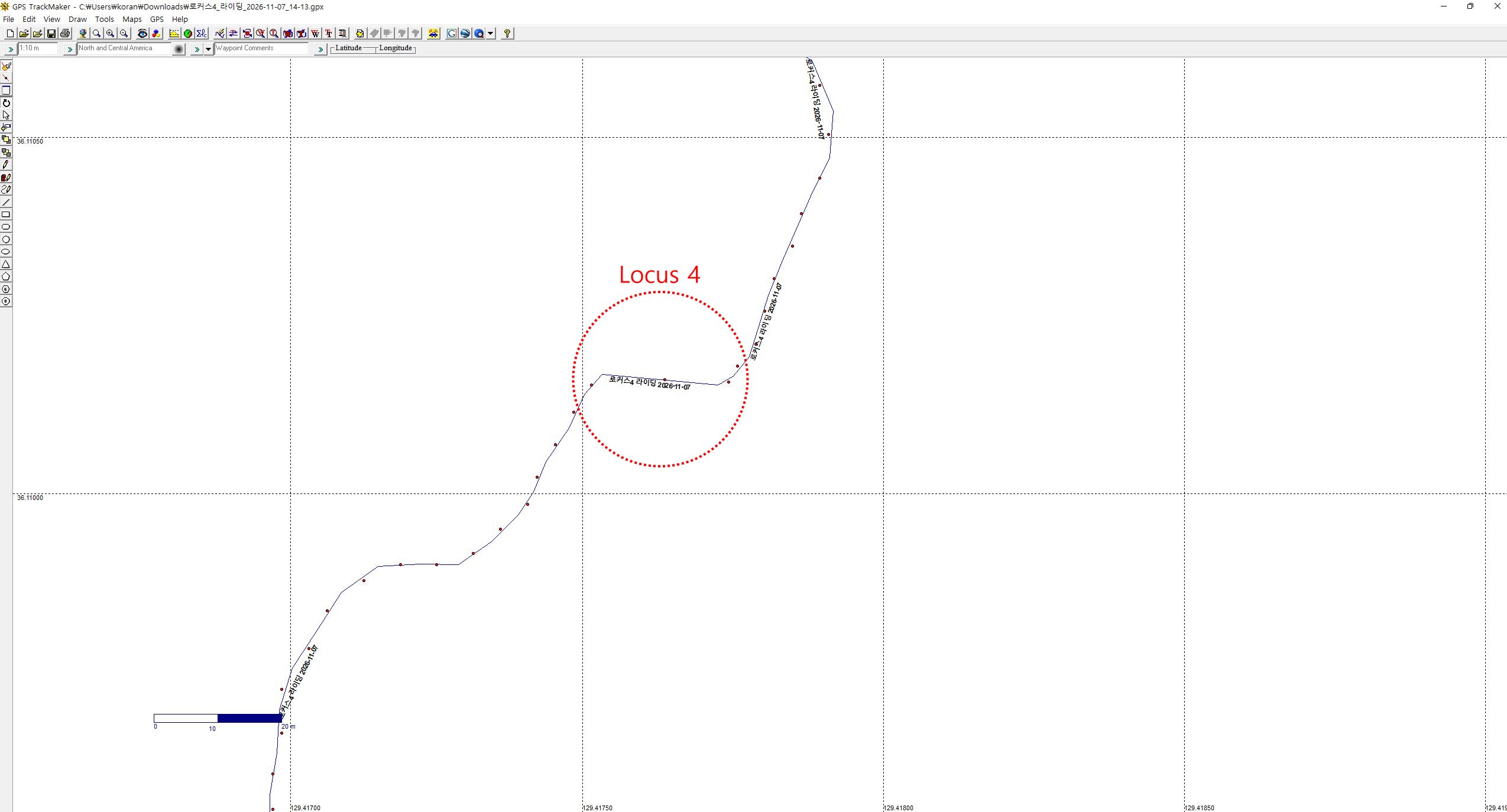
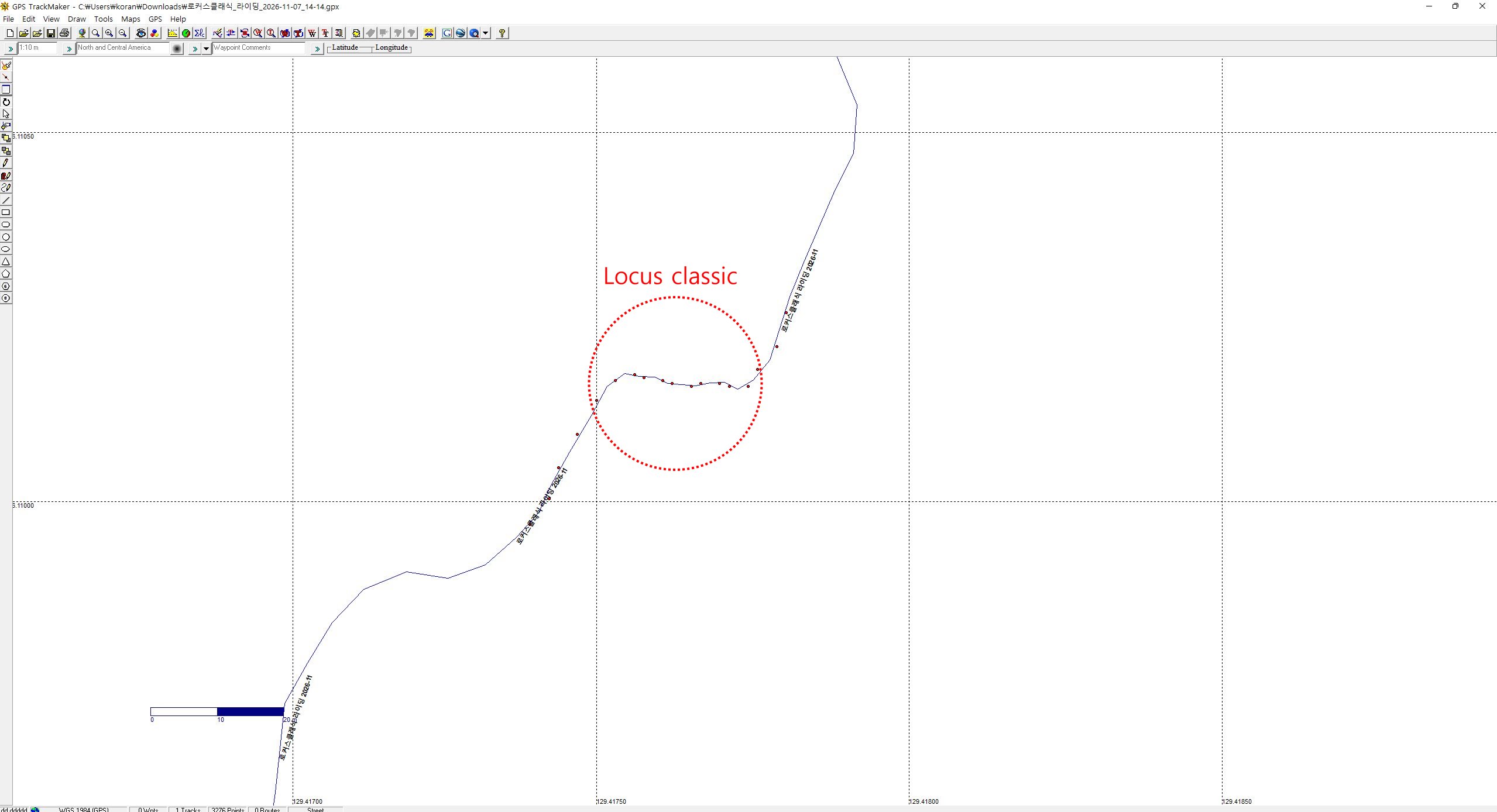
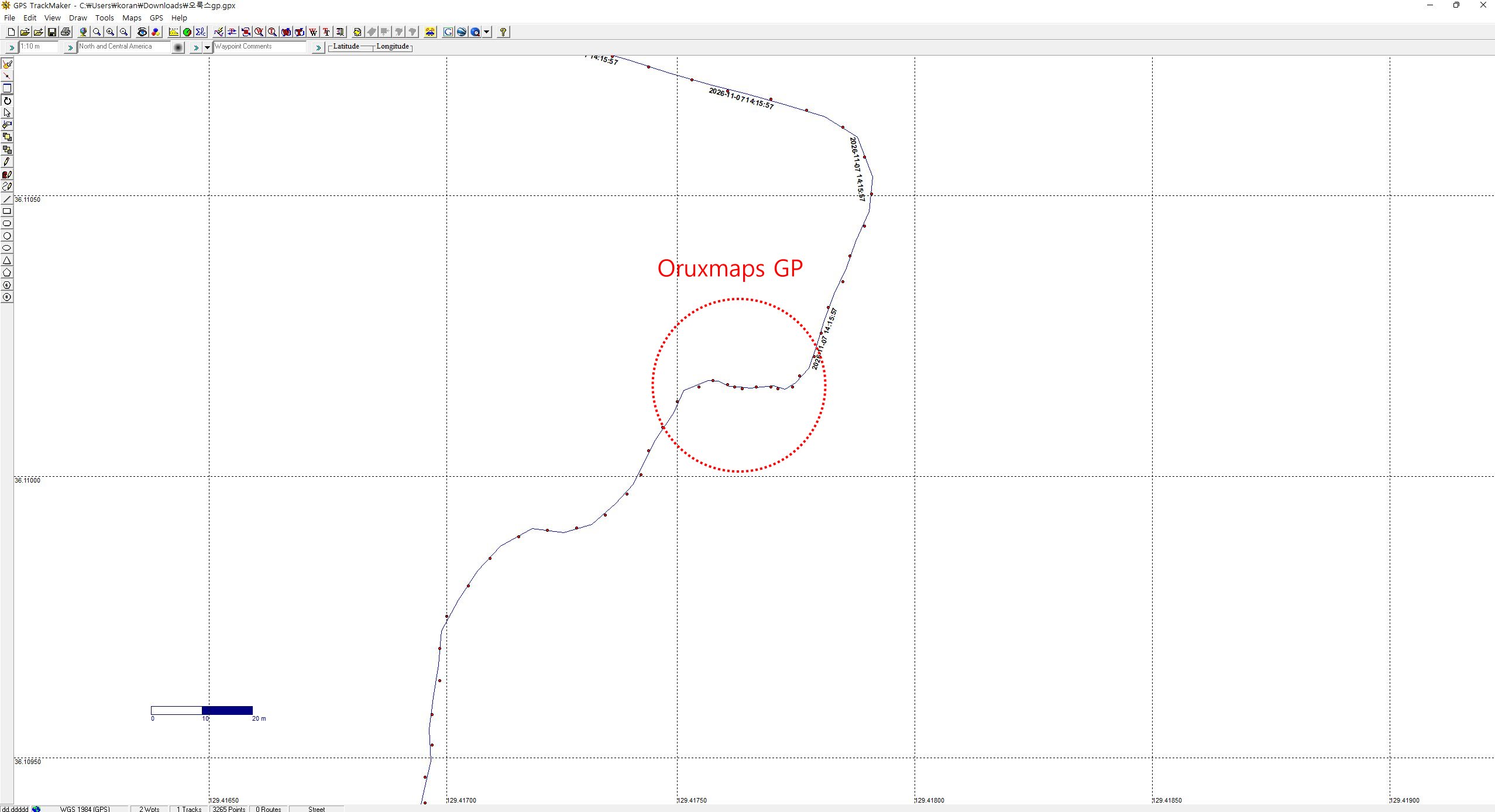
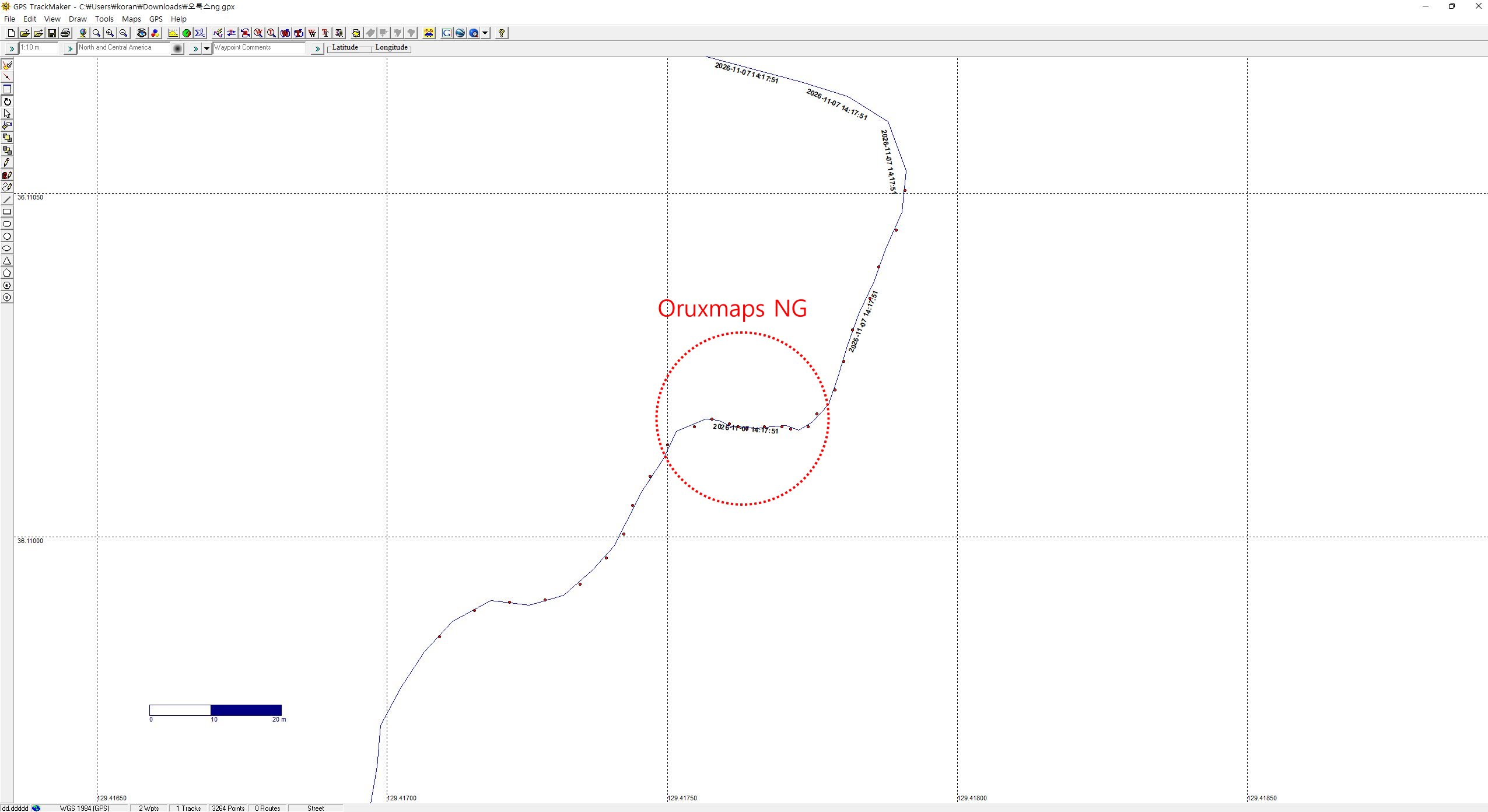
Point location
Point location
Another track example
Appearance of the recording points during very slow movement (as if the patient were walking)
Another track example
Appearance of the recording points during very slow movement (as if the patient were walking)
Hi,
Thank you for such a carefully prepared report. We parsed all four GPX files and compared them point by point — here’s what we found.
Overall, the four tracks are nearly identical. Over the same 2h21m window, Locus Map 4 recorded 3,254 points, Locus Classic 3,274, OruxMaps NG 3,264 and OruxMaps GP 3,263, with the same 23.7 km distance and the same 2-second median interval. So trackpoints are not being lost across the recording as a whole.
Most of the large gaps in your track are GPS signal loss, not the app. The long interruptions — around 06:57:46, 07:27:26, 06:06:05 and 06:11 — appear in all four files at the same timestamps. All four apps stopped and resumed together there, so those gaps come from the device’s GPS, not from Locus Map’s recording logic.
You are right about very low speeds, though. Using the OruxMaps track as a speed reference, below roughly 2 km/h Locus Map 4 records about 40% fewer points per minute than the other three apps (about 27 points versus 41–46 across the ~10 minutes you spent under 2 km/h). Above 2 km/h all four are equivalent.
This points to Movement detection in your recording profile. If it is set to Stop recording trackpoints or Auto-pause, the app stops writing points once it concludes you have stopped — and at a slow climbing pace the GPS-reported speed sits near zero even though you are still moving. Two things in your files fit this: Locus Map 4 has 26 gaps longer than 8 seconds with no points at all inside them, almost all at 0–1 km/h, where the other apps kept a few; and after a stop it resumes slightly later than the others, which matches the documented behavior of Auto-pause (“resumes when the phone’s sensors detect motion”).
One more thing worth adjusting: your Required GPS accuracy is set to 20 m. We recommend more than 50 m, since on steep terrain or under tree cover the reported accuracy often drifts above 20 m, and every fix beyond that limit is discarded.
Could you try one more run with:
All profile settings are documented here: https://docs.locusmap.app/doku.php/manual:user_guide:tracks:recording:profiles_settings
One clarification on your comparison: the other apps don’t actually record more points as you slow down — their rate drops too, from about 34 to about 3 points per minute. The difference is that they keep the small GPS drift that occurs while you are standing still, which Locus Map filters out by design. With No pauses you’ll get those points as well.
It would still help us to know which Movement detection mode your profile used during the test, and your phone model and Android version (we can see the app was 4.36.1.5).
Thanks again for the thorough testing — this kind of report is genuinely useful to us.
Movment detection : Stop recording trackpoint
Galaxy S26 Ultra
Android 17
s you mentioned, if I keep the recording running the entire time, it creates too many "burrs" (unwanted segments/clutter) during breaks, which makes the subsequent editing process difficult.
Movment detection : Stop recording trackpoint
Galaxy S26 Ultra
Android 17
s you mentioned, if I keep the recording running the entire time, it creates too many "burrs" (unwanted segments/clutter) during breaks, which makes the subsequent editing process difficult.
In tests with the settings at 2 seconds and 1 meter, the system records points correctly when moving at a moderately slow pace, but fails to record any points when moving very slowly. In short, the 2-second/1-meter setting is also problematic. I plan to change the settings to 50 meters as you suggested and test it during a hike; I will report the results to you afterward.
In tests with the settings at 2 seconds and 1 meter, the system records points correctly when moving at a moderately slow pace, but fails to record any points when moving very slowly. In short, the 2-second/1-meter setting is also problematic. I plan to change the settings to 50 meters as you suggested and test it during a hike; I will report the results to you afterward.
Galaxy S26 Ultra.
Android 17.
During a hike today, I recorded a track using Locus 4 connected to an external F10N GPS receiver (with the "required GPS accuracy" setting adjusted to 50m), while simultaneously using the phone’s built-in (dual) GPS for a separate recording in Locus Classic.
For over a year and a half, using an external GPS (F10N) with the app would consistently lead to a crash after about three hours, rendering it unusable. After discovering that some improvements had been made regarding GPS functionality, I began testing the F10N connection again a few days ago; it has since proven to work reliably, even beyond the 5-hour and 8-hour marks.
However, an unexpected issue has surfaced.
Even with the "required GPS accuracy" in Locus 4 set to 50m, the recording of track points has become sparse—much like it was before.
While this doesn't actually pose a problem for hiking, now that I’m aware of it, it’s something I can’t help but notice.
I hope this can be resolved soon.
Hi,
Thank you — those two details solve it. Movement detection set to Stop recording trackpoints is the cause of the missing points at very low speeds.
That setting uses GPS speed to decide when you have stopped, and once it concludes you are standing still it writes no trackpoints at all — regardless of your distance and time intervals. On a steep, slow climb the GPS-reported speed sits near zero even though you are still moving, so recording goes quiet. This is exactly why your 2 s / 1 m test changed nothing: the distance threshold was never the limiting factor there. It also explains the 7 November comparison, where the other three apps have no equivalent filter.
One clarification before your next hike: the 50 m we recommended was for Required GPS accuracy, which you have already set. Please do not change your Distance interval to 50 m — that would place trackpoints 50 m apart and make your tracks much coarser. Keep the distance interval at 1–2 m.
Our recommendation: set Movement detection → Auto-pause.
This is the option that fits what you need. Instead of GPS speed, Auto-pause uses the phone’s motion sensors to decide whether you are moving — so slow walking uphill still registers as motion and keeps recording, while a genuine rest stop still pauses it and keeps your tracks free of the clutter you want to avoid. The only thing to be aware of is that recording can take a few seconds to resume after a break.
Everything else can stay as it is: 2 s time interval, 1–2 m distance interval, Required GPS accuracy 50 m.
If you would like to confirm the cause first, record one hike with Movement detection → No pauses. That records continuously with no filtering at all, so the slow sections should come out fully detailed. It will produce the break clutter you dislike, so it’s worth doing once as a test rather than as your everyday setting.
One more note: our earlier suggestion to switch to Distance OR time won’t make a difference while Movement detection is pausing, since the point is suppressed either way. Try it only afterwards, if you want an even denser line.
All of these settings are documented here: https://docs.locusmap.app/doku.php/manual:user_guide:tracks:recording:profiles_settings
We’re passing your findings to our developers as well. Your case is a good argument for making the GPS-speed threshold less aggressive on very slow uphill sections — that is a real limitation, not something you configured incorrectly.
Thanks again for the systematic testing — please let us know how the next hike goes.
Following Michal’s recommendation, I tested the "Movement detection → Auto-pause" feature with settings configured to 1 second, 1 meter, and 50 meters.
As a result, each time I stopped and then resumed moving—which happened twice—the recording was split entirely, creating three separate segments.
Consequently, for me, the "Movement detection → Auto-pause" setting is unusable.
I honestly wonder who would even find the "Auto-pause" option necessary.
The settings that work best for me are: 2 seconds, 2 meters, 20 meters, with the trackpoint recording condition set to "Distance AND time" (both).
Hi,
Thank you for running the test and sending the file. We analyzed it, and there’s good news in it: Auto-pause solved the original problem.
Inside the recorded sections, 82% of your trackpoints are spaced exactly 1 second apart — your configured interval, applied continuously. At speeds between 1 and 2 km/h you recorded 17.5 points per minute, compared with 4 to 10 points per minute in your earlier tracks using Stop recording trackpoints. The sparse recording at very slow speeds no longer occurs.
On the three segments — the recording was not actually split into three tracks. The file contains a single track with three segments inside it. Distance, duration and all statistics remain continuous, and nothing was separated into different tracks or files.
We also checked whether Auto-pause interrupted you while you were still moving, and it did not. Your two pauses lasted 50 seconds and 3 minutes, and during them your position changed by 9.3 m and 9.8 m respectively — that is GPS drift while standing, not walking. The third segment contains only 4 points over 4 seconds, which suggests the recording was stopped shortly after you resumed.
If the segment breaks bother you during editing, they can be removed. In the track editor, tap the trackpoint next to the gap and choose “Remove gap” from the tool menu. The segments are joined into one continuous line: https://docs.locusmap.app/doku.php/manual:user_guide:tracks:editing
As for who needs Auto-pause — it is mainly used for sports recording, where elapsed time should reflect moving time only. A cyclist waiting at traffic lights or a runner pausing at a crossing doesn’t want those minutes counted in their average pace. For hiking with later editing, your preference for an uninterrupted line is completely understandable.
One question about your final settings. You listed 2 seconds, 2 meters, 20 meters and Distance AND time, but not which Movement detection mode you’ll use. This matters: if you return to Stop recording trackpoints, the sparse recording at very slow speeds will return as well, since that mode is what caused it. Your options are:
We’d also suggest raising Required GPS accuracy back to 50 m rather than 20 m. At 20 m, fixes are discarded whenever the reported accuracy drifts above that, which happens regularly under tree cover and on steep terrain.
Is the Locus help desk run by AI? They seem to grasp the issues I clearly lay out, only to then fail to understand them and conclude that "there are no problems."
I suppose it’s a basic human instinct to deflect responsibility by claiming everything is fine, but this is just not right.
If Locus 4 has no issues, then Locus Classic does—and if Locus 4 *does* have issues, then Locus Classic supposedly doesn't. How can the same developer create two conflicting apps and claim that neither has any problems?
It’s enough to make a passing dog laugh.
Hi,
Locus help desk is managed by real humans; don't worry :) Only some analytic tasks are processed with the assistance of AI.
Your report is correct, and it is not “no problem.” We measured it in your own files: on 7 November, with all four apps recording simultaneously from the same phone GPS and the same settings, Locus Map 4 recorded roughly 40% fewer trackpoints below 2 km/h than Locus Classic and the two OruxMaps versions. That is a genuine difference in behavior between our own two apps under identical configuration, and it is a shortcoming in Locus Map 4 for your use case.
We’ve been responding with settings you could change instead of addressing that, and that was the wrong emphasis. Your configuration is a club standard, shared across four apps so that tracks recorded by different members remain comparable for mapmaking. A workaround that only applies to Locus Map 4 defeats the purpose. Understood.
What is actually happening: in Locus Map 4, Stop recording trackpoints decides you have stopped based on GPS speed, and its threshold is more aggressive than the equivalent logic in Locus Map Classic. At a slow climbing pace, the reported speed sits near zero; Locus Map 4 concludes you are standing still, and writes nothing — while Classic, under the same setting, keeps recording. Your Auto-pause test confirmed this from the other direction: with sensor-based movement detection, the slow sections recorded in full detail.
So the two apps genuinely do behave differently here, and Classic behaves the way you need. We’re not claiming otherwise.
What we’re doing about it. We’ve forwarded your case to the development team with all four of your datasets and the measurements from them. The specific request is that the movement threshold in Stop recording trackpoints be made less aggressive, or that it consult the phone’s motion sensors before concluding that you’ve stopped — so that the setting works at a slow walking pace without the segment breaks that Auto-pause introduces. Your test data makes that case better than a description could, which is why it’s going to them in full.
I can’t promise you a date, and I won’t pretend to. But the issue is recorded as a real one rather than as user configuration.
Thank you for your persistence through four rounds of testing. It is what made the problem measurable, and I’m sorry it took this long to say so plainly.
Replies have been locked on this page!