


Webplanner: "No preview" for some tracks in my library
In Progress
I’m sure this has been asked before: It often happens that individual tracks in the Web Planner don’t show a map preview (thumbnail); instead, a blank field saying ‘No preview’ appears. This affects both recorded and planned tracks.
However, the previews are displayed correctly in the app.
Refreshing, resyncing, clearing the browser cache… nothing helps.
Files:
no_preview.jpg
 The same problem

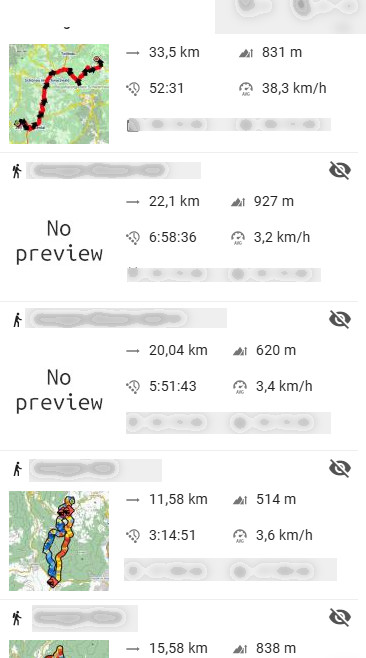
Further information:
I’ve been playing around a bit and have noticed the following: When I edit and overwrite a saved track in the app using the route planner, a preview is no longer displayed in the app. After synchronisation, it’s not shown in the web planner either ('No preview').
In the app, I can manually recreate the empty preview by long-pressing. When I synchronise again, this isn’t uploaded, as the track itself hasn’t actually changed. In the web planner, it therefore remains at ‘No preview’.
If I edit the track in the app using the route planner and then (before synchronising!) refresh the preview by long-pressing, and only then synchronise, the preview is also displayed in the web planner.
This behaviour is inconsistent. Particularly if you have enabled automatic synchronisation, creating the preview retrospectively by long-pressing no longer affects what is displayed in the web planner.
Why isn’t the preview mini-map in the app updated automatically straight away when I edit and ovewrite the track, instead of generating a blank preview? Why do you have to long-press first?
And one more thing: I can also change and overwrite the track in the route planner; a new preview is then generated straight away and, once synchronised, is also applied in the app. Unfortunately, though, the line thicknesses differ in the previews – the web planner generates thinner lines in the preview than the app does, which makes it look inconsistent… even though I’ve set the same line thickness value in both the app and the web planner.
The main problem, however, is that when changes are made to an existing track in the app, a blank preview map is generated.
Further information:
I’ve been playing around a bit and have noticed the following: When I edit and overwrite a saved track in the app using the route planner, a preview is no longer displayed in the app. After synchronisation, it’s not shown in the web planner either ('No preview').
In the app, I can manually recreate the empty preview by long-pressing. When I synchronise again, this isn’t uploaded, as the track itself hasn’t actually changed. In the web planner, it therefore remains at ‘No preview’.
If I edit the track in the app using the route planner and then (before synchronising!) refresh the preview by long-pressing, and only then synchronise, the preview is also displayed in the web planner.
This behaviour is inconsistent. Particularly if you have enabled automatic synchronisation, creating the preview retrospectively by long-pressing no longer affects what is displayed in the web planner.
Why isn’t the preview mini-map in the app updated automatically straight away when I edit and ovewrite the track, instead of generating a blank preview? Why do you have to long-press first?
And one more thing: I can also change and overwrite the track in the route planner; a new preview is then generated straight away and, once synchronised, is also applied in the app. Unfortunately, though, the line thicknesses differ in the previews – the web planner generates thinner lines in the preview than the app does, which makes it look inconsistent… even though I’ve set the same line thickness value in both the app and the web planner.
The main problem, however, is that when changes are made to an existing track in the app, a blank preview map is generated.
Replies have been locked on this page!