


This object is in archive!

Automatic/Manual Backup to Dropbox not working
Not a Problem
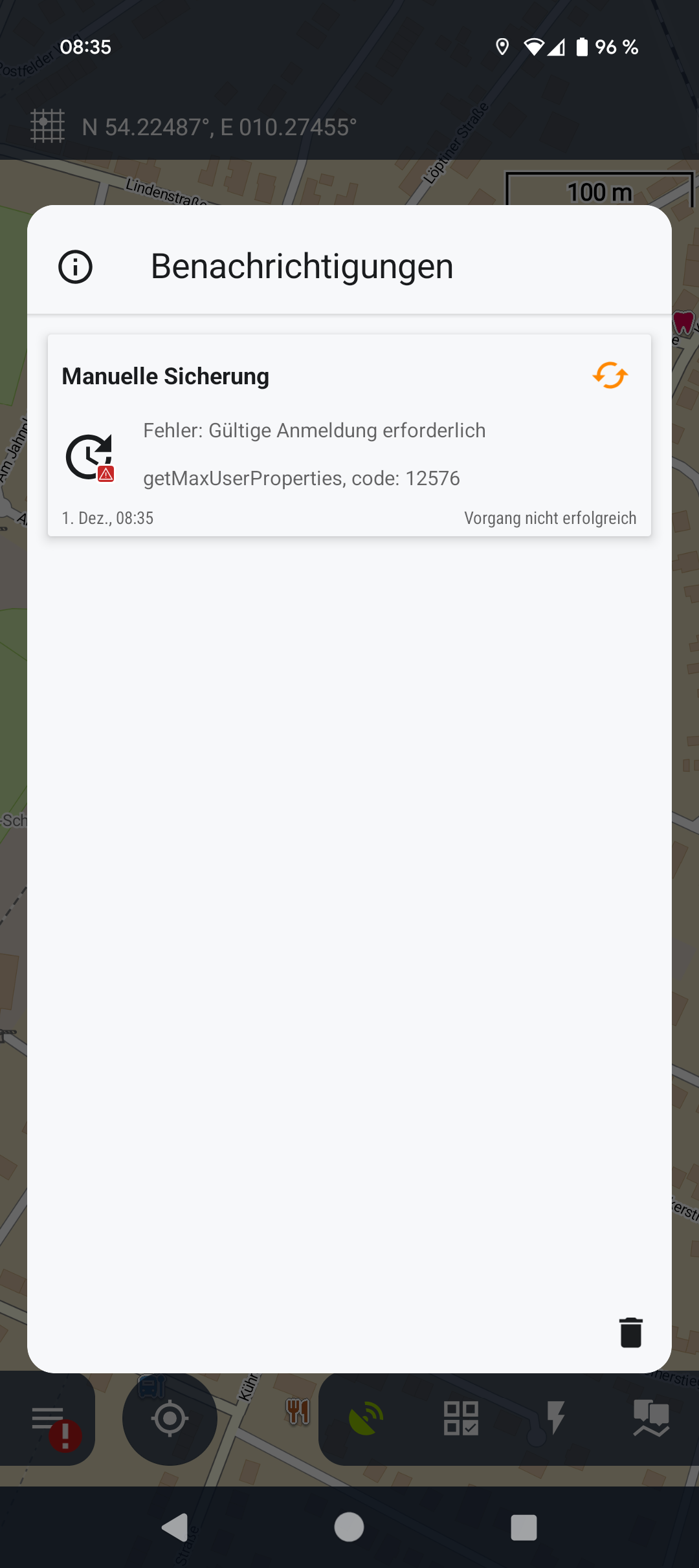
Good day, the Automatic and Manual Backup to Dropbox ist not working since a few days. I allowed my Android system (Pixel 9 with Android 15) to get access to Dropbox. But the system refuses to make an update with an error message (see attached screenshot). I would appreciate any help or hints to solve the problems, Thanks a lot!
Best regards
Files:
Screenshot_2024...
 The same problem
Hi,
please go to the backup manager and log out of Dropbox:
Then log back in Dropbox.
Hi,
please go to the backup manager and log out of Dropbox:
Then log back in Dropbox.
Hello Michal,
seems to work now, thanks. I don't know why, because I tried the login to Dropbox a few times before.
Did you change something in your backup system?
Best regards, Joern
Hello Michal,
seems to work now, thanks. I don't know why, because I tried the login to Dropbox a few times before.
Did you change something in your backup system?
Best regards, Joern
Joern, no, we haven't touched the backup system recently.
Joern, no, we haven't touched the backup system recently.
Good evening Michal,
unfortunately the automatic backup is still not working like before... 🙁
The system tries to start the backup (i.e. at 2am) but will not start the upload. When I open the Locus App next morning, backup has not started or was paused (see attached)
When I leave the app onscreen for a few minutes, the upload starts and is finished after a few minutes as normal.
It seems, the upload is not starting, when the phone/app is not onscreen.
I gave the app all possible system rights (as far I as know) and don't know whats wrong... Maybe you have an idea
Phone is a Pixel 9 with actual updates...
Thx and best regards
Joern
Good evening Michal,
unfortunately the automatic backup is still not working like before... 🙁
The system tries to start the backup (i.e. at 2am) but will not start the upload. When I open the Locus App next morning, backup has not started or was paused (see attached)
When I leave the app onscreen for a few minutes, the upload starts and is finished after a few minutes as normal.
It seems, the upload is not starting, when the phone/app is not onscreen.
I gave the app all possible system rights (as far I as know) and don't know whats wrong... Maybe you have an idea
Phone is a Pixel 9 with actual updates...
Thx and best regards
Joern
It may be due to Dropbox permissions. Don't forget to enable background activity permission.
It may be due to Dropbox permissions. Don't forget to enable background activity permission.
And also check the battery settings for Locus. I had exactly the same problem when the "optimised" setting was selected. It is essential that "not restricted" is activated.
And also check the battery settings for Locus. I had exactly the same problem when the "optimised" setting was selected. It is essential that "not restricted" is activated.
Thanks for your comments...
@freischneider: background activity for Dropbox is allowed
@Graf Geo: where do I find the battery settings for Locus? Background activity is (of course) also allowed for Locus
Thx
Joern
Thanks for your comments...
@freischneider: background activity for Dropbox is allowed
@Graf Geo: where do I find the battery settings for Locus? Background activity is (of course) also allowed for Locus
Thx
Joern
@Joern:
You can find this in the Android settings, for Android 12 here:
Android settings -> Apps -> Locus Map -> Battery
@Joern:
You can find this in the Android settings, for Android 12 here:
Android settings -> Apps -> Locus Map -> Battery
with Android 15 the menu must have changed, I don't have such a menu entry... :(
with Android 15 the menu must have changed, I don't have such a menu entry... :(
Replies have been locked on this page!