


Filters are no more additiv
Hi,
I have several filters defined. To keep the map smooth and not overloaded I use several filters to enable just a few caches with different filter options. E.g. first I want to enable all caches with more than 150 Favs and then all caches around 5km. So in summary I would see all caches around 5km and Fav150+ also in a larger area.
Other times I enable all Caches around at 5km then I move the map cursor to the next target location to do the same. So I have two regions where caches are shown on the map around 5km of each center point.
Usually I only do this on holidays. And that's the reason why I did not yet mention the different behavior earlier.
When I now choose a filter all other points on the map are now hidden it's no more additiv.
I hope this is a bug and not a wished behavior. Or does the filter manager of the new library has a checkbox to be additiv, what I did not yet found?
Wolfgang
 The same problem
Hi,
your original use case worked as you expected on some previous version of Locus Map 4 or on Locus Map Classic? What exactly do you mean by "additiv"? Is it a combination of two filtering criteria? I've tested the criteria you mentioned - 5km distance + 150favs - and the app works as it should.
Hi,
your original use case worked as you expected on some previous version of Locus Map 4 or on Locus Map Classic? What exactly do you mean by "additiv"? Is it a combination of two filtering criteria? I've tested the criteria you mentioned - 5km distance + 150favs - and the app works as it should.
Hi Michal,
I mean LM4. I was afraid that my examples could be misunderstood ;)
Let me say it in different words.
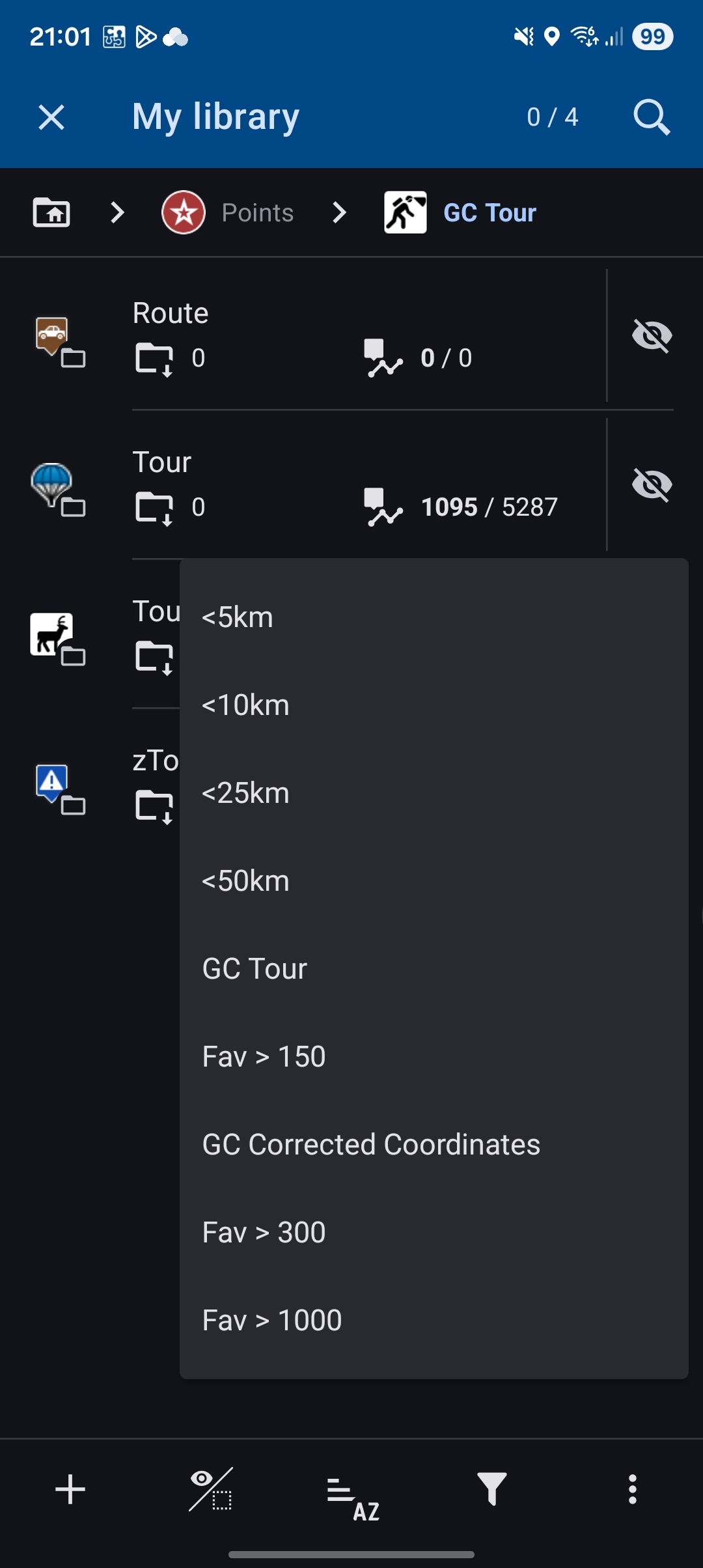
On my initial screenshot you see that I have different saved filters - these ones I use all the time. But I also combine them.
Lets say you have 100km around Prague Geocaches in your database. Then you plan a tour on the western part of this radius and you come from the eastern part, You use the <5km filter on your target location to have all geocaches active in the target region. But you don't want to miss Geocaches with more than 150Fav while traveling east to west - so you apply as second step the filter with >150Fav. In earlier versions you than had with this two steps all Caches with more than 150Fav visible from your 100km radius and additionally all existing caches <5km radius of your target location.
But today it works like that: When you apply a second filter on a folder all other caches will be removed from the map and only the ones matching the last applied filter are shown.
With the old behavior I was able to make Geocaches visible through combination of (saved) filters and/or moving the map cursor. This was a powerful feature. I'am sad :(
Hopefully I could explain it now better. If not let me know :)
Wolfgang
Hi Michal,
I mean LM4. I was afraid that my examples could be misunderstood ;)
Let me say it in different words.
On my initial screenshot you see that I have different saved filters - these ones I use all the time. But I also combine them.
Lets say you have 100km around Prague Geocaches in your database. Then you plan a tour on the western part of this radius and you come from the eastern part, You use the <5km filter on your target location to have all geocaches active in the target region. But you don't want to miss Geocaches with more than 150Fav while traveling east to west - so you apply as second step the filter with >150Fav. In earlier versions you than had with this two steps all Caches with more than 150Fav visible from your 100km radius and additionally all existing caches <5km radius of your target location.
But today it works like that: When you apply a second filter on a folder all other caches will be removed from the map and only the ones matching the last applied filter are shown.
With the old behavior I was able to make Geocaches visible through combination of (saved) filters and/or moving the map cursor. This was a powerful feature. I'am sad :(
Hopefully I could explain it now better. If not let me know :)
Wolfgang
Hi Wolfgang,
regarding the logic of filtering, it is not acceptable to display caches within a distance of 100 km if you have an active filter <5 km.
Hi Wolfgang,
regarding the logic of filtering, it is not acceptable to display caches within a distance of 100 km if you have an active filter <5 km.
Wolfgang, the filter affects the content of the My Library screen. So, please try this:
- open your geocache folder and hide all geocaches in it
- activate filter 1 and select "Display all"
- activate filter 2 and select "Display all" again
The result of both filters should be visible on the map.
Wolfgang, the filter affects the content of the My Library screen. So, please try this:
- open your geocache folder and hide all geocaches in it
- activate filter 1 and select "Display all"
- activate filter 2 and select "Display all" again
The result of both filters should be visible on the map.
OK, you are using the "Display by filter" option. This really can't multiply filters.
But you can try long-pressing the filter button in the bottom bar - this opens a list of available filters - choose one - select "display all". When needed, do the same and tap another filter - again, display all. This way should multiply the filtered caches on the map.
OK, you are using the "Display by filter" option. This really can't multiply filters.
But you can try long-pressing the filter button in the bottom bar - this opens a list of available filters - choose one - select "display all". When needed, do the same and tap another filter - again, display all. This way should multiply the filtered caches on the map.
Replies have been locked on this page!