


Hike & Bike theme broken for offline maps from external source, not showing coloured hiking trails
After a recent update of Locus to 4.32.2, the built-in Hike & Bike theme that I used for offline maps (downloaded from osm paws cz) no longer shows colours of tourist/hiking trails. In the the theme's settings, all options are enabled (Cycling routes, Hiking trails, etc.).
There are also some other minor changes in the new theme that make the map actually look worse than before (e.g. green color of a forest area is now less saturated).
I am not sure if this is a bug or some incompatibility with the osm paws maps, but is it possible to return the old Hike&Bike theme as an option?
Unfortunately I don't know which exact version of Locus was the "old" one with the older better map themes, as Google Play sometimes gives me updates with a significant delay. I suppose it was either 4.32.0 or 4.31.3.
I have a screenshot from 20.01.2026 from the "old" version, showing a piece of map that is not very representative but the difference (and the hiking trail) is quite obvious when compared to today's screenshot of the same area in Locus 4.32.2
 The same problem
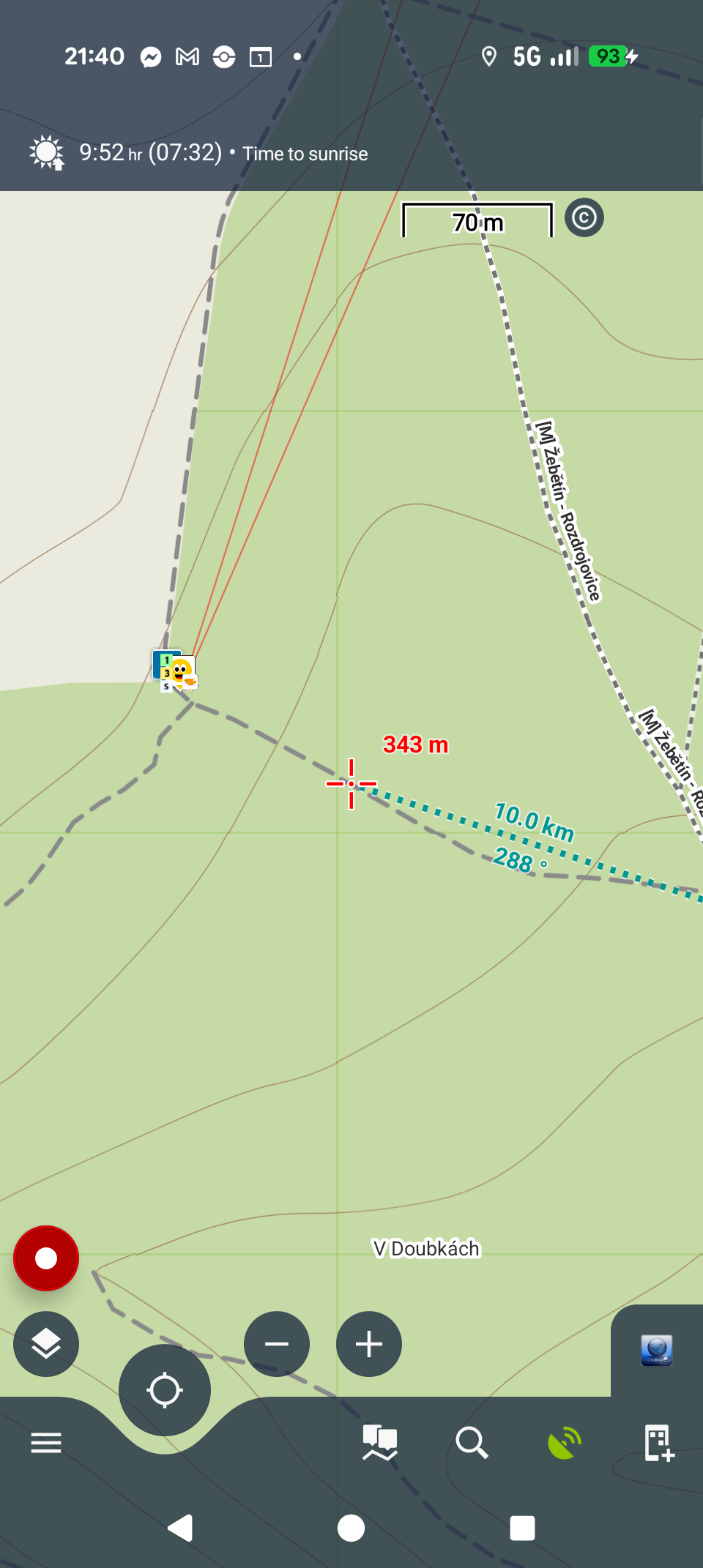
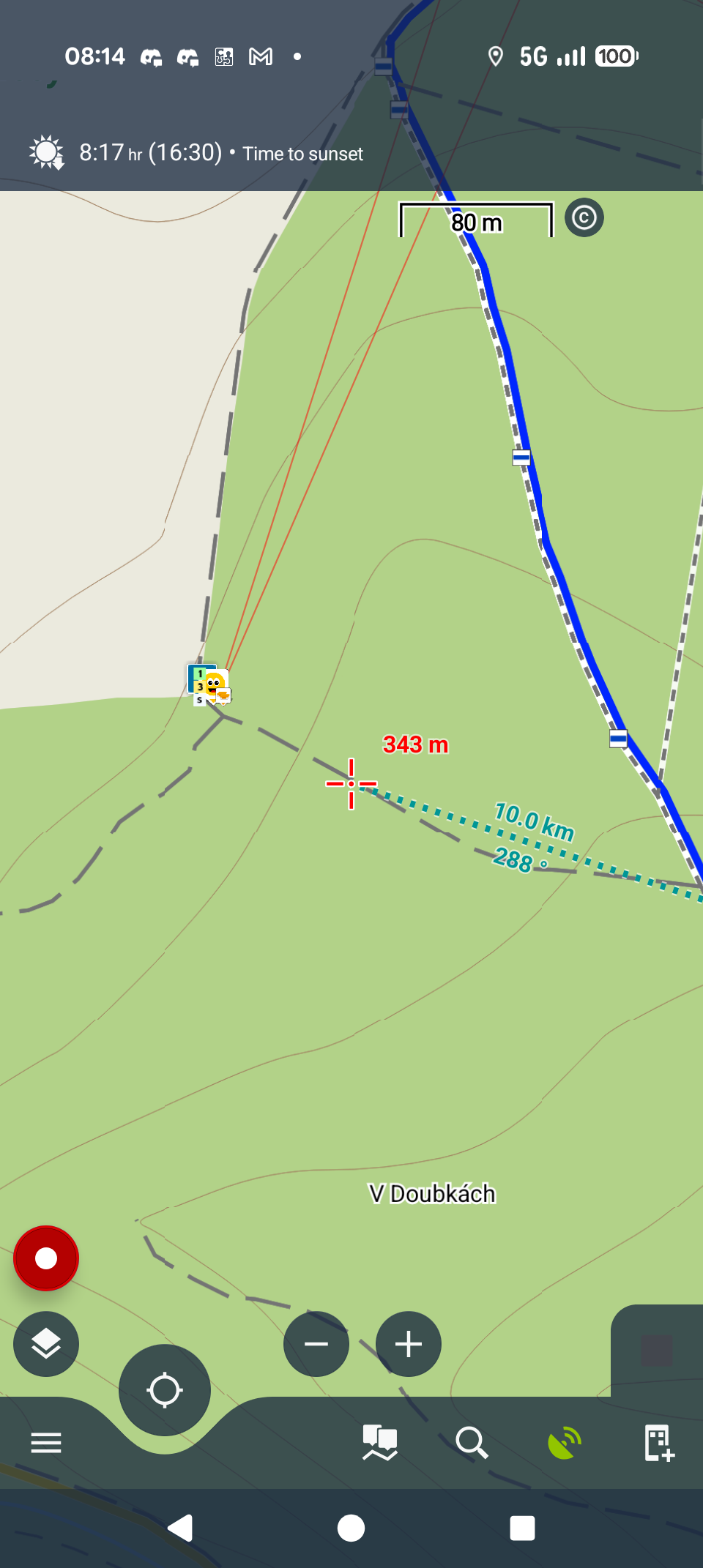
Hi,
The new version no longer supports MapsForge V3-generated maps (being an obsolete, over 10 years old platform), and the internal theme is also optimized for V4. Please update your maps to a newer version.
Hi,
The new version no longer supports MapsForge V3-generated maps (being an obsolete, over 10 years old platform), and the internal theme is also optimized for V4. Please update your maps to a newer version.
Alternatively, you can also try out the Openandromaps maps with the corresponding Elevate theme.
Alternatively, you can also try out the Openandromaps maps with the corresponding Elevate theme.
I tried some V4 maps and the theme seems to be the same, so I will have to get used to the slightly different colors. That means that the new theme still works for a V3 map, except for coloring of hiking trails. The alternatives do not really cover exactly what I need. OpenAndroMaps do not seem to contain the hiking trail relations. And LoMaps are almost perfect but the density of elevation lines is 20 m. The maps from osm paws have 10 m density, which is what I need.
Having backward compatibility for hiking trails of V3 maps would solve the whole problem, as otherwise the new theme seems to look the same for V3 and V4 maps for me.
I tried some V4 maps and the theme seems to be the same, so I will have to get used to the slightly different colors. That means that the new theme still works for a V3 map, except for coloring of hiking trails. The alternatives do not really cover exactly what I need. OpenAndroMaps do not seem to contain the hiking trail relations. And LoMaps are almost perfect but the density of elevation lines is 20 m. The maps from osm paws have 10 m density, which is what I need.
Having backward compatibility for hiking trails of V3 maps would solve the whole problem, as otherwise the new theme seems to look the same for V3 and V4 maps for me.
We are sorry but Locus Map's internal themes are fully compatible with LoMaps only. If you use vector maps from external sources, please also use the corresponding map themes. Thank you for understanding.
We are sorry but Locus Map's internal themes are fully compatible with LoMaps only. If you use vector maps from external sources, please also use the corresponding map themes. Thank you for understanding.
Since none of the offered alternatives were good enough (LoMaps look awesome, but 20 m elevation lines are a no-go for me), I spent several hours today by investigating the possibilities.
In the end I found a solution: I extracted the current V4 internal theme from the latest APK and experimented a bit (with the help of AI as an analyst) with the rules and found out the reason why the hiking trails do not render for paws maps:
In the internal Locus theme, to render a coloured hiking trail, it needs to have osmc_order "1", "2", "3" or missing. The hiking trails in the paws map seem to have another value set, though I did not manage to reverse-engineer which one it is (does not seem to be "0", which was suggested by AI).
Anyway, my workaround was to duplicate the rule block [<rule e="way" k="osmc_order" v="~" zoom-min="0" zoom-max="127" closed="any">] and change v="~" to v="*". This has to be done for each color, for each zoom range. Changing it to v="~|*" or v="*|~" did not work and I don't know if this is a valid syntax.
Whether you want to add hike trail rendering for "other" osmc_order values is up to you, but at least I have a workaround that I can use now. Packing the modified mapsforgeV4 theme into a zip and putting it into the _themes folder makes it possible to use it as an "external" theme.
Since none of the offered alternatives were good enough (LoMaps look awesome, but 20 m elevation lines are a no-go for me), I spent several hours today by investigating the possibilities.
In the end I found a solution: I extracted the current V4 internal theme from the latest APK and experimented a bit (with the help of AI as an analyst) with the rules and found out the reason why the hiking trails do not render for paws maps:
In the internal Locus theme, to render a coloured hiking trail, it needs to have osmc_order "1", "2", "3" or missing. The hiking trails in the paws map seem to have another value set, though I did not manage to reverse-engineer which one it is (does not seem to be "0", which was suggested by AI).
Anyway, my workaround was to duplicate the rule block [<rule e="way" k="osmc_order" v="~" zoom-min="0" zoom-max="127" closed="any">] and change v="~" to v="*". This has to be done for each color, for each zoom range. Changing it to v="~|*" or v="*|~" did not work and I don't know if this is a valid syntax.
Whether you want to add hike trail rendering for "other" osmc_order values is up to you, but at least I have a workaround that I can use now. Packing the modified mapsforgeV4 theme into a zip and putting it into the _themes folder makes it possible to use it as an "external" theme.
Replies have been locked on this page!