


Lock the current map rotation below given speed
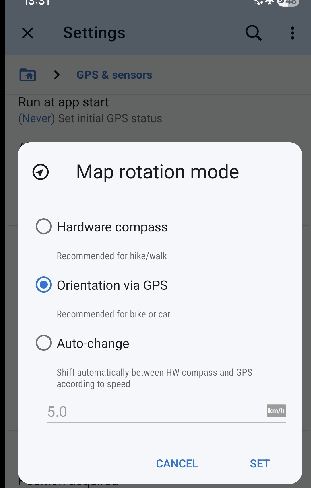
see settings > GPS > Map rotation mode
1) hardware compass is mostly useless to me (Samsung A35) even with calibration
2) auto change is similar because when you stop you still have the compass rotate to wrong angle
I always use "Orientation via GPS". This works very well while moving, and now also with Smooth movement, until you stop, or below few km/h. Then 50% of time in next few seconds, the map will rotate by 10..45 degrees, which in busy areas can be disorientating.
For the Orientation via GPS mode, my suggestion is to enable the bottom speed threshold textbox, with the comment specific to the selected mode, like "Lock orientation at or below this speed". I would set it to say 2km/h. Then as the calculated GPS speed reduces towards zero in few seconds after actually stopping, the current map is locked before the silly final rotation.
General comment: HDOP for modern devices is around +/-3m and even when stationary there is constant jitter of position, but the speed is clearly zero. Locus indicates this with change of map cursor icon, but the threshold appears "too low" - 0km/h. Maybe the threshold for deciding when "stopped" could be an expert setting - eg. 2km/h?
 I like this idea
I noticed this too. On top of that, the hardware conpass seems to be influenced by Google maps, so even if calibrated, the moment you open Google maps, the hardware compass jumps 90 degrees.
Fixing thenorientation below a certain threshold would indeed be a nice addition.
I noticed this too. On top of that, the hardware conpass seems to be influenced by Google maps, so even if calibrated, the moment you open Google maps, the hardware compass jumps 90 degrees.
Fixing thenorientation below a certain threshold would indeed be a nice addition.
Hi guys,
please give a try to current 4.33.0.8+ Beta version. I was improving exactly this system to prevent some rotations at low speeds. Current limit is set to 0.5m/s (so approx. 1.8km/h). Below this speed, last known orientation should be preserved.
I would like to avoid some special settings for this. Mentioned 2km/h (1.8) should be good value to prevent really unwanted rotation.
Hi guys,
please give a try to current 4.33.0.8+ Beta version. I was improving exactly this system to prevent some rotations at low speeds. Current limit is set to 0.5m/s (so approx. 1.8km/h). Below this speed, last known orientation should be preserved.
I would like to avoid some special settings for this. Mentioned 2km/h (1.8) should be good value to prevent really unwanted rotation.
Hello Menion,
Seems good.
Hello Menion,
Seems good.
Completed? Really? Work-in-progress.
In latest 4.34 I thought there may be further refinement. Certainly when changing direction with continual movement the rotation is quite nice - gentle. It's when there is abrupt stop that rotation can sometimes be crazy. I don't see any improvement in the 2nd scenario. Two examples today when bus is stopping:
1) complete 180 degree rotation in maybe one second, icon shows not yet stopped, it's not physical reality
2) similar but only 90 degree turn, although bus has stopped
Google Maps by comparison is perfect. There is no rotation "jitter" when stopping/ stopped. It points perfectly in forward position.
I note when "stopping" it takes about 4s to finally decide. When starting LM decides within 0.5s.
Completed? Really? Work-in-progress.
In latest 4.34 I thought there may be further refinement. Certainly when changing direction with continual movement the rotation is quite nice - gentle. It's when there is abrupt stop that rotation can sometimes be crazy. I don't see any improvement in the 2nd scenario. Two examples today when bus is stopping:
1) complete 180 degree rotation in maybe one second, icon shows not yet stopped, it's not physical reality
2) similar but only 90 degree turn, although bus has stopped
Google Maps by comparison is perfect. There is no rotation "jitter" when stopping/ stopped. It points perfectly in forward position.
I note when "stopping" it takes about 4s to finally decide. When starting LM decides within 0.5s.
I have to agree. I've tested the Beta for a while and indeed, when coming to a full stop, the map rotates quite a bit before it actually stops moving. The selected 1.8 km/hour is too low in an urban environment as the GPS inaccuracy sometimes reaches more than that even when not moving at all.
I agree that this is behavior I do not see in other navigation apps. Google maps keeps the direction 'on track', but probably this has to do with the missing 'GPS Flywheel' in Locus which also causes jumping about in tunnels when accuracy of GPS is very low or the signal is even absent.
When coming to a stop, the map should not rotate, but instead keep the direction of the track being navigated and similarly in tunnels, the navigation should continue to follow the track at the speed from when the signal was lost for a certain amount of time.
I have to agree. I've tested the Beta for a while and indeed, when coming to a full stop, the map rotates quite a bit before it actually stops moving. The selected 1.8 km/hour is too low in an urban environment as the GPS inaccuracy sometimes reaches more than that even when not moving at all.
I agree that this is behavior I do not see in other navigation apps. Google maps keeps the direction 'on track', but probably this has to do with the missing 'GPS Flywheel' in Locus which also causes jumping about in tunnels when accuracy of GPS is very low or the signal is even absent.
When coming to a stop, the map should not rotate, but instead keep the direction of the track being navigated and similarly in tunnels, the navigation should continue to follow the track at the speed from when the signal was lost for a certain amount of time.
In today's examples I think GPS horizontal accuracy was +/-3m.
In today's examples I think GPS horizontal accuracy was +/-3m.
Marked as completed, but yes agree. I was in plan to invest more time into this. Agree, not yet finished.
Marked as completed, but yes agree. I was in plan to invest more time into this. Agree, not yet finished.
Maybe just a little kick along? This can be very frustrating - here I am 70km ride from Kolin to (of all places) Prague - new country, new big city - and a few times we stop to check the route with much traffic all around and the map rotates stupidity & results in disorientation. Can I say again Google Maps is perfect for rotating when stopping. Is it time to incorporate the accelerometer for better movement detection? Has been deferred many times but surely would be the key to fixing "GPS jitters"?
Maybe just a little kick along? This can be very frustrating - here I am 70km ride from Kolin to (of all places) Prague - new country, new big city - and a few times we stop to check the route with much traffic all around and the map rotates stupidity & results in disorientation. Can I say again Google Maps is perfect for rotating when stopping. Is it time to incorporate the accelerometer for better movement detection? Has been deferred many times but surely would be the key to fixing "GPS jitters"?
here is another YouTube video - https://youtu.be/fQ5Hcx29oGM - showing how frustrating this behavior is - YouTube comment - <this sort of silliness is most annoying & disorientating - when stopped I shouldn't have to toggle the "north up" map button; there should be a more reliable method to detect when stopped; GMaps doesn't have a problem; and in fact there is another "timing bug" - sometimes I do tap the "north up" button but Locus a fraction of second later switches back to "compass orientation", and could happen multiple times>
here is another YouTube video - https://youtu.be/fQ5Hcx29oGM - showing how frustrating this behavior is - YouTube comment - <this sort of silliness is most annoying & disorientating - when stopped I shouldn't have to toggle the "north up" map button; there should be a more reliable method to detect when stopped; GMaps doesn't have a problem; and in fact there is another "timing bug" - sometimes I do tap the "north up" button but Locus a fraction of second later switches back to "compass orientation", and could happen multiple times>
Replies have been locked on this page!