


High battery usage because Locus Map keeps activating in the background
Hi,
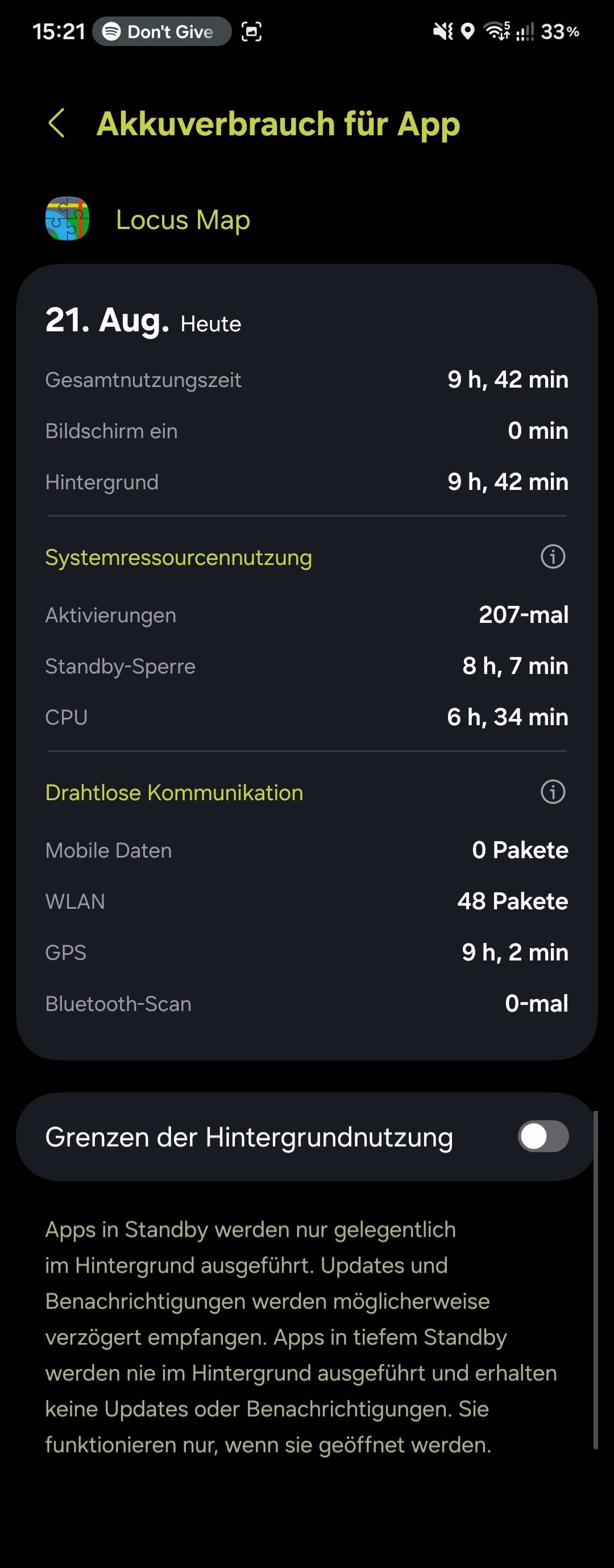
I have noticed that Locus Map is using a significant amount of battery, even though I am not actively using the app.
According to the battery statistics on my phone, Locus Map has a very high usage time. It seems that the app repeatedly becomes active in the background, although I have not started the app and no track recording or navigation is running.
I am using a Samsung Galaxy S24 with Android 16 / One UI 8.5.
Is there a setting in Locus Map that could cause the app to repeatedly wake up or activate itself in the background?
I would like Locus Map to remain inactive when I am not using it, but of course still work normally when I start navigation or track recording.
Does anyone know what could cause this behavior and how I can prevent it?
Thank you for your help!
 The same question
Problem solved?
Problem solved?
Hi,
please install the latest beta version available at our public repo https://bit.ly/lmVersionsTest and test the issue. Thanks!
Hi,
please install the latest beta version available at our public repo https://bit.ly/lmVersionsTest and test the issue. Thanks!
I think it hasn't been released by Google yet. Just wait.
I think it hasn't been released by Google yet. Just wait.
I notice the same behavior since 3 years on a Samsung S23 (phone of my wives). Sometimes, not every day, the battery drain, caused by locus, is extremly high, up to 20%, while locus isn't active.
Seldom, I noticed the same on my A55, startet logging, but after collection of more then 6GB without that issue, I'd stopped it.
There must be locus-related activities in background, which leads to battery drain.
It would be helpful, if locus tracks battery consumption and starts logging by itself, if consumption is higher than twice followed by a hint to user, how to act with that info.
I notice the same behavior since 3 years on a Samsung S23 (phone of my wives). Sometimes, not every day, the battery drain, caused by locus, is extremly high, up to 20%, while locus isn't active.
Seldom, I noticed the same on my A55, startet logging, but after collection of more then 6GB without that issue, I'd stopped it.
There must be locus-related activities in background, which leads to battery drain.
It would be helpful, if locus tracks battery consumption and starts logging by itself, if consumption is higher than twice followed by a hint to user, how to act with that info.
Replies have been locked on this page!