


High battery usage because Locus Map keeps activating in the background
Hi,
I have noticed that Locus Map is using a significant amount of battery, even though I am not actively using the app.
According to the battery statistics on my phone, Locus Map has a very high usage time. It seems that the app repeatedly becomes active in the background, although I have not started the app and no track recording or navigation is running.
I am using a Samsung Galaxy S24 with Android 16 / One UI 8.5.
Is there a setting in Locus Map that could cause the app to repeatedly wake up or activate itself in the background?
I would like Locus Map to remain inactive when I am not using it, but of course still work normally when I start navigation or track recording.
Does anyone know what could cause this behavior and how I can prevent it?
Thank you for your help!
 The same question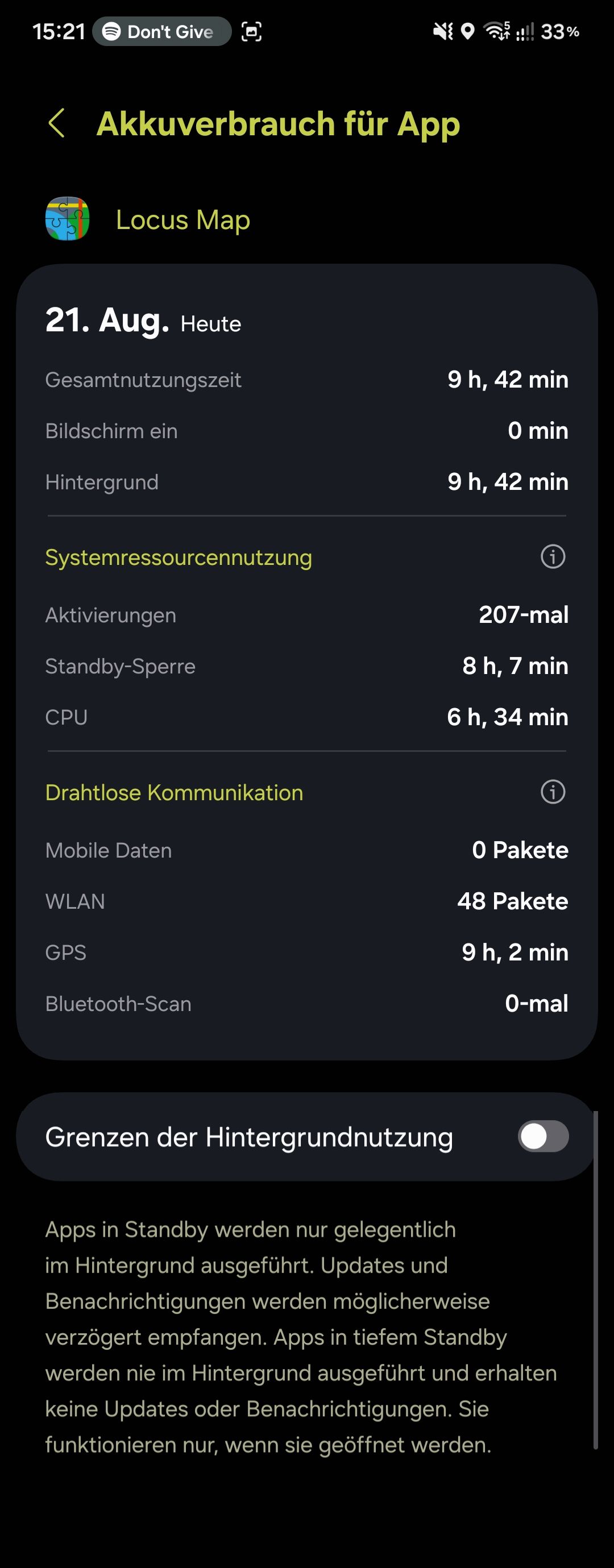
Problem solved?
Problem solved?
Hi,
please install the latest beta version available at our public repo https://bit.ly/lmVersionsTest and test the issue. Thanks!
Hi,
please install the latest beta version available at our public repo https://bit.ly/lmVersionsTest and test the issue. Thanks!
I think it hasn't been released by Google yet. Just wait.
I think it hasn't been released by Google yet. Just wait.
Replies have been locked on this page!