
What is the purpose of the map icon at top of track chart panel

Andrew Heard shared this problem 22 days ago
Solved

I'm pretty sure this has been discussed many times, but without a screen capture/ video maybe the issue has been misunderstood.

tap My Library > tap a track > tap chart button ">" > tap on position of interest, for example steep slope or highest altitude > tap Map icon > tap Centering button > the map IS NOT positioned to the location on the chart. Bug?

For comparison (working): tap My Library > tap a track >tap directly on summary chart > tap Centering button > the map IS positioned to the location on the chart.

What exactly is this Map icon below supposed to do?
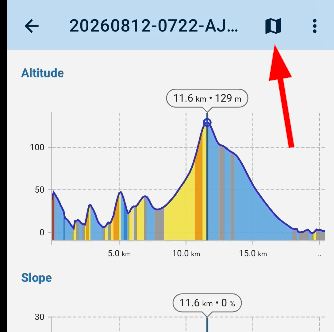
7a6c5b4443c46a2632b0cb05e0ce8253c8b8637f0be2ed52b3838f8a8a40e8c7

here is a video of the issue https://youtu.be/_IxUSSfIByQ

bug or question?

Replies (2)

photo
1

HI Andrew, I've tested this with the newest 4.36.1 and I can't reproduce it. Please try it from https://bit.ly/lmVersions or wait for the official release.

So the answer is: the "map" button shows the position tapped on the chart also on the track on the map.

This comment is in trash! Restore
photo
1

Thanks Michal. OK, so it's a bug - I think since the new chart system was introduced.

I installed 4.36.1 but no mention in the release notes.

I've shared the track @ https://link.locusmap.app/t/3t1nmq

But it's not an isolated case. Any recorded track will do. Another selected at random https://link.locusmap.app/t/wwka56 when I tap chart at the max altitude moves the map into the water. I'm pretty sure tapio has also raised this issue.

This comment is in trash! Restore
photo
1

also confirmed in 4.36.1.1

I couldn't edit my previous comment - last para should read "tap the chart at the max altitude mid-route moves the map into the water."

This comment is in trash! Restore
photo
1

I've tested both tracks with 4.36.1.1. Here's the first: https://drive.google.com/file/d/19isoqiu9zV1VRknMSr4KnVPRfE6uqa27/view?usp=sharing. Here's the second: https://drive.google.com/file/d/1l4HmoJNTT2naT7uVQqWO1rANJsgEojIv/view?usp=sharing. What am I doing wrong, since the issue can't be reproduced?

This comment is in trash! Restore
photo
1

Thanks Michal for taking the (long) time to test this. I can see a difference. BTW the second track (your Screenrecorder-2026-10-02-11-44-20-847.mp4) is probably best as a test because obvious for me the mid-track high altitude is positioned over water.

Here is a difference - my map screen has Map centering & Visibility buttons - why not you? But my mistake is tapping the Map centering button to return to the map ==> middle of water - duh.

fd4c96e8136887d8ae8c321958d0700b67ce04906a44356cdfab803a818a2b2c

Two follow-up questions - 1) from the track detail chart panel, the Map button used to return direct to the map but now it only returns to the track detail panel

aeb3d65a466be30884a0164a2ec9c6288335ebc587a7fc601c593697d7dc1757

2) in the meantime/ workaround - tap the Map button > but how to now return to re-positioned map??

This comment is in trash! Restore
photo
1

The difference is that I opened the track directly from the sharing link, whereas you opened it from your Library. I tried it both ways, and both worked without a problem.

This comment is in trash! Restore
photo
1

Michal, it worked for you but not for me, so even if you can't reproduce it, shouldn't this topic be changed from "question" to "problem"? It hasn't been answered. Or should I create a new topic? Tapping the Map icon from the chart used to position & return directly to the map; I suggest that should be the same behavior now.

This comment is in trash! Restore
photo
photo
2

Hi Andrew,

we've discussed the issue with @Menion and we agreed that the problem is in the centering button, which appears when you open the track detail from the Library and that it doesn't center the track on the point selected on the chart, right? The issue should be fixed in the next app version.

This comment is in trash! Restore
photo
1

excellent - thanks both of you

This comment is in trash! Restore
photo
1

fixed in 4.36.1.2 - thanks

moving from the chart Map icon directly back to a centered map would be even better (as older versions) but now working at least

This comment is in trash! Restore
photo
Leave a Comment
 
Attach a file
You can't vote. Please authorize!