


This object is in archive!

Not visible main menu button
Solved
Hi 
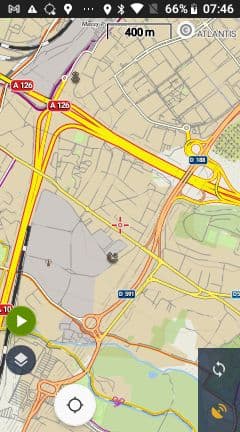
Trying Locus and some settings on my (little...) Jelly Pro, I loosed the menu button and the lower bar...
So, no access to the settings again... How to recover?
Files:
photo_2021-05-2...
 The same problem
do you have different presets - maybe one has settings to bring back the menu - this is my workaround, otherwise view https://help.locusmap.eu/topic/24537-lm4-1-update-missing-menue-button#comment-97646
do you have different presets - maybe one has settings to bring back the menu - this is my workaround, otherwise view https://help.locusmap.eu/topic/24537-lm4-1-update-missing-menue-button#comment-97646
Hello Sylvain,
We apologize for the inconvenience.
First try double-clicking on the screen. You should see the bottom panel.
Then just reset the visibility of the bottom panel.
If this doesn't help - please try uploading a new Beta (released yesterday) where it should already be fixed.
Thank you for your understanding.
Have a nice day
Andrea
Hello Sylvain,
We apologize for the inconvenience.
First try double-clicking on the screen. You should see the bottom panel.
Then just reset the visibility of the bottom panel.
If this doesn't help - please try uploading a new Beta (released yesterday) where it should already be fixed.
Thank you for your understanding.
Have a nice day
Andrea
Had the same. Solved with this new Beta release.
Had the same. Solved with this new Beta release.
Hello,
I hope that everything is already working correctly and I can close this Ticket.
A new version was released on Google Play yesterday.
Have a nice day
Andrea
Hello,
I hope that everything is already working correctly and I can close this Ticket.
A new version was released on Google Play yesterday.
Have a nice day
Andrea
Replies have been locked on this page!