Well is not really special It's very wide spreaded like garmin and polar that you support.
Therefore I'm wondering why it's not support because is leading the eBike scene as Pedelec supplier.
I think a bt connect interface would be just enough to query a few information like speed, heart rate, cadence and transfer the GPS date of the route to Locus.
Well is not really special It's very wide spreaded like garmin and polar that you support.
Therefore I'm wondering why it's not support because is leading the eBike scene as Pedelec supplier.
I think a bt connect interface would be just enough to query a few information like speed, heart rate, cadence and transfer the GPS date of the route to Locus.
I'm trying to find out if this is really possible and I see that direct connection from Android device is currently used only with their own Android application. I see here a big difference compare to existing POLAR etc support. These various sensors are directly made as a source of data for other apps, so they use the standard BT interface. WIth Bosch Kiox it is different. It is already a final product that consume data from other sensors and I'm not sure that any 3rd party app may simply connect and read it's data.
So sorry, for now, I do not think it will be done in the near future. Thanks for understanding.
Menion
Hello,
I'm trying to find out if this is really possible and I see that direct connection from Android device is currently used only with their own Android application. I see here a big difference compare to existing POLAR etc support. These various sensors are directly made as a source of data for other apps, so they use the standard BT interface. WIth Bosch Kiox it is different. It is already a final product that consume data from other sensors and I'm not sure that any 3rd party app may simply connect and read it's data.
So sorry, for now, I do not think it will be done in the near future. Thanks for understanding.
I reopen this topic as I have bought a brand new VAE using the latest KIOX system which is now able to display navigation on it.
Currently, Bosch eBike Connect (the application provided by Bosch for their systems) can be connected via bluetooth with a smartphone containing a navigation system (Locus Maps for us) and displays the navigation instructions directly on the KIOX screen.
They are currently providing the connection to the 'Komoot' application.
Maybe they have developped an API which allows to get navigation instructions from navigation systems to display it on their screen, and it will be nice to have this kind of feature so we can connect our Locus Maps application directly.
Can you get in touch with Bosch to be able to connect to Locus Maps in their Bosch eBike Connect application?
So maybe it will be possible to connect also Locus Maps and not only 'Komoot' to their application.
Regards,
Laurent
Hi Menion,
I reopen this topic as I have bought a brand new VAE using the latest KIOX system which is now able to display navigation on it.
Currently, Bosch eBike Connect (the application provided by Bosch for their systems) can be connected via bluetooth with a smartphone containing a navigation system (Locus Maps for us) and displays the navigation instructions directly on the KIOX screen.
They are currently providing the connection to the 'Komoot' application.
Maybe they have developped an API which allows to get navigation instructions from navigation systems to display it on their screen, and it will be nice to have this kind of feature so we can connect our Locus Maps application directly.
Can you get in touch with Bosch to be able to connect to Locus Maps in their Bosch eBike Connect application?
So maybe it will be possible to connect also Locus Maps and not only 'Komoot' to their application.
I think that the connection used by the Bosch Kiox is both ways, that means that you can retrieve information from the Bosch Kiox as speed, cadence, and input some data to it as the navigation information.
If you have a look at the Bosch displays here, if you put your mouse on the 'i' icon next to 'Third-party apps' you can see that there are already many smartphone applications.
So hopefully next year we can get something intersting with Locus Map and Bosch e-bikes and probably other e-bikes systems.
Hi Menion,
Thanks for your answer.
I think that the connection used by the Bosch Kiox is both ways, that means that you can retrieve information from the Bosch Kiox as speed, cadence, and input some data to it as the navigation information.
If you have a look at the Bosch displays here, if you put your mouse on the 'i' icon next to 'Third-party apps' you can see that there are already many smartphone applications.
So hopefully next year we can get something intersting with Locus Map and Bosch e-bikes and probably other e-bikes systems.
I have seen that you have released a new version of the App which is version 4, but the eBike connection is still missing.
This is more than 8 months that I do not use Locus Map anymore as I have conflicts with the GPS sharing between Locus Map Pro and the Bosch eBike app with Bluetooth connection.
I have downloaded instead Komoot as it is fully compatible with Bosch eBike App. I use it everytime I go out for a ride and have event paid the 29€ for the world map.
I would really like to go back to Locus Map, v4 and even pay for the gold member to get access to every functionnality, but the Bosch eBike is still missing.
Do you have any plans ? Any date when the application will be compatible with Bosch eBike App ?
Thanks
Hi Menion,
Any news about le Boch eBike connection ?
I have seen that you have released a new version of the App which is version 4, but the eBike connection is still missing.
This is more than 8 months that I do not use Locus Map anymore as I have conflicts with the GPS sharing between Locus Map Pro and the Bosch eBike app with Bluetooth connection.
I have downloaded instead Komoot as it is fully compatible with Bosch eBike App. I use it everytime I go out for a ride and have event paid the 29€ for the world map.
I would really like to go back to Locus Map, v4 and even pay for the gold member to get access to every functionnality, but the Bosch eBike is still missing.
Do you have any plans ? Any date when the application will be compatible with Bosch eBike App ?
I do not like promises so I won't do that. Anyway right now I'm working on completely new system for work with sensors. Once, all current sensors will work, next step is support for Power meter and improvements in dashboard. Support for additional sensors, eBikes etc may comes later. It will anyway depends on few factors, also complexity of implementation. This anyway needs to be examined first.
Menion
Hello Laurent,
I do not like promises so I won't do that. Anyway right now I'm working on completely new system for work with sensors. Once, all current sensors will work, next step is support for Power meter and improvements in dashboard. Support for additional sensors, eBikes etc may comes later. It will anyway depends on few factors, also complexity of implementation. This anyway needs to be examined first.
Currently I've to use Komoot for planning my bike tours as this is the only app able syncing with the Bosh systems, in my case the Nyon. I really don't like Komoot and want to use LocusMaps for this. For details see:
Currently I've to use Komoot for planning my bike tours as this is the only app able syncing with the Bosh systems, in my case the Nyon. I really don't like Komoot and want to use LocusMaps for this. For details see:
You have exactly the same issue as me and This is a long time I am waiting for this wonderfull app to be fully compatible with eBikes systems (and precisely with Bosch eBike system in our case).
I also use Komoot for the moment and this is not as simple as with the Locus Map app. The worst is when you want to change a trip, the points are going everywhere instead of the road you want to define.
The whole system is not as friendly as the Locus Map app and I can't wait to get Locus Map compatible with eBike systems.
I am glad you are also pushing to get this app compatible with Bosch eBike.
Hoping to get this compatibility soon.
Cheers,
Laurent
Hi Matthias,
You have exactly the same issue as me and This is a long time I am waiting for this wonderfull app to be fully compatible with eBikes systems (and precisely with Bosch eBike system in our case).
I also use Komoot for the moment and this is not as simple as with the Locus Map app. The worst is when you want to change a trip, the points are going everywhere instead of the road you want to define.
The whole system is not as friendly as the Locus Map app and I can't wait to get Locus Map compatible with eBike systems.
I am glad you are also pushing to get this app compatible with Bosch eBike.
you probably noticed that we did a completely new "Sensors manager" last year. This was the first step necessary for this task. This year, we really would like to give e-bikes a lot higher priority and start working (somehow) on their better support. I won't rather promise anything, because we still have a few tasks with higher priority in a row. But I just wanted to inform, you that this is something we will focus hopefully soon.
Hi guys,
you probably noticed that we did a completely new "Sensors manager" last year. This was the first step necessary for this task. This year, we really would like to give e-bikes a lot higher priority and start working (somehow) on their better support. I won't rather promise anything, because we still have a few tasks with higher priority in a row. But I just wanted to inform, you that this is something we will focus hopefully soon.
unfortunately, Dashboard & e-bike tasks have to be moved to the next year 2023 because of more important tasks (problems with the Wear platform, geocaching, LoPoints support, ..).
Hello Laurent,
unfortunately, Dashboard & e-bike tasks have to be moved to the next year 2023 because of more important tasks (problems with the Wear platform, geocaching, LoPoints support, ..).
thanks for the push. I'm searching for some news regards the possibility to connect to Bosch devices directly, but it seems, it is still not simply possible.
We will be finalizing plans for this year next week, so I'll open this topic. It will most probably need some extra communication with the Bosch team. Unfortunately.
Hi guys,
thanks for the push. I'm searching for some news regards the possibility to connect to Bosch devices directly, but it seems, it is still not simply possible.
We will be finalizing plans for this year next week, so I'll open this topic. It will most probably need some extra communication with the Bosch team. Unfortunately.
Hello, I would also be very interested in the integration of data such as range, possible support level, selected mode, pedal rotation, etc. from the Bosch Flow app in the dashboard. I find the display of the Komoot screen in the Bosch Flow app very bad, as it cannot even be zoomed while driving. In general, I can't get much out of Komoot, I find Locus better by classes.
Greetings
Hello, I would also be very interested in the integration of data such as range, possible support level, selected mode, pedal rotation, etc. from the Bosch Flow app in the dashboard. I find the display of the Komoot screen in the Bosch Flow app very bad, as it cannot even be zoomed while driving. In general, I can't get much out of Komoot, I find Locus better by classes.
Hi there, I'm also on the fence - waiting for Locus to be included into the Bosch system for route planing etc. Hopefully you get that task done soon. 👍
Hi there, I'm also on the fence - waiting for Locus to be included into the Bosch system for route planing etc. Hopefully you get that task done soon. 👍
I just leave another comment on this topic to get news about when we will have compatibility between Locus Map and Bosch eBike system.
This is way long that you said it is under investigation but so far nothing. You have provided compatibility with another eBike brand from the US (Specialized) but not one from the EU, however the Locus Map app is from EU.
This is a very long time that we are waiting for this compatibility, so do you 'really' have plans to make it for Locus Map or shall we all go to Komoot/Strava ?
Thank you for your clarification on this point.
Hi everyone,
I just leave another comment on this topic to get news about when we will have compatibility between Locus Map and Bosch eBike system.
This is way long that you said it is under investigation but so far nothing. You have provided compatibility with another eBike brand from the US (Specialized) but not one from the EU, however the Locus Map app is from EU.
This is a very long time that we are waiting for this compatibility, so do you 'really' have plans to make it for Locus Map or shall we all go to Komoot/Strava ?
I am buying an e-bike with Kioks and would like to have an option to use Locus with it. These bikes tend to be quite expensive, so people buing them probably have the means to pay for Locus subscription, maybe there is a business case there :-).
It seems there is an API and a SDK from Bosch, though it is only available on request if I get it correctly?
I am buying an e-bike with Kioks and would like to have an option to use Locus with it. These bikes tend to be quite expensive, so people buing them probably have the means to pay for Locus subscription, maybe there is a business case there :-).
Thank You. I would be be the first user to opt-in.
Currently the only working integration is with Komoot so far and that's a pain. And will probably get even worse after Komoot being taken over by Bending spoons.
Thank You. I would be be the first user to opt-in.
Currently the only working integration is with Komoot so far and that's a pain. And will probably get even worse after Komoot being taken over by Bending spoons.
Quick update on this long-standing topic — we now have experimental support for the Bosch eBike Smart System (smart-system v19+) in the latest Locus Map beta. It connects directly to the bike over Bluetooth (no cloud, no Bosch account needed) using the same Live Data Interface that the Bosch Flow App talks to.
What works right now (live during the ride in Sensors manager):
Battery state of charge (%)
Speed
Cadence (pedal rotation)
Rider power (W)
Odometer
What's not exposed by the Bosch protocol on this channel:
Assist mode / support level (Eco / Tour / eMTB / Turbo) — Bosch deliberately doesn't broadcast it on the BLE interface, so this is not something we can add without their cooperation
Range in km — only battery % is available; range estimation would have to come from a different Bosch data source
Ride history / Komoot-style activity sync — separate cloud-side project (we're talking to Bosch about it)
How to try it (smart-system v19+ only — Kiox 500, Nyon, Performance Line CX displays from ~2022 onwards):
In the Bosch **Flow App** → *Add component* → *Smartphone* → follow the confirmation flow on the bike's display.
In **Android Bluetooth settings**, pair the bike (Just-Works, completes silently).
In **Locus Map** → *Sensors* → *Add device* → *e-bikes* → "Bosch eBike" → pick your bike from the list.
If the bike isn't paired in steps 1+2, the connection looks fine but no data arrives. Both steps are mandatory — that's a Bosch limitation, not a Locus one.
Help us by capturing diagnostics if you try it:
Since none of us own a smart-system v19+ bike in-house, we built this against the reverse-engineered protocol from the Home Assistant community. Any real-world capture is gold. In the sensor settings sheet, toggle "Enable raw capture" (visible only on beta builds). Use the bike normally for 10–15 min. Then attach the `/Locus/Logs/sensor_Bosch*_<timestamp>.log` file to a reply here, with one or two sentences on what you saw vs what the bike's display said. We'll replay the capture, fix any quirks, and ship a follow-up.
Thanks for the help and patience.
Jiří M. aka Menion
Hi everyone,
Quick update on this long-standing topic — we now have experimental support for the Bosch eBike Smart System (smart-system v19+) in the latest Locus Map beta. It connects directly to the bike over Bluetooth (no cloud, no Bosch account needed) using the same Live Data Interface that the Bosch Flow App talks to.
What works right now (live during the ride in Sensors manager):
Battery state of charge (%)
Speed
Cadence (pedal rotation)
Rider power (W)
Odometer
What's not exposed by the Bosch protocol on this channel:
Assist mode / support level (Eco / Tour / eMTB / Turbo) — Bosch deliberately doesn't broadcast it on the BLE interface, so this is not something we can add without their cooperation
Range in km — only battery % is available; range estimation would have to come from a different Bosch data source
Ride history / Komoot-style activity sync — separate cloud-side project (we're talking to Bosch about it)
How to try it (smart-system v19+ only — Kiox 500, Nyon, Performance Line CX displays from ~2022 onwards):
In the Bosch **Flow App** → *Add component* → *Smartphone* → follow the confirmation flow on the bike's display.
In **Android Bluetooth settings**, pair the bike (Just-Works, completes silently).
In **Locus Map** → *Sensors* → *Add device* → *e-bikes* → "Bosch eBike" → pick your bike from the list.
If the bike isn't paired in steps 1+2, the connection looks fine but no data arrives. Both steps are mandatory — that's a Bosch limitation, not a Locus one.
Help us by capturing diagnostics if you try it:
Since none of us own a smart-system v19+ bike in-house, we built this against the reverse-engineered protocol from the Home Assistant community. Any real-world capture is gold. In the sensor settings sheet, toggle "Enable raw capture" (visible only on beta builds). Use the bike normally for 10–15 min. Then attach the `/Locus/Logs/sensor_Bosch*_<timestamp>.log` file to a reply here, with one or two sentences on what you saw vs what the bike's display said. We'll replay the capture, fix any quirks, and ship a follow-up.
Hm, I have had my phone and Flow app paired with my bike for four months. Are steps 1 and 2 still necessary? I do not see a "smartphone" option in step 1 (see screenshot). And then Locus Map does not find anything.
I have Kiosk 300, which should be the same as Kiosk 500, just smaller display.
By the way, I guess I misunderstood. For me the main application was to be to use Locus Maps to push routes and navigation to the display. But now looking at it more closely, this is not really possible in principle, or is it?
Hm, I have had my phone and Flow app paired with my bike for four months. Are steps 1 and 2 still necessary? I do not see a "smartphone" option in step 1 (see screenshot). And then Locus Map does not find anything.
I have Kiosk 300, which should be the same as Kiosk 500, just smaller display.
By the way, I guess I misunderstood. For me the main application was to be to use Locus Maps to push routes and navigation to the display. But now looking at it more closely, this is not really possible in principle, or is it?
Hi Tomas, yes, this is currently not about connecting to Bosch servers. This part heavily depends on Bosch itself and they still ignore our attempts for email communication.
What this change brings is a direct connection of Locus Map running on Android device over Bluetooth to the bike itself. Then app may read mentioned data and allows to display them on the Locus Map dashboard.
Hi Tomas, yes, this is currently not about connecting to Bosch servers. This part heavily depends on Bosch itself and they still ignore our attempts for email communication.
What this change brings is a direct connection of Locus Map running on Android device over Bluetooth to the bike itself. Then app may read mentioned data and allows to display them on the Locus Map dashboard.
Here, Bosch Smart System v19.54.0 connected via BT and Flow app can access the bike, but Locus v4.35.0 does not find the bike. I have unlocking via BT active, maybe this is important.
Maybe you have a bike rental around you or a friend owning one?
Here, Bosch Smart System v19.54.0 connected via BT and Flow app can access the bike, but Locus v4.35.0 does not find the bike. I have unlocking via BT active, maybe this is important.
Maybe you have a bike rental around you or a friend owning one?
Great to see progress here, it's such a pity it Locus does not find the bike. What's curious is that the Bosch Smart System EBike appears under GPS Bluetooth 3.
Great to see progress here, it's such a pity it Locus does not find the bike. What's curious is that the Bosch Smart System EBike appears under GPS Bluetooth 3.
Data transfer via the Flow app isn't working for me either.
It would be great to have a detailed guide for this.
In any case, the instructions mentioned earlier don't work for me...
Data transfer via the Flow app isn't working for me either.
It would be great to have a detailed guide for this.
In any case, the instructions mentioned earlier don't work for me...
Hello. I'm confused 😀 I can't pair Bosch via BT. Locus has the option to add Bosch e-bike in the menu, but it doesn't see the bike. Can we ask the author for a visual demonstration of how it should work? Because it basically doesn't work. I tried turning on BT pairing on the bike, the phone doesn't see it. BT connection works, only through the Flow application in the background, without the device in the BT settings of the phone 😀
Hello. I'm confused 😀 I can't pair Bosch via BT. Locus has the option to add Bosch e-bike in the menu, but it doesn't see the bike. Can we ask the author for a visual demonstration of how it should work? Because it basically doesn't work. I tried turning on BT pairing on the bike, the phone doesn't see it. BT connection works, only through the Flow application in the background, without the device in the BT settings of the phone 😀
Connection to my Bosch Smart Sytem does not work here either. No bike is found, nothing shown when trying to add Bosch e-bike. Flow app works as intended and smart system is shown in Bluetooth devices.
Connection to my Bosch Smart Sytem does not work here either. No bike is found, nothing shown when trying to add Bosch e-bike. Flow app works as intended and smart system is shown in Bluetooth devices.
sorry for the late response. It is a little complicated task that I solve by a little amateur way, sorry for this - unofficial system + no real bike for testing.
Anyway during this week (Wednesday most probably) will be published 4.35.0.5 Beta version, so give it a try.
Once you're on 4.35.0.5:
In the Bosch Flow app, make sure the phone is added (Add component → Smartphone).
In Locus: Sensors → Add device → e-bikes → Bosch eBike. The list now shows all nearby Bluetooth devices — pick your bike; Locus will start the pairing itself, so just accept the Bluetooth pairing prompt.
If it still doesn't connect, please enable sensor logging (sensor settings → "Enable raw capture" on beta builds), try once more, and send us the /Locus/Logs/sensor_Bosch*.log file — it records what your bike advertises and lets us finish the tuning. Thanks for helping test this!
Hi guys,
sorry for the late response. It is a little complicated task that I solve by a little amateur way, sorry for this - unofficial system + no real bike for testing.
Anyway during this week (Wednesday most probably) will be published 4.35.0.5 Beta version, so give it a try.
Once you're on 4.35.0.5:
In the Bosch Flow app, make sure the phone is added (Add component → Smartphone).
In Locus: Sensors → Add device → e-bikes → Bosch eBike. The list now shows all nearby Bluetooth devices — pick your bike; Locus will start the pairing itself, so just accept the Bluetooth pairing prompt.
If it still doesn't connect, please enable sensor logging (sensor settings → "Enable raw capture" on beta builds), try once more, and send us the /Locus/Logs/sensor_Bosch*.log file — it records what your bike advertises and lets us finish the tuning. Thanks for helping test this!
Locus still doesn't connect to the Bosch Ebike with latest beta. It doesn't discover the connection. Bosch Flow is installed and working. I have test the connection with nRfConnect and it finds and connects to the bike. Smartbridge a github app also connects to the bike https://github.com/Nilogax/SmartBridge
In the case of Smartbridge the bike needs to be put in bluetooth pairing mode, this is not necessary for nRfConnect. I have attached logs from both
Locus still doesn't connect to the Bosch Ebike with latest beta. It doesn't discover the connection. Bosch Flow is installed and working. I have test the connection with nRfConnect and it finds and connects to the bike. Smartbridge a github app also connects to the bike https://github.com/Nilogax/SmartBridge
In the case of Smartbridge the bike needs to be put in bluetooth pairing mode, this is not necessary for nRfConnect. I have attached logs from both
Unfortunately 4.35.0.5 doesn't do the job. It finds the Bosch Smart ebike when the bike is put in bluetooth pairing mode and connects. However it captures no data. If Locus is closed and restarted it fails to connect.
Unfortunately 4.35.0.5 doesn't do the job. It finds the Bosch Smart ebike when the bike is put in bluetooth pairing mode and connects. However it captures no data. If Locus is closed and restarted it fails to connect.
sorry for a delay and missing information along-the-way. A little harded topic than expected.
Some good news and one step backwards.
The good news: Bosch published the official specification for their Live Data Interface on 1 May 2026 — openly, free, no registration needed. It arrived after we had already built our first attempt, and it answers questions we previously had to guess at.
And now he negative part: the specification defines the connection the opposite way round to how we built it. The bike is the side that searches and connects; the phone has to wait to be found. Our first version does it the other way - the way how all other sensors usually works. Which means it can never actually find a bike.
Option to connect to Bosch bikes will be hidden for now in the next app version.
Meanwhile, I've rebuilt the data decoding against Bosch's official definitions and covered it with automated tests. With the help of the ESP devices I was able to simulate "Bosch bike" and proven, that it should work in the end. There is anyway still a lot to do as this system was never used in the Locus Map yet.
Two things worth knowing:
this only works on the smart system (2021 and newer, Flow app, displays named Purion 200, Kiox 300/400C/500, Intuvia 100 or Nyon), with control-unit software v19 or newer. eBike System 2 bikes - plain Purion, Intuvia or Kiox displays and the eBike Connect app will never support it. Bosch has not made it available for that generation.
Bosch's interface does not provide the assist mode (Eco/Tour/eMTB/Turbo), and it also does not provide remaining range, unfortunately.
Thank you for the patience on a thread that has been open a long time. We will post again when there is a build worth testing.
Hi guys,
sorry for a delay and missing information along-the-way. A little harded topic than expected.
Some good news and one step backwards.
The good news: Bosch published the official specification for their Live Data Interface on 1 May 2026 — openly, free, no registration needed. It arrived after we had already built our first attempt, and it answers questions we previously had to guess at.
And now he negative part: the specification defines the connection the opposite way round to how we built it. The bike is the side that searches and connects; the phone has to wait to be found. Our first version does it the other way - the way how all other sensors usually works. Which means it can never actually find a bike.
Option to connect to Bosch bikes will be hidden for now in the next app version.
Meanwhile, I've rebuilt the data decoding against Bosch's official definitions and covered it with automated tests. With the help of the ESP devices I was able to simulate "Bosch bike" and proven, that it should work in the end. There is anyway still a lot to do as this system was never used in the Locus Map yet.
Two things worth knowing:
this only works on the smart system (2021 and newer, Flow app, displays named Purion 200, Kiox 300/400C/500, Intuvia 100 or Nyon), with control-unit software v19 or newer. eBike System 2 bikes - plain Purion, Intuvia or Kiox displays and the eBike Connect app will never support it. Bosch has not made it available for that generation.
Bosch's interface does not provide the assist mode (Eco/Tour/eMTB/Turbo), and it also does not provide remaining range, unfortunately.
Thank you for the patience on a thread that has been open a long time. We will post again when there is a build worth testing.
@Menion: The spec is good news because you can now work much more targeted – of course it's sad that you need to implement from scratch the "inverse" connection direction, but that's definitely less effort than getting Bosch eBike integration running with the previous try-error-approach using the "wrong" direction 🙂
I'm quite happy because the API offers most of the data I'm strongly interested in (cadence, rider power, battery SOC) which do allow several interesting computations in the future (e.g. battery drain related to rider power & slope & speed, increased accuracy of Locus' kcal consumption computation)
Speed is IMHO only interesting in times of bad or no GNSS signals (e.g. in narrow valleys or bad weather) to increase precision of Locus' speed data.
I don't have any idea what bike's ambient brightness, time or odometer might be useful for because smartphone has this data natively.
I'm missing motor power (to know proportion between motor & human power) and assist mode (Eco/Tour/eMTB/Turbo to see mode distribution during the trip and to learn better which mode offers which range under which conditions). As the spec explicitly tells Live Data Interface is experimental and v1.0.0, to me, it makes the impression Bosch is open for feedback. @all Would you also like both motor power & assist mode? What do you think could most motivate Bosch to add them? Maybe if several users ask Bosch to add them, so repeatedly over a longer time the same request? Or is it better if Locus team asks because it's probably one of the first professional teams to make use of the API, so a welcome multiplier & mental sparring partner? Or a combination of both? Or will the combination be "too much"?
I think it's not really sad that remaining range is not offered because if Locus does track recording as well as navigation, it can provide a much more useful/precise remaining range estimation: It knows the elevation profile, surface type & smoothness of the route ahead (future) and can compare to similar slopes & surfaces in the recorded track (past), while the bike does know nothing about the future so it does not know what to compare with – resulting in very bad range estimations when you have a big ascent/descent ahead.
Best regards, Georg
Hi all 👋
@Menion: The spec is good news because you can now work much more targeted – of course it's sad that you need to implement from scratch the "inverse" connection direction, but that's definitely less effort than getting Bosch eBike integration running with the previous try-error-approach using the "wrong" direction 🙂
I'm quite happy because the API offers most of the data I'm strongly interested in (cadence, rider power, battery SOC) which do allow several interesting computations in the future (e.g. battery drain related to rider power & slope & speed, increased accuracy of Locus' kcal consumption computation)
Speed is IMHO only interesting in times of bad or no GNSS signals (e.g. in narrow valleys or bad weather) to increase precision of Locus' speed data.
I don't have any idea what bike's ambient brightness, time or odometer might be useful for because smartphone has this data natively.
I'm missing motor power (to know proportion between motor & human power) and assist mode (Eco/Tour/eMTB/Turbo to see mode distribution during the trip and to learn better which mode offers which range under which conditions). As the spec explicitly tells Live Data Interface is experimental and v1.0.0, to me, it makes the impression Bosch is open for feedback. @all Would you also like both motor power & assist mode? What do you think could most motivate Bosch to add them? Maybe if several users ask Bosch to add them, so repeatedly over a longer time the same request? Or is it better if Locus team asks because it's probably one of the first professional teams to make use of the API, so a welcome multiplier & mental sparring partner? Or a combination of both? Or will the combination be "too much"?
I think it's not really sad that remaining range is not offered because if Locus does track recording as well as navigation, it can provide a much more useful/precise remaining range estimation: It knows the elevation profile, surface type & smoothness of the route ahead (future) and can compare to similar slopes & surfaces in the recorded track (past), while the bike does know nothing about the future so it does not know what to compare with – resulting in very bad range estimations when you have a big ascent/descent ahead.
I forgot: Does anyone besides me want a possibility to use the Kiox display for navigation like Bosch Flow app does? Do you see a way to implement it? In my experience, Flow app is far inferior in bike routing than BRouter + LoRouter, e.g. it cannot recalculate when offline, it cannot use coordinates as input, it does not offer customization of routing profile, at crossings I repeatedly did not understand where to go,... If Locus used Kiox as display, battery of the mobile would be drained less and the mobile could rest within a bag, so well protected from the elements.
I forgot: Does anyone besides me want a possibility to use the Kiox display for navigation like Bosch Flow app does? Do you see a way to implement it? In my experience, Flow app is far inferior in bike routing than BRouter + LoRouter, e.g. it cannot recalculate when offline, it cannot use coordinates as input, it does not offer customization of routing profile, at crossings I repeatedly did not understand where to go,... If Locus used Kiox as display, battery of the mobile would be drained less and the mobile could rest within a bag, so well protected from the elements.
Yeah, I would be interested. I tried the Flow app, but it just stops updating as soon as my mobile turns the screen off. Maybe I need to do some fiddling with battery settings htat I needed to do for Locus so that it was able to record GPS tracks, but it would be cool. But I am not sure if this can offer navigation, does Bosch expose that?
Yeah, I would be interested. I tried the Flow app, but it just stops updating as soon as my mobile turns the screen off. Maybe I need to do some fiddling with battery settings htat I needed to do for Locus so that it was able to record GPS tracks, but it would be cool. But I am not sure if this can offer navigation, does Bosch expose that?
This is a long time that I am waiting for this to be implemented and for sure I am waiting for this to work with my Bosch eBike MTB.
I own a bike with the correct engine but the interface I have is the original Kiox and not the latest version, so I'd love to have backward compatibility as Komoot is doing for the Bosch eBike connection.
I own a QuadLock system to have my phone on the handlebar and use it as display to display the track I am following.
If LocusMap can do the same thing without to having to change all the display system to Nyon that will make me invest in +300€ to be compatible, that would be the best solution for me, but i think I am not the only one to have this backward compatibility.
So please, Menion and others at LocusMap, try to find a way to be compatible with the older systems like Kiox to connect to the Bosch eBike system
This is a long time that I am waiting for this to be implemented and for sure I am waiting for this to work with my Bosch eBike MTB.
I own a bike with the correct engine but the interface I have is the original Kiox and not the latest version, so I'd love to have backward compatibility as Komoot is doing for the Bosch eBike connection.
I own a QuadLock system to have my phone on the handlebar and use it as display to display the track I am following.
If LocusMap can do the same thing without to having to change all the display system to Nyon that will make me invest in +300€ to be compatible, that would be the best solution for me, but i think I am not the only one to have this backward compatibility.
So please, Menion and others at LocusMap, try to find a way to be compatible with the older systems like Kiox to connect to the Bosch eBike system
Update to my post 2026-09-05: Motor powerand assist mode values are coming in Locus 🙂 v4.36.0.1beta shows
@Tomas: For me, Flow App as well as Locus keep updating the values also after screen is locked / off. Maybe your phone's battery optimizer is currently configured too aggressive and kills? Flow app navigation is very limited compared to the routers available in Locus, e.g. you can't enter coordinates, you can't plan a route when offline, you can't choose wet/hilly/valley/smallroads/...
Update to my post 2026-09-05: Motor powerand assist mode values are coming in Locus 🙂 v4.36.0.1beta shows
@Tomas: For me, Flow App as well as Locus keep updating the values also after screen is locked / off. Maybe your phone's battery optimizer is currently configured too aggressive and kills? Flow app navigation is very limited compared to the routers available in Locus, e.g. you can't enter coordinates, you can't plan a route when offline, you can't choose wet/hilly/valley/smallroads/...
next news. Mainly thanks to logs from Larry Egan (thanks a lot for them), I have another iteration that needs your help. It may require some time, so a any help is highly appreciated.
Who can test this: you need a Bosch smart system bike - 2021 or newer, the one that uses the Bosch Flow app, with displays like Purion 200/400, Kiox 300/400C/500, Intuvia 100 or Nyon, and control unit software version 19 or newer. Older Bosch systems (the ones using the eBike Connect app, with plain Purion / Intuvia / Kiox displays) unfortunately cannot work at all: Bosch does not make the live data available on them.
In the Bosch Flow app: Add component → Smartphone, then confirm it on the bike's display. Without this step the bike accepts the connection but sends no data.
Put the bike into pairing mode (hold its power button until the indicator flashes) and pair it in your phone's Bluetooth settings. This is the only moment the bike is discoverable.
In Locus Map add the Bosch device under E-bikes category, then pick your bike from the list. Accept the pairing dialog if one appears. It times out after 30 seconds.
Tap the added sensor → Settings → enable Record raw data to file.
Ride normally for about 15 minutes.
Send us the newest `Locus/Logs/sensor_...log` file, plus a sentence comparing what Locus showed with what the bike's own display showed. It may be send over long click on the main menu > Upload to support.
Please send the log even if it does not work at all. It records how far the connection got, whether the bike was found, paired, connected, and whether it accepted our request for data, and that is exactly what we need to fix it.
Known limits in this first version: assist mode, motor power, rider power, speed, cadence, battery and odometer are read. Remaining range is not available. On non-CX motors the assist mode name for the third level may read "eMTB" where your display says "Sport".
Hi guys,
next news. Mainly thanks to logs from Larry Egan (thanks a lot for them), I have another iteration that needs your help. It may require some time, so a any help is highly appreciated.
Who can test this: you need a Bosch smart system bike - 2021 or newer, the one that uses the Bosch Flow app, with displays like Purion 200/400, Kiox 300/400C/500, Intuvia 100 or Nyon, and control unit software version 19 or newer. Older Bosch systems (the ones using the eBike Connect app, with plain Purion / Intuvia / Kiox displays) unfortunately cannot work at all: Bosch does not make the live data available on them.
In the Bosch Flow app: Add component → Smartphone, then confirm it on the bike's display. Without this step the bike accepts the connection but sends no data.
Put the bike into pairing mode (hold its power button until the indicator flashes) and pair it in your phone's Bluetooth settings. This is the only moment the bike is discoverable.
In Locus Map add the Bosch device under E-bikes category, then pick your bike from the list. Accept the pairing dialog if one appears. It times out after 30 seconds.
Tap the added sensor → Settings → enable Record raw data to file.
Ride normally for about 15 minutes.
Send us the newest `Locus/Logs/sensor_...log` file, plus a sentence comparing what Locus showed with what the bike's own display showed. It may be send over long click on the main menu > Upload to support.
Please send the log even if it does not work at all. It records how far the connection got, whether the bike was found, paired, connected, and whether it accepted our request for data, and that is exactly what we need to fix it.
Known limits in this first version: assist mode, motor power, rider power, speed, cadence, battery and odometer are read. Remaining range is not available. On non-CX motors the assist mode name for the third level may read "eMTB" where your display says "Sport".
I did try with Locus v4.35.0.8 beta with default configuration and without connecting to my account – so it's tested in free mode / without subscription. For the test, I customized the track recording side panel display like this, and these values I am referring to in the further text:
Feedback: You're on a good way! 🙂
For final release, we shall rework the setup explanation. For example, step 2 is completely unclear to me; in my Flow app interface, in components, I did not find anything that could translate to "Smartphone". I've the impression (!) 2+3 are already done if Flow app works fine – so before 2, we might tell something like "If Flow app is already fully operational (i.e. shows bike data), following 2 steps can be skipped"
Values were coming, updating with low latency, all seemed correct only battery SOC was shown 1% higher than in bike computer (which is IMHO not worth any fixing effort). When switching modes, they were correct just one mode was shown without the tailing "+". I changed mode list in Bosch Flow app, saved, changed modes back as the were before, then the mode name came correct with tailing "+".
I don't recall what exactly happened, but suddenly no values came any more – i.e. the display was as in the screenshot. I tried several approaches, e.g. stop track recording & restarted, I terminated Locus and Flow app, I switched off the bike, switched off Bluetooth in phone, etc. Nothing caused to get values again 🤷♂ Interestingly, after the bike ride, Locus map content button opened the side bar but it stayed blank until I terminated Locus and started it again – not usual.
The wording "Fahrradausrüstung" is very unspecific. I don't recall what was shown in the short time when data was coming. Maybe we can find a wording that's more clear, intuitive 🙂 What exactly shall it mean? From the icon I'd guess it is lights on/off but I cannot remember to have seen a value on/off or the like.
The wording "Leistung (3sek)" and "Power" are unclear – is it bike's or rider's or total power? By comparing to bike display I learned it's rider's power, i.e. how strongly I move the pedals. Maybe you could change the wording (e.g. "Your power" or "Human Power" or "Rider power" or the like) and/or icon (e.g. adding a human to the lightning).
When values were coming, IIRC (but maybe vice versa) "Assistierter Modus" did show Eco, eMTB etc. while "Assist profile" stayed as "–". What is "Assist profile" expected to show?
Track's multiple charts display do not show any sensor data, and track exported as GPX contains no sensor data. I hoped to see sensor data in both – but maybe this is related to the values not showing any more.
Attached log files.
Best regards, Georg
I did try with Locus v4.35.0.8 beta with default configuration and without connecting to my account – so it's tested in free mode / without subscription. For the test, I customized the track recording side panel display like this, and these values I am referring to in the further text:
Feedback: You're on a good way! 🙂
For final release, we shall rework the setup explanation. For example, step 2 is completely unclear to me; in my Flow app interface, in components, I did not find anything that could translate to "Smartphone". I've the impression (!) 2+3 are already done if Flow app works fine – so before 2, we might tell something like "If Flow app is already fully operational (i.e. shows bike data), following 2 steps can be skipped"
Values were coming, updating with low latency, all seemed correct only battery SOC was shown 1% higher than in bike computer (which is IMHO not worth any fixing effort). When switching modes, they were correct just one mode was shown without the tailing "+". I changed mode list in Bosch Flow app, saved, changed modes back as the were before, then the mode name came correct with tailing "+".
I don't recall what exactly happened, but suddenly no values came any more – i.e. the display was as in the screenshot. I tried several approaches, e.g. stop track recording & restarted, I terminated Locus and Flow app, I switched off the bike, switched off Bluetooth in phone, etc. Nothing caused to get values again 🤷♂ Interestingly, after the bike ride, Locus map content button opened the side bar but it stayed blank until I terminated Locus and started it again – not usual.
The wording "Fahrradausrüstung" is very unspecific. I don't recall what was shown in the short time when data was coming. Maybe we can find a wording that's more clear, intuitive 🙂 What exactly shall it mean? From the icon I'd guess it is lights on/off but I cannot remember to have seen a value on/off or the like.
The wording "Leistung (3sek)" and "Power" are unclear – is it bike's or rider's or total power? By comparing to bike display I learned it's rider's power, i.e. how strongly I move the pedals. Maybe you could change the wording (e.g. "Your power" or "Human Power" or "Rider power" or the like) and/or icon (e.g. adding a human to the lightning).
When values were coming, IIRC (but maybe vice versa) "Assistierter Modus" did show Eco, eMTB etc. while "Assist profile" stayed as "–". What is "Assist profile" expected to show?
Track's multiple charts display do not show any sensor data, and track exported as GPX contains no sensor data. I hoped to see sensor data in both – but maybe this is related to the values not showing any more.
Hi, today I did another test with v4.35.8 during a longer ride, duration 2h15, divided into 2 segments with a break in between. Bottom line is same as in above's post: Current state is already usable 👍 and mainly joy & usability would benefit if some details get some care.
As in 2. of above post, values were correct & quickly updated with 2 exceptions:
This time, battery SoC in Locus was 2% higher than on bike display whenever I compared. As written, IMHO issue worth a fix because 2% is probably within error margin of SoC measurement precision, and as long as the difference is constant, the value is still easy to interpret.
Assist mode Tour+ was shown as Tour so + was missing. Again, after changing modes list in Bosch Flow App and afterwards changing the list back to previous state, the + appeared in Locus (see screenshot), so the value can be processed. I now programmed my bike such that Tour and Tour+ are not in my modes list, so we can see whether just the + sign is omitted or a completely wrong modes list is used.
Concerning 3. in above post: Bike connection was stable for over 1h 🙂 with one exception (after I took a break) for which I assume I now understood the precondition:
After stopping recording, shutting off bike, having a break, starting the bike, starting recording – values not recorded. Phone's BT was not turned off but it lost connection to bike because bike was off. IIRC Locus was still showing sensor as connected.
After stopping recording, shutting off bike, having a break, starting the bike, disconnecting the bike in sensor manager and connecting it again, starting recording – values are recorded
@Locus team: Are values also not coming from other sensors if sensor is switched off and connection is not switched off in Locus? Or is it specific to Bosch smart system because its "different" way of Bluetooth connection? In any case, would be much more convenient if Locus did not get any values for e.g. 1 minute, it would take actions. At least battery SoC shall always come, even when standing still, so no values at all are a strong indicator for broken connection. Action could be e.g. that Locus displayed a popup "BT connection to sensor <name> active but no values for over 1min. Disconnect and reconnect? <no> <yes with countdown of e.g. 10secs>" so if desired, user can cancel automatic reconnect by tapping <no>, but if user does nothing, system "tries to heal itself" and values are likely coming again.
Concerning 4. in above post: "Fahrradausrüstung" never showed a value. Also when light was on. As the wording is very unspecific: What is expected to be shown there?
Concerning 6. in above post: "Assistierter Modus" did show Eco, eMTB etc. while "Assist profile" stayed as "–".What is "Assist profile" expected to show?
Concerning 7. in above post:
Track charts did now show sensor data 🙂 I do miss 3 values: motor's power (to see distribution between motor & human power) battery SoC (to see how much it drains depending on situation) assist mode (strongly affects power and battery drain).
GPX export did now contain sensor data 🙂 but only power and cadence. It would be very nice if all recorded sensor values were in the GPX because that allows to freely analyse – also in ways Locus does not provide. Example GPX snippet:
In track statistics, sensor values appear – I'd like to see also
average power of motor and power distribution human + motor, e.g. <icon human> 73%, <pie chart> <motor or gears icon> 27% (so similar to Bosch display, see screenshot) It's a good feeling to see that I do most power myself 🙂
battery SoC at start and end, and SoC drain, e.g. 85% → 70% (-15%) For example, this helps to understand later on why I used weak assist mode despite strong slope – because of low SoC
theoretical range, i.e. if my tour had 25km and battery drain was 15%, I could drive 25*100/15=166.7km with the mix of modes and the power of motor support. This is "just" for convenience, i.e. users do not have to do the maths every time but the computer computes
modes distribution as pie chart (see screenshot)
Referred screenshot of Bosch bike display Kiox 300:
Best regards, Georg
Hi, today I did another test with v4.35.8 during a longer ride, duration 2h15, divided into 2 segments with a break in between. Bottom line is same as in above's post: Current state is already usable 👍 and mainly joy & usability would benefit if some details get some care.
As in 2. of above post, values were correct & quickly updated with 2 exceptions:
This time, battery SoC in Locus was 2% higher than on bike display whenever I compared. As written, IMHO issue worth a fix because 2% is probably within error margin of SoC measurement precision, and as long as the difference is constant, the value is still easy to interpret.
Assist mode Tour+ was shown as Tour so + was missing. Again, after changing modes list in Bosch Flow App and afterwards changing the list back to previous state, the + appeared in Locus (see screenshot), so the value can be processed. I now programmed my bike such that Tour and Tour+ are not in my modes list, so we can see whether just the + sign is omitted or a completely wrong modes list is used.
Concerning 3. in above post: Bike connection was stable for over 1h 🙂 with one exception (after I took a break) for which I assume I now understood the precondition:
After stopping recording, shutting off bike, having a break, starting the bike, starting recording – values not recorded. Phone's BT was not turned off but it lost connection to bike because bike was off. IIRC Locus was still showing sensor as connected.
After stopping recording, shutting off bike, having a break, starting the bike, disconnecting the bike in sensor manager and connecting it again, starting recording – values are recorded
@Locus team: Are values also not coming from other sensors if sensor is switched off and connection is not switched off in Locus? Or is it specific to Bosch smart system because its "different" way of Bluetooth connection? In any case, would be much more convenient if Locus did not get any values for e.g. 1 minute, it would take actions. At least battery SoC shall always come, even when standing still, so no values at all are a strong indicator for broken connection. Action could be e.g. that Locus displayed a popup "BT connection to sensor <name> active but no values for over 1min. Disconnect and reconnect? <no> <yes with countdown of e.g. 10secs>" so if desired, user can cancel automatic reconnect by tapping <no>, but if user does nothing, system "tries to heal itself" and values are likely coming again.
Concerning 4. in above post: "Fahrradausrüstung" never showed a value. Also when light was on. As the wording is very unspecific: What is expected to be shown there?
Concerning 6. in above post: "Assistierter Modus" did show Eco, eMTB etc. while "Assist profile" stayed as "–".What is "Assist profile" expected to show?
Concerning 7. in above post:
Track charts did now show sensor data 🙂 I do miss 3 values: motor's power (to see distribution between motor & human power) battery SoC (to see how much it drains depending on situation) assist mode (strongly affects power and battery drain).
GPX export did now contain sensor data 🙂 but only power and cadence. It would be very nice if all recorded sensor values were in the GPX because that allows to freely analyse – also in ways Locus does not provide. Example GPX snippet:
In track statistics, sensor values appear – I'd like to see also
average power of motor and power distribution human + motor, e.g. <icon human> 73%, <pie chart> <motor or gears icon> 27% (so similar to Bosch display, see screenshot) It's a good feeling to see that I do most power myself 🙂
battery SoC at start and end, and SoC drain, e.g. 85% → 70% (-15%) For example, this helps to understand later on why I used weak assist mode despite strong slope – because of low SoC
theoretical range, i.e. if my tour had 25km and battery drain was 15%, I could drive 25*100/15=166.7km with the mix of modes and the power of motor support. This is "just" for convenience, i.e. users do not have to do the maths every time but the computer computes
modes distribution as pie chart (see screenshot)
Referred screenshot of Bosch bike display Kiox 300:
Update with new Locus versions: Everything as above with following exceptions:
v4.36.0 from Google Play on main device:
Values are only coming after I started Bosch Flow app. Same after rebooting phone + bike. This does not happen on spare device. Overall, using the eBike sensor is quite some setup effort that has to be done for every ride and within the ride, after each break: Put bike in pairing mode, open track recording side panel, if it is in connected state (e.g. from before a food break) click disconnect, click connect, open Bosch Floe app, connect it to bike, change to Locus, verify that values are coming, start recording, and ride.
Connection stable for at least 4h (then, I did a longer break and switched the bike off)
v4.36.0.1beta on spare device:
Remaining range (DE: verbleibende Reichweite) is coming. Didn't memorize whether it also came in v4.36.0
Both:
Battery SoC value most of the time coming, sometimes not – it changes during a ride back and forth. It's not the short "void" while values updates, but stays empty for many seconds or even minutes.
GPX Export: For newly introduced XML element gpxpx:PowerInWatts it is unclear whether it's human, motor or total power. It's also not clarified by the used Garmin's XML schema https://www8.garmin.com/xmlschemas/PowerExtensionv1.xsd because it contains no documentation for the element. If an XML element MotorPowerInWatts was added in Locus' GPX export (which I would really like to have so I can analyse it), gpxpx:PowerInWatts would become clear instantly (it must be cyclist's power and cannot be total power because sometimes, PowerInWatts is lower than MotorPowerInWatts). The new element could be used for all ebike types, not only Bosch.
Would be great to have all values shown in sensor manager also available as sources for track recording panel (long press any tile) and for dashboard
Update with new Locus versions: Everything as above with following exceptions:
v4.36.0 from Google Play on main device:
Values are only coming after I started Bosch Flow app. Same after rebooting phone + bike. This does not happen on spare device. Overall, using the eBike sensor is quite some setup effort that has to be done for every ride and within the ride, after each break: Put bike in pairing mode, open track recording side panel, if it is in connected state (e.g. from before a food break) click disconnect, click connect, open Bosch Floe app, connect it to bike, change to Locus, verify that values are coming, start recording, and ride.
Connection stable for at least 4h (then, I did a longer break and switched the bike off)
v4.36.0.1beta on spare device:
Remaining range (DE: verbleibende Reichweite) is coming. Didn't memorize whether it also came in v4.36.0
Both:
Battery SoC value most of the time coming, sometimes not – it changes during a ride back and forth. It's not the short "void" while values updates, but stays empty for many seconds or even minutes.
GPX Export: For newly introduced XML element gpxpx:PowerInWatts it is unclear whether it's human, motor or total power. It's also not clarified by the used Garmin's XML schema https://www8.garmin.com/xmlschemas/PowerExtensionv1.xsd because it contains no documentation for the element. If an XML element MotorPowerInWatts was added in Locus' GPX export (which I would really like to have so I can analyse it), gpxpx:PowerInWatts would become clear instantly (it must be cyclist's power and cannot be total power because sometimes, PowerInWatts is lower than MotorPowerInWatts). The new element could be used for all ebike types, not only Bosch.
Would be great to have all values shown in sensor manager also available as sources for track recording panel (long press any tile) and for dashboard
I paid closer attention on v4.36.0 from Google Play on main device during 2 rides of 1 hour and 3 hours, bike + phone rebooted in between, bike battery not recharged.
I reconfirm no values are coming until Bosch Flow app was started even though "Connected" is shown. It looks like this
Values come automatically after break, i.e. bike switched off and Locus track recording paused but nothing else changed/done (so not disconnected in Locus' sensor manager, stopped Flow app,...), then bike switched on and Locus track recording resumed but nothing else changed/done.
Remaining range is coming also in this version and this device. Values matches the value in bike display.
Assistence mode is coming correct, i.e. it respects the customized modes list, and it shows with suffix + where appropriate. Remember, Bosch Flow app must be started on this device – maybe that makes a difference.
Battery SoC value
That the value is not coming can happen after "events" like bike switch off and switch on, as well as during a trip.
Missing value heals itself, i.e. without any interaction from my side. Sometimes after 1 minute, sometimes it took at least 5 minutes maximum 25 minutes (I did not look for it in between). As the SoC value does not change very quickly, IMHO that has not high priority.
If value comes, it is exactly as bike display, i.e. no offset. Remember, Bosch Flow app must be started on this device – maybe that makes a difference.
Next, I will try v4.36.0.1beta on spare device
I paid closer attention on v4.36.0 from Google Play on main device during 2 rides of 1 hour and 3 hours, bike + phone rebooted in between, bike battery not recharged.
I reconfirm no values are coming until Bosch Flow app was started even though "Connected" is shown. It looks like this
Values come automatically after break, i.e. bike switched off and Locus track recording paused but nothing else changed/done (so not disconnected in Locus' sensor manager, stopped Flow app,...), then bike switched on and Locus track recording resumed but nothing else changed/done.
Remaining range is coming also in this version and this device. Values matches the value in bike display.
Assistence mode is coming correct, i.e. it respects the customized modes list, and it shows with suffix + where appropriate. Remember, Bosch Flow app must be started on this device – maybe that makes a difference.
Battery SoC value
That the value is not coming can happen after "events" like bike switch off and switch on, as well as during a trip.
Missing value heals itself, i.e. without any interaction from my side. Sometimes after 1 minute, sometimes it took at least 5 minutes maximum 25 minutes (I did not look for it in between). As the SoC value does not change very quickly, IMHO that has not high priority.
If value comes, it is exactly as bike display, i.e. no offset. Remember, Bosch Flow app must be started on this device – maybe that makes a difference.
Update for v4.36.0.1beta on spare device (compared to v4.36.0 from Google Play on main device, see post above)
Also here, values are now only coming after I started Bosch Flow app. Same after rebooting phone + bike. No idea why I did not perceive this in previous tests with 4.35.8beta on same device and across reboots 🤷♂🙁 Fore sure, values were coming before I consciously started Flow app, because I noticed the assist mode names were shown without tailing + in Locus, so I did for sure see values coming before I started Flow app to get mode names correct – but it's possible Flow app was started some time before (so I forgot this) as it keeps running in background. I wish I could edit my previous post and strike through "This does not happen on spare device"
Battery SoC is same as on bike display, i.e. no offset and improvement to 4.35.8beta
Values come automatically after break (what I mean by "break" see above post), i.e. improvement to 4.35.8beta
Assistence mode is coming correct (see above post)
Concerning "assist profile" not showing values: I looked up that GUI text in Locus' crowdin translations and saw in file Locus, basic (required general texts) key assist_profile the description
sensor/dashboard label for the e-bike's currently selected assist profile: a named tuning configuration the assist level lives inside, for example a saved Shimano E-Tube profile; keep it short, it is shown next to other sensor values
AFAIK, Bosch smart system does not have this but only assist mode. If you find the same in the API docu and the actual sensor data, you may supress assist_profile for Bosch ebikes.
Whether a value is shown is successfully adapted to current context, e.g. if assist mode is switched from ECO to OFF, in sensors manager, the row "motor power" is vanishing 1-15 seconds later (as motor can never have a power if it is off), and when mode is switched back from OFF to ECO, "motor power" re-appears after 1-15s.
Maybe you already have considered this in the code for track recording, maybe you still need to do.
Update for v4.36.0.1beta on spare device (compared to v4.36.0 from Google Play on main device, see post above)
Also here, values are now only coming after I started Bosch Flow app. Same after rebooting phone + bike. No idea why I did not perceive this in previous tests with 4.35.8beta on same device and across reboots 🤷♂🙁 Fore sure, values were coming before I consciously started Flow app, because I noticed the assist mode names were shown without tailing + in Locus, so I did for sure see values coming before I started Flow app to get mode names correct – but it's possible Flow app was started some time before (so I forgot this) as it keeps running in background. I wish I could edit my previous post and strike through "This does not happen on spare device"
Battery SoC is same as on bike display, i.e. no offset and improvement to 4.35.8beta
Values come automatically after break (what I mean by "break" see above post), i.e. improvement to 4.35.8beta
Assistence mode is coming correct (see above post)
Concerning "assist profile" not showing values: I looked up that GUI text in Locus' crowdin translations and saw in file Locus, basic (required general texts) key assist_profile the description
sensor/dashboard label for the e-bike's currently selected assist profile: a named tuning configuration the assist level lives inside, for example a saved Shimano E-Tube profile; keep it short, it is shown next to other sensor values
AFAIK, Bosch smart system does not have this but only assist mode. If you find the same in the API docu and the actual sensor data, you may supress assist_profile for Bosch ebikes.
Whether a value is shown is successfully adapted to current context, e.g. if assist mode is switched from ECO to OFF, in sensors manager, the row "motor power" is vanishing 1-15 seconds later (as motor can never have a power if it is off), and when mode is switched back from OFF to ECO, "motor power" re-appears after 1-15s.
Maybe you already have considered this in the code for track recording, maybe you still need to do.
it is almost impossible, to handle so many reports during so short time, thanks for it :)
The main problem I would like to solve first is the need for a "Flow" app running, and I need one test from you. The currently published beta 4.36.1.2 also subscribes to the second half of the Bosch channel, the configuration one, because the only standalone app known to work without Flow takes both halves. Could you try it and tell me whether values arrive before you start Flow? A raw capture (Sensors manager > bike > settings > "Record raw data to file") either way helps - including if nothing changes.
Missing battery > seems that bike sends only changes and Locus Map kept valid value for only a 15 minutes. Fixed by making battery value valid for unlimited time as long, as bike is connected.
Thanks.
Hi Georg,
it is almost impossible, to handle so many reports during so short time, thanks for it :)
The main problem I would like to solve first is the need for a "Flow" app running, and I need one test from you. The currently published beta 4.36.1.2 also subscribes to the second half of the Bosch channel, the configuration one, because the only standalone app known to work without Flow takes both halves. Could you try it and tell me whether values arrive before you start Flow? A raw capture (Sensors manager > bike > settings > "Record raw data to file") either way helps - including if nothing changes.
Missing battery > seems that bike sends only changes and Locus Map kept valid value for only a 15 minutes. Fixed by making battery value valid for unlimited time as long, as bike is connected.
I tried Locus Map version 4.36.0.1 beta. I have to say it works very well. All the data is displayed perfectly. On my Cube with Bosch CX4 and Kiox 300, it's not necessary to launch the Flow app. Once the bike is turned on and Locus is started, after getting the GPS fix and clicking start, the data is displayed correctly on the screen. The only piece of data that shows up with a slight delay is the battery percentage. I also made stops with the bike switched off, and everything resumed working properly. The new version doesn't show up on the Play Store; it's still stuck at 4.34 from June, at least here in Italy—tested on multiple devices.
Thanks for the great work!
I tried Locus Map version 4.36.0.1 beta. I have to say it works very well. All the data is displayed perfectly. On my Cube with Bosch CX4 and Kiox 300, it's not necessary to launch the Flow app. Once the bike is turned on and Locus is started, after getting the GPS fix and clicking start, the data is displayed correctly on the screen. The only piece of data that shows up with a slight delay is the battery percentage. I also made stops with the bike switched off, and everything resumed working properly. The new version doesn't show up on the Play Store; it's still stuck at 4.34 from June, at least here in Italy—tested on multiple devices.
Hi Menion, no worries – there was no expectation that you immediately respond. I just wanted to give updates as soon as I have them, so whenever you or others find time, you can start and have as much observations/infos as possible 🙂
I installed v4.36.1.2beta, rebooted phone to ensure Flow App has no background task running, started Locus + track recording and connected eBike in sensor manager. No values. Tried several things, e.g. long press eBike to get it in pairing mode, shutting bike off & on,... No success. After starting Flow App at 12:49, values came. Attached sensor raw capture – or do we need a new topic, as this one is closed?
"Fahrradausrüstung" wording: I know it's crowd translation which I could improve 🙂 But before doing so, I need to understand the purpose/meaning/usage of the translation key – maybe it's already fine 🙂
Best regards, Georg
Hi Menion, no worries – there was no expectation that you immediately respond. I just wanted to give updates as soon as I have them, so whenever you or others find time, you can start and have as much observations/infos as possible 🙂
I installed v4.36.1.2beta, rebooted phone to ensure Flow App has no background task running, started Locus + track recording and connected eBike in sensor manager. No values. Tried several things, e.g. long press eBike to get it in pairing mode, shutting bike off & on,... No success. After starting Flow App at 12:49, values came. Attached sensor raw capture – or do we need a new topic, as this one is closed?
"Fahrradausrüstung" wording: I know it's crowd translation which I could improve 🙂 But before doing so, I need to understand the purpose/meaning/usage of the translation key – maybe it's already fine 🙂
Here is what the log shows: Locus connected to the bike and asked it to start sending data. The bike accepted, and then sent nothing at all for over a minute. The moment you opened the Flow app, the data started to send the data over the connection, Locus already had open. So Locus was asking correctly the whole time, the bike simply does not send anything until the Flow app is there.
Anyway, one question left, and it decides whether this can be fixed: does the Flow app send the bike a command that wakes the data up, or does the bike only talk when the Flow app is connected to it? If it is a command, Locus can send the same one and you would no longer need Flow running. If it is just Flow's presence, then "keep the Flow app open" is a limitation that will have to stay.
To solve this, I'll use a recording of the phone's Bluetooth traffic, which also captures what the Flow app does - something Locus cannot see from the inside.
If you are willing:
Developer options → Enable Bluetooth HCI snoop log, set to Enabled. Then switch Bluetooth off and on, otherwise the setting does not take effect.
Repeat what you did last time: bike on, Locus connected, no values - then open the Flow app. Note the clock time you open it.
Developer options → Take bug report. The recording is inside that file.
Switch the setting off again afterwards.
Share the reporting over private ticket as it may contains sensitive data.
On your two questions: yes, please open a new topic with the `bosch` tag rather than continuing here, as this one is "closed" - and the recording belongs in a private ticket anyway. And "Fahrradausrüstung" is simply a bad translation: the value means the gear you are riding in, from a shifting system, so "Gang" would fit. It stays empty on Bosch bikes because they do not report it.
Hi Georg,
thanks for the additional tests, appreciate it!
Here is what the log shows: Locus connected to the bike and asked it to start sending data. The bike accepted, and then sent nothing at all for over a minute. The moment you opened the Flow app, the data started to send the data over the connection, Locus already had open. So Locus was asking correctly the whole time, the bike simply does not send anything until the Flow app is there.
Anyway, one question left, and it decides whether this can be fixed: does the Flow app send the bike a command that wakes the data up, or does the bike only talk when the Flow app is connected to it? If it is a command, Locus can send the same one and you would no longer need Flow running. If it is just Flow's presence, then "keep the Flow app open" is a limitation that will have to stay.
To solve this, I'll use a recording of the phone's Bluetooth traffic, which also captures what the Flow app does - something Locus cannot see from the inside.
If you are willing:
Developer options → Enable Bluetooth HCI snoop log, set to Enabled. Then switch Bluetooth off and on, otherwise the setting does not take effect.
Repeat what you did last time: bike on, Locus connected, no values - then open the Flow app. Note the clock time you open it.
Developer options → Take bug report. The recording is inside that file.
Switch the setting off again afterwards.
Share the reporting over private ticket as it may contains sensitive data.
On your two questions: yes, please open a new topic with the `bosch` tag rather than continuing here, as this one is "closed" - and the recording belongs in a private ticket anyway. And "Fahrradausrüstung" is simply a bad translation: the value means the gear you are riding in, from a shifting system, so "Gang" would fit. It stays empty on Bosch bikes because they do not report it.
Took a quick test but will test again over weekend. Bike connnected OK. Great progress indeed.
Intial battery level was displayed but it did not subsequently update. The bike cadence value displayed needs to be divided by 2 to match the Flow app cadence. Other data seemed in line with Flow. Assist mode as you noted does match bike setup.
The Flow app allows the assist levels to be customised with 4 levels plus Off in use from a possible 14 I think depending on bike models.
EBike monitor on github correctly displays the correct assist mode levels
Took a quick test but will test again over weekend. Bike connnected OK. Great progress indeed.
Intial battery level was displayed but it did not subsequently update. The bike cadence value displayed needs to be divided by 2 to match the Flow app cadence. Other data seemed in line with Flow. Assist mode as you noted does match bike setup.
The Flow app allows the assist levels to be customised with 4 levels plus Off in use from a possible 14 I think depending on bike models.
EBike monitor on github correctly displays the correct assist mode levels
Hello, the data seems to be processed in Locus. The cadence reading is double what it should be for me, too, and the e-bike battery level is two percentage points higher than on my Purion 200 display. Speed and power output are working perfectly.
Hello, the data seems to be processed in Locus. The cadence reading is double what it should be for me, too, and the e-bike battery level is two percentage points higher than on my Purion 200 display. Speed and power output are working perfectly.
I rode 110 km with it today. It connected instantly after I set it up yesterday. The displayed cadence is twice as high as on the e-bike's display. Power in watts, assistance level, and speed all work just like on the bike's display. That's all very good so far. A range indicator would be great.
I rode 110 km with it today. It connected instantly after I set it up yesterday. The displayed cadence is twice as high as on the e-bike's display. Power in watts, assistance level, and speed all work just like on the bike's display. That's all very good so far. A range indicator would be great.
Which Locus version did you use? For my setup, in v4.35.8 cadence is as on bike display. Forget my question, as in your post further down, you write cadence is now correct with newer Locus version
Which Locus version did you use? For my setup, in v4.35.8 cadence is as on bike display. Forget my question, as in your post further down, you write cadence is now correct with newer Locus version
thanks for the test, appreciate it. Seems we are on a good path.
There was a new Beta version 4.35.0.8 yesterday, with some more fixes. The connection now goes over the same channel the Bosch Flow app uses, which is what made the rest of this possible. So a summary of values available in Locus now:
Speed
Cadence
Power - your own pedalling power
Motor power - what the motor is adding
Assist mode - with the names your own bike uses, so a bike that calls its second level "Auto" shows Auto, not Tour
Bicycle battery - remaining charge in %
Odometer - the bike's lifetime distance
All of them can be shown on the dashboard and recorded into your track.
Hi,
thanks for the test, appreciate it. Seems we are on a good path.
There was a new Beta version 4.35.0.8 yesterday, with some more fixes. The connection now goes over the same channel the Bosch Flow app uses, which is what made the rest of this possible. So a summary of values available in Locus now:
Speed
Cadence
Power - your own pedalling power
Motor power - what the motor is adding
Assist mode - with the names your own bike uses, so a bike that calls its second level "Auto" shows Auto, not Tour
Bicycle battery - remaining charge in %
Odometer - the bike's lifetime distance
All of them can be shown on the dashboard and recorded into your track.
Latest beta doesn't seem to be any different to previous version. Assist mode still unchanged does not show assist modes correctly where they have been customised in the Flow app, still showing Tour as second assist mode.
Battery percentage is usually 2% greater than the bike/Flow app, occasionally it is 1% higher. Other data seems fine
Latest beta doesn't seem to be any different to previous version. Assist mode still unchanged does not show assist modes correctly where they have been customised in the Flow app, still showing Tour as second assist mode.
Battery percentage is usually 2% greater than the bike/Flow app, occasionally it is 1% higher. Other data seems fine
For me, it was a workaround to change the modes list in Bosch Flow app, than change it back to what it was. Does it also work for you? I don't mean the workaround for use in the long run, just to know whether behavior across devices is identical 🙂
For me, it was a workaround to change the modes list in Bosch Flow app, than change it back to what it was. Does it also work for you? I don't mean the workaround for use in the long run, just to know whether behavior across devices is identical 🙂
I just tried it out again, and the cadence seems to be correct now—matching the reading on the e-bike display. It would be great to have the range displayed too, but otherwise, it’s working perfectly.
I just tried it out again, and the cadence seems to be correct now—matching the reading on the e-bike display. It would be great to have the range displayed too, but otherwise, it’s working perfectly.
Got curious about battery % being off by 2%. In my earlier tests the battery was at between 50% and 60% charge level. Tried again today with the battery at 100% charge and the battery % in Locus was correct, matching bike and Flow app. Hopefully the battery % can be based on the battery size at full charge level.
Got curious about battery % being off by 2%. In my earlier tests the battery was at between 50% and 60% charge level. Tried again today with the battery at 100% charge and the battery % in Locus was correct, matching bike and Flow app. Hopefully the battery % can be based on the battery size at full charge level.
Tried latest version beta 4.36.1.1 , a version 4.36.1.2 was mentioned but doesn't seem to be available, without Bosch Flow app installed, just the bike paired through Bluetooth. It connects and shows values as unknown does not record any bike data
Tried latest version beta 4.36.1.1 , a version 4.36.1.2 was mentioned but doesn't seem to be available, without Bosch Flow app installed, just the bike paired through Bluetooth. It connects and shows values as unknown does not record any bike data
I just made update to 4.36.1. bosch flow app is 1.37.2 bike is with PURION200 in use
guess I have found the right bluetooth device and have connected my bosch e-bike. But as you can see, it does not show any data. can somebody help or have an idea? thanks in advance, Tom
I just made update to 4.36.1. bosch flow app is 1.37.2 bike is with PURION200 in use
guess I have found the right bluetooth device and have connected my bosch e-bike. But as you can see, it does not show any data. can somebody help or have an idea? thanks in advance, Tom



 I like this idea
Hello Michael,
as I quickly check, we speak about a special eBike device right? There are no direct plans to connect such specialized hardware, sorry.
Jiří M. aka Menion
Hello Michael,
as I quickly check, we speak about a special eBike device right? There are no direct plans to connect such specialized hardware, sorry.
Jiří M. aka Menion
Hi,
let me bump this one 😀
Currently I've to use Komoot for planning my bike tours as this is the only app able syncing with the Bosh systems, in my case the Nyon. I really don't like Komoot and want to use LocusMaps for this. For details see:
https://www.bosch-ebike.com/us/news/bosch-ebike-systems-close-cooperation-with-komoot
Cheers
Matthias
Hi,
let me bump this one 😀
Currently I've to use Komoot for planning my bike tours as this is the only app able syncing with the Bosh systems, in my case the Nyon. I really don't like Komoot and want to use LocusMaps for this. For details see:
https://www.bosch-ebike.com/us/news/bosch-ebike-systems-close-cooperation-with-komoot
Cheers
Matthias
Hi Matthias,
You have exactly the same issue as me and This is a long time I am waiting for this wonderfull app to be fully compatible with eBikes systems (and precisely with Bosch eBike system in our case).
I also use Komoot for the moment and this is not as simple as with the Locus Map app. The worst is when you want to change a trip, the points are going everywhere instead of the road you want to define.
The whole system is not as friendly as the Locus Map app and I can't wait to get Locus Map compatible with eBike systems.
I am glad you are also pushing to get this app compatible with Bosch eBike.
Hoping to get this compatibility soon.
Cheers,
Laurent
Hi Matthias,
You have exactly the same issue as me and This is a long time I am waiting for this wonderfull app to be fully compatible with eBikes systems (and precisely with Bosch eBike system in our case).
I also use Komoot for the moment and this is not as simple as with the Locus Map app. The worst is when you want to change a trip, the points are going everywhere instead of the road you want to define.
The whole system is not as friendly as the Locus Map app and I can't wait to get Locus Map compatible with eBike systems.
I am glad you are also pushing to get this app compatible with Bosch eBike.
Hoping to get this compatibility soon.
Cheers,
Laurent
Hi guys,
you probably noticed that we did a completely new "Sensors manager" last year. This was the first step necessary for this task. This year, we really would like to give e-bikes a lot higher priority and start working (somehow) on their better support. I won't rather promise anything, because we still have a few tasks with higher priority in a row. But I just wanted to inform, you that this is something we will focus hopefully soon.
Hi guys,
you probably noticed that we did a completely new "Sensors manager" last year. This was the first step necessary for this task. This year, we really would like to give e-bikes a lot higher priority and start working (somehow) on their better support. I won't rather promise anything, because we still have a few tasks with higher priority in a row. But I just wanted to inform, you that this is something we will focus hopefully soon.
I also jump on this train , I use Locus for many years now and love it everytime more.
Now I also have an Ebike with Bosch system and would like to use Locus with this.
I would love to see Locus with Bosch integration, Komoot is no option for me for now.
I also jump on this train , I use Locus for many years now and love it everytime more.
Now I also have an Ebike with Bosch system and would like to use Locus with this.
I would love to see Locus with Bosch integration, Komoot is no option for me for now.
Hi Menion and Locus Map developpers,
Any news on this topic ?
This has been a while since we didn't get any news about the new 'Sensors manager' with addition to support e-Bike connections.
Thanks for your update on this
Hi Menion and Locus Map developpers,
Any news on this topic ?
This has been a while since we didn't get any news about the new 'Sensors manager' with addition to support e-Bike connections.
Thanks for your update on this
Hello Menion,
Any news about the implementation of connections between Locus Map and Bosch eBikes ?
(and also other kind of eBikes probably)
I hope this is really going to be a reality in 2023.
Let me know how it goes on your side.
Thanks
Hello Menion,
Any news about the implementation of connections between Locus Map and Bosch eBikes ?
(and also other kind of eBikes probably)
I hope this is really going to be a reality in 2023.
Let me know how it goes on your side.
Thanks
Hi guys,
thanks for the push. I'm searching for some news regards the possibility to connect to Bosch devices directly, but it seems, it is still not simply possible.
We will be finalizing plans for this year next week, so I'll open this topic. It will most probably need some extra communication with the Bosch team. Unfortunately.
Hi guys,
thanks for the push. I'm searching for some news regards the possibility to connect to Bosch devices directly, but it seems, it is still not simply possible.
We will be finalizing plans for this year next week, so I'll open this topic. It will most probably need some extra communication with the Bosch team. Unfortunately.
Hello, I would also be very interested in the integration of data such as range, possible support level, selected mode, pedal rotation, etc. from the Bosch Flow app in the dashboard. I find the display of the Komoot screen in the Bosch Flow app very bad, as it cannot even be zoomed while driving. In general, I can't get much out of Komoot, I find Locus better by classes.
Greetings
Hello, I would also be very interested in the integration of data such as range, possible support level, selected mode, pedal rotation, etc. from the Bosch Flow app in the dashboard. I find the display of the Komoot screen in the Bosch Flow app very bad, as it cannot even be zoomed while driving. In general, I can't get much out of Komoot, I find Locus better by classes.
Greetings
3 years is long time to make a deal with Bosch 😀 Komoot and Strava did it 😀
Will be fine to have this service !
3 years is long time to make a deal with Bosch 😀 Komoot and Strava did it 😀
Will be fine to have this service !
Hi there, I'm also on the fence - waiting for Locus to be included into the Bosch system for route planing etc. Hopefully you get that task done soon. 👍
Hi there, I'm also on the fence - waiting for Locus to be included into the Bosch system for route planing etc. Hopefully you get that task done soon. 👍
me too
me too
Me too! Spending that much for a good eBike I would like to also use a good navigation- app on it.
I have long avoided to switch to komoot, but now it gets harder for me to stick with locus...
Me too! Spending that much for a good eBike I would like to also use a good navigation- app on it.
I have long avoided to switch to komoot, but now it gets harder for me to stick with locus...
There are news?
There are news?
Hi everyone,
I just leave another comment on this topic to get news about when we will have compatibility between Locus Map and Bosch eBike system.
This is way long that you said it is under investigation but so far nothing. You have provided compatibility with another eBike brand from the US (Specialized) but not one from the EU, however the Locus Map app is from EU.
This is a very long time that we are waiting for this compatibility, so do you 'really' have plans to make it for Locus Map or shall we all go to Komoot/Strava ?
Thank you for your clarification on this point.
Hi everyone,
I just leave another comment on this topic to get news about when we will have compatibility between Locus Map and Bosch eBike system.
This is way long that you said it is under investigation but so far nothing. You have provided compatibility with another eBike brand from the US (Specialized) but not one from the EU, however the Locus Map app is from EU.
This is a very long time that we are waiting for this compatibility, so do you 'really' have plans to make it for Locus Map or shall we all go to Komoot/Strava ?
Thank you for your clarification on this point.
It seems there is an API and a SDK from Bosch, though it is only available on request if I get it correctly?
https://www.bosch-ebike.com/us/company/industry-solutions/cloud-api-ebike-sdk
I am buying an e-bike with Kioks and would like to have an option to use Locus with it. These bikes tend to be quite expensive, so people buing them probably have the means to pay for Locus subscription, maybe there is a business case there :-).
It seems there is an API and a SDK from Bosch, though it is only available on request if I get it correctly?
https://www.bosch-ebike.com/us/company/industry-solutions/cloud-api-ebike-sdk
I am buying an e-bike with Kioks and would like to have an option to use Locus with it. These bikes tend to be quite expensive, so people buing them probably have the means to pay for Locus subscription, maybe there is a business case there :-).
Hello Tomáši,
thanks for the info.
Seems to be quite a new. I've contacted the Bosch team now and will inform here, if I get something useful to share with you.
Hello Tomáši,
thanks for the info.
Seems to be quite a new. I've contacted the Bosch team now and will inform here, if I get something useful to share with you.
Thank You. I would be be the first user to opt-in.
Currently the only working integration is with Komoot so far and that's a pain. And will probably get even worse after Komoot being taken over by Bending spoons.
Thank You. I would be be the first user to opt-in.
Currently the only working integration is with Komoot so far and that's a pain. And will probably get even worse after Komoot being taken over by Bending spoons.
I look forward to your positive response
I look forward to your positive response
Hi everyone,
Quick update on this long-standing topic — we now have experimental support for the Bosch eBike Smart System (smart-system v19+) in the latest Locus Map beta. It connects directly to the bike over Bluetooth (no cloud, no Bosch account needed) using the same Live Data Interface that the Bosch Flow App talks to.
What works right now (live during the ride in Sensors manager):
What's not exposed by the Bosch protocol on this channel:
How to try it (smart-system v19+ only — Kiox 500, Nyon, Performance Line CX displays from ~2022 onwards):
If the bike isn't paired in steps 1+2, the connection looks fine but no data arrives. Both steps are mandatory — that's a Bosch limitation, not a Locus one.
Help us by capturing diagnostics if you try it:
Since none of us own a smart-system v19+ bike in-house, we built this against the reverse-engineered protocol from the Home Assistant community. Any real-world capture is gold. In the sensor settings sheet, toggle "Enable raw capture" (visible only on beta builds). Use the bike normally for 10–15 min. Then attach the `/Locus/Logs/sensor_Bosch*_<timestamp>.log` file to a reply here, with one or two sentences on what you saw vs what the bike's display said. We'll replay the capture, fix any quirks, and ship a follow-up.
Thanks for the help and patience.
Jiří M. aka Menion
Hi everyone,
Quick update on this long-standing topic — we now have experimental support for the Bosch eBike Smart System (smart-system v19+) in the latest Locus Map beta. It connects directly to the bike over Bluetooth (no cloud, no Bosch account needed) using the same Live Data Interface that the Bosch Flow App talks to.
What works right now (live during the ride in Sensors manager):
What's not exposed by the Bosch protocol on this channel:
How to try it (smart-system v19+ only — Kiox 500, Nyon, Performance Line CX displays from ~2022 onwards):
If the bike isn't paired in steps 1+2, the connection looks fine but no data arrives. Both steps are mandatory — that's a Bosch limitation, not a Locus one.
Help us by capturing diagnostics if you try it:
Since none of us own a smart-system v19+ bike in-house, we built this against the reverse-engineered protocol from the Home Assistant community. Any real-world capture is gold. In the sensor settings sheet, toggle "Enable raw capture" (visible only on beta builds). Use the bike normally for 10–15 min. Then attach the `/Locus/Logs/sensor_Bosch*_<timestamp>.log` file to a reply here, with one or two sentences on what you saw vs what the bike's display said. We'll replay the capture, fix any quirks, and ship a follow-up.
Thanks for the help and patience.
Jiří M. aka Menion
Finally. Well done. Can't wait to test it.
Finally. Well done. Can't wait to test it.
Thanks for looking into this. I was so looking forward to test it, unfortunately I had to find out this solution is not working for my Kiox. (https://www.bosch-ebike.com/de/produkte/displays#product-1262). Pity :(
Thanks for looking into this. I was so looking forward to test it, unfortunately I had to find out this solution is not working for my Kiox. (https://www.bosch-ebike.com/de/produkte/displays#product-1262). Pity :(
Hello. I'm confused 😀 I can't pair Bosch via BT. Locus has the option to add Bosch e-bike in the menu, but it doesn't see the bike. Can we ask the author for a visual demonstration of how it should work? Because it basically doesn't work. I tried turning on BT pairing on the bike, the phone doesn't see it. BT connection works, only through the Flow application in the background, without the device in the BT settings of the phone 😀
Hello. I'm confused 😀 I can't pair Bosch via BT. Locus has the option to add Bosch e-bike in the menu, but it doesn't see the bike. Can we ask the author for a visual demonstration of how it should work? Because it basically doesn't work. I tried turning on BT pairing on the bike, the phone doesn't see it. BT connection works, only through the Flow application in the background, without the device in the BT settings of the phone 😀
Connection to my Bosch Smart Sytem does not work here either. No bike is found, nothing shown when trying to add Bosch e-bike. Flow app works as intended and smart system is shown in Bluetooth devices.
Connection to my Bosch Smart Sytem does not work here either. No bike is found, nothing shown when trying to add Bosch e-bike. Flow app works as intended and smart system is shown in Bluetooth devices.
Hi guys,
sorry for the late response. It is a little complicated task that I solve by a little amateur way, sorry for this - unofficial system + no real bike for testing.
Anyway during this week (Wednesday most probably) will be published 4.35.0.5 Beta version, so give it a try.
Once you're on 4.35.0.5:
If it still doesn't connect, please enable sensor logging (sensor settings → "Enable raw capture" on beta builds), try once more, and send us the /Locus/Logs/sensor_Bosch*.log file — it records what your bike advertises and lets us finish the tuning. Thanks for helping test this!
Hi guys,
sorry for the late response. It is a little complicated task that I solve by a little amateur way, sorry for this - unofficial system + no real bike for testing.
Anyway during this week (Wednesday most probably) will be published 4.35.0.5 Beta version, so give it a try.
Once you're on 4.35.0.5:
If it still doesn't connect, please enable sensor logging (sensor settings → "Enable raw capture" on beta builds), try once more, and send us the /Locus/Logs/sensor_Bosch*.log file — it records what your bike advertises and lets us finish the tuning. Thanks for helping test this!
Locus still doesn't connect to the Bosch Ebike with latest beta. It doesn't discover the connection. Bosch Flow is installed and working. I have test the connection with nRfConnect and it finds and connects to the bike. Smartbridge a github app also connects to the bike https://github.com/Nilogax/SmartBridge
In the case of Smartbridge the bike needs to be put in bluetooth pairing mode, this is not necessary for nRfConnect. I have attached logs from both
Locus still doesn't connect to the Bosch Ebike with latest beta. It doesn't discover the connection. Bosch Flow is installed and working. I have test the connection with nRfConnect and it finds and connects to the bike. Smartbridge a github app also connects to the bike https://github.com/Nilogax/SmartBridge
In the case of Smartbridge the bike needs to be put in bluetooth pairing mode, this is not necessary for nRfConnect. I have attached logs from both
Hi guys,
sorry for a delay and missing information along-the-way. A little harded topic than expected.
Some good news and one step backwards.
The good news: Bosch published the official specification for their Live Data Interface on 1 May 2026 — openly, free, no registration needed. It arrived after we had already built our first attempt, and it answers questions we previously had to guess at.
And now he negative part: the specification defines the connection the opposite way round to how we built it. The bike is the side that searches and connects; the phone has to wait to be found. Our first version does it the other way - the way how all other sensors usually works. Which means it can never actually find a bike.
Option to connect to Bosch bikes will be hidden for now in the next app version.
Meanwhile, I've rebuilt the data decoding against Bosch's official definitions and covered it with automated tests. With the help of the ESP devices I was able to simulate "Bosch bike" and proven, that it should work in the end. There is anyway still a lot to do as this system was never used in the Locus Map yet.
Two things worth knowing:
Thank you for the patience on a thread that has been open a long time. We will post again when there is a build worth testing.
Hi guys,
sorry for a delay and missing information along-the-way. A little harded topic than expected.
Some good news and one step backwards.
The good news: Bosch published the official specification for their Live Data Interface on 1 May 2026 — openly, free, no registration needed. It arrived after we had already built our first attempt, and it answers questions we previously had to guess at.
And now he negative part: the specification defines the connection the opposite way round to how we built it. The bike is the side that searches and connects; the phone has to wait to be found. Our first version does it the other way - the way how all other sensors usually works. Which means it can never actually find a bike.
Option to connect to Bosch bikes will be hidden for now in the next app version.
Meanwhile, I've rebuilt the data decoding against Bosch's official definitions and covered it with automated tests. With the help of the ESP devices I was able to simulate "Bosch bike" and proven, that it should work in the end. There is anyway still a lot to do as this system was never used in the Locus Map yet.
Two things worth knowing:
Thank you for the patience on a thread that has been open a long time. We will post again when there is a build worth testing.
Hi guys,
next news. Mainly thanks to logs from Larry Egan (thanks a lot for them), I have another iteration that needs your help. It may require some time, so a any help is highly appreciated.
Who can test this: you need a Bosch smart system bike - 2021 or newer, the one that uses the Bosch Flow app, with displays like Purion 200/400, Kiox 300/400C/500, Intuvia 100 or Nyon, and control unit software version 19 or newer. Older Bosch systems (the ones using the eBike Connect app, with plain Purion / Intuvia / Kiox displays) unfortunately cannot work at all: Bosch does not make the live data available on them.
Please send the log even if it does not work at all. It records how far the connection got, whether the bike was found, paired, connected, and whether it accepted our request for data, and that is exactly what we need to fix it.
Known limits in this first version: assist mode, motor power, rider power, speed, cadence, battery and odometer are read. Remaining range is not available. On non-CX motors the assist mode name for the third level may read "eMTB" where your display says "Sport".
Hi guys,
next news. Mainly thanks to logs from Larry Egan (thanks a lot for them), I have another iteration that needs your help. It may require some time, so a any help is highly appreciated.
Who can test this: you need a Bosch smart system bike - 2021 or newer, the one that uses the Bosch Flow app, with displays like Purion 200/400, Kiox 300/400C/500, Intuvia 100 or Nyon, and control unit software version 19 or newer. Older Bosch systems (the ones using the eBike Connect app, with plain Purion / Intuvia / Kiox displays) unfortunately cannot work at all: Bosch does not make the live data available on them.
Please send the log even if it does not work at all. It records how far the connection got, whether the bike was found, paired, connected, and whether it accepted our request for data, and that is exactly what we need to fix it.
Known limits in this first version: assist mode, motor power, rider power, speed, cadence, battery and odometer are read. Remaining range is not available. On non-CX motors the assist mode name for the third level may read "eMTB" where your display says "Sport".
Took a quick test but will test again over weekend. Bike connnected OK. Great progress indeed.
Intial battery level was displayed but it did not subsequently update. The bike cadence value displayed needs to be divided by 2 to match the Flow app cadence. Other data seemed in line with Flow. Assist mode as you noted does match bike setup.
The Flow app allows the assist levels to be customised with 4 levels plus Off in use from a possible 14 I think depending on bike models.
EBike monitor on github correctly displays the correct assist mode levels
https://github.com/thtexpert/eBikeMonitor
Information on how it decodes the BLE data is here
https://github.com/thtexpert/eBikeMonitor/blob/main/BLE_TOPICS.md
Took a quick test but will test again over weekend. Bike connnected OK. Great progress indeed.
Intial battery level was displayed but it did not subsequently update. The bike cadence value displayed needs to be divided by 2 to match the Flow app cadence. Other data seemed in line with Flow. Assist mode as you noted does match bike setup.
The Flow app allows the assist levels to be customised with 4 levels plus Off in use from a possible 14 I think depending on bike models.
EBike monitor on github correctly displays the correct assist mode levels
https://github.com/thtexpert/eBikeMonitor
Information on how it decodes the BLE data is here
https://github.com/thtexpert/eBikeMonitor/blob/main/BLE_TOPICS.md
Hello, the data seems to be processed in Locus. The cadence reading is double what it should be for me, too, and the e-bike battery level is two percentage points higher than on my Purion 200 display. Speed and power output are working perfectly.
Hello, the data seems to be processed in Locus. The cadence reading is double what it should be for me, too, and the e-bike battery level is two percentage points higher than on my Purion 200 display. Speed and power output are working perfectly.
I rode 110 km with it today. It connected instantly after I set it up yesterday. The displayed cadence is twice as high as on the e-bike's display. Power in watts, assistance level, and speed all work just like on the bike's display. That's all very good so far. A range indicator would be great.
I rode 110 km with it today. It connected instantly after I set it up yesterday. The displayed cadence is twice as high as on the e-bike's display. Power in watts, assistance level, and speed all work just like on the bike's display. That's all very good so far. A range indicator would be great.
Hi,
thanks for the test, appreciate it. Seems we are on a good path.
There was a new Beta version 4.35.0.8 yesterday, with some more fixes. The connection now goes over the same channel the Bosch Flow app uses, which is what made the rest of this possible. So a summary of values available in Locus now:
All of them can be shown on the dashboard and recorded into your track.
Hi,
thanks for the test, appreciate it. Seems we are on a good path.
There was a new Beta version 4.35.0.8 yesterday, with some more fixes. The connection now goes over the same channel the Bosch Flow app uses, which is what made the rest of this possible. So a summary of values available in Locus now:
All of them can be shown on the dashboard and recorded into your track.
Latest beta doesn't seem to be any different to previous version. Assist mode still unchanged does not show assist modes correctly where they have been customised in the Flow app, still showing Tour as second assist mode.
Battery percentage is usually 2% greater than the bike/Flow app, occasionally it is 1% higher. Other data seems fine
Latest beta doesn't seem to be any different to previous version. Assist mode still unchanged does not show assist modes correctly where they have been customised in the Flow app, still showing Tour as second assist mode.
Battery percentage is usually 2% greater than the bike/Flow app, occasionally it is 1% higher. Other data seems fine
I just tried it out again, and the cadence seems to be correct now—matching the reading on the e-bike display. It would be great to have the range displayed too, but otherwise, it’s working perfectly.
I just tried it out again, and the cadence seems to be correct now—matching the reading on the e-bike display. It would be great to have the range displayed too, but otherwise, it’s working perfectly.
Got curious about battery % being off by 2%. In my earlier tests the battery was at between 50% and 60% charge level. Tried again today with the battery at 100% charge and the battery % in Locus was correct, matching bike and Flow app. Hopefully the battery % can be based on the battery size at full charge level.
Got curious about battery % being off by 2%. In my earlier tests the battery was at between 50% and 60% charge level. Tried again today with the battery at 100% charge and the battery % in Locus was correct, matching bike and Flow app. Hopefully the battery % can be based on the battery size at full charge level.
Thanks guys,
logs helped with the remaining problem with battery and valid assist mode + "Range" support added.
I plan a final public version at the end of this week.
Thanks guys,
logs helped with the remaining problem with battery and valid assist mode + "Range" support added.
I plan a final public version at the end of this week.
Tried latest version beta 4.36.1.1 , a version 4.36.1.2 was mentioned but doesn't seem to be available, without Bosch Flow app installed, just the bike paired through Bluetooth. It connects and shows values as unknown does not record any bike data
Tried latest version beta 4.36.1.1 , a version 4.36.1.2 was mentioned but doesn't seem to be available, without Bosch Flow app installed, just the bike paired through Bluetooth. It connects and shows values as unknown does not record any bike data
I just made update to 4.36.1.
bosch flow app is 1.37.2
bike is with PURION200 in use
guess I have found the right bluetooth device and have connected my bosch e-bike.
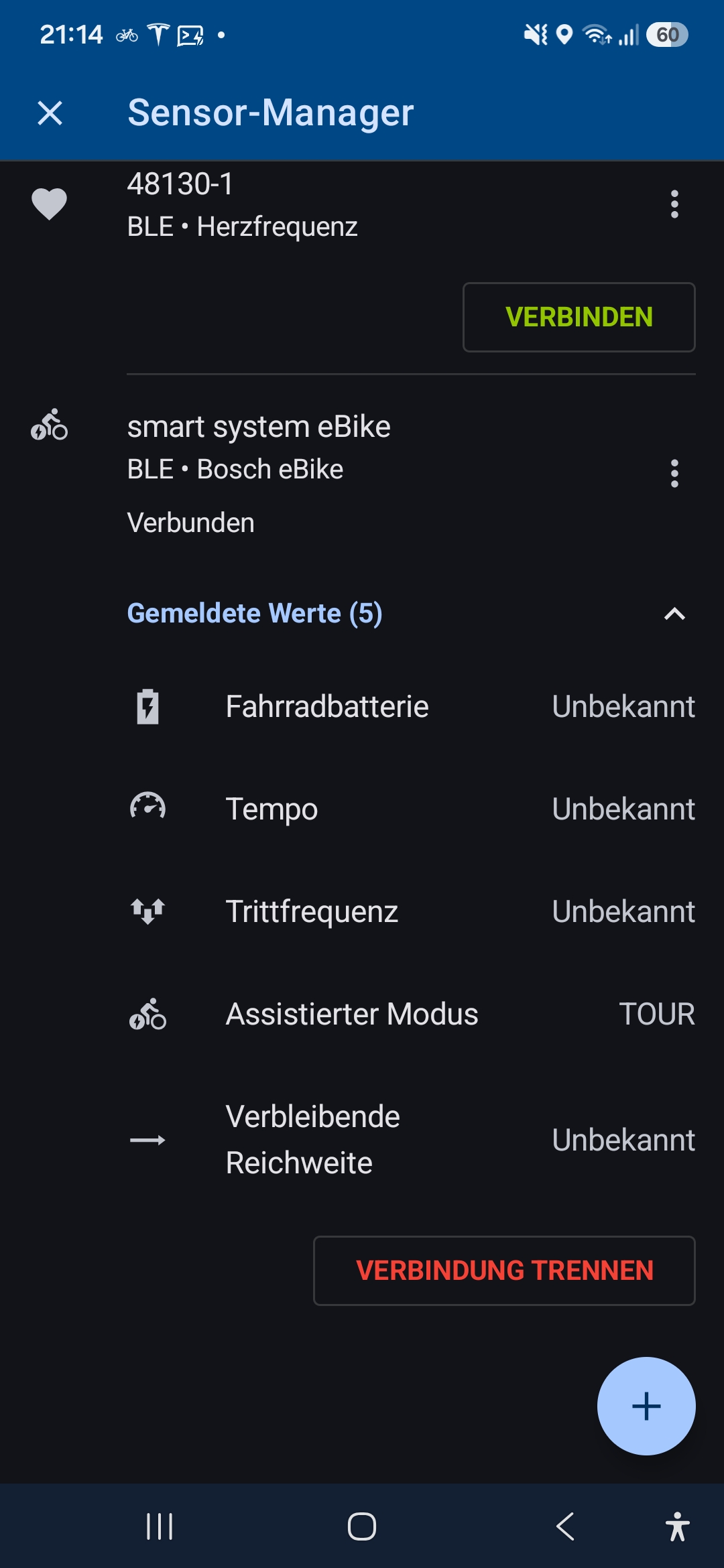
But as you can see, it does not show any data.
can somebody help or have an idea?
thanks in advance, Tom
I just made update to 4.36.1.
bosch flow app is 1.37.2
bike is with PURION200 in use
guess I have found the right bluetooth device and have connected my bosch e-bike.

But as you can see, it does not show any data.
can somebody help or have an idea?
thanks in advance, Tom
works now, it is important, that the flow app is also connected.
I hope that more data will be made available.
br Tom
works now, it is important, that the flow app is also connected.
I hope that more data will be made available.
br Tom
Perfect.
So thanks all for a big help here! I'll mark with idea as "Completed".
Future improvements should be done over separate topics (with the Bosch tag).
Perfect.
So thanks all for a big help here! I'll mark with idea as "Completed".
Future improvements should be done over separate topics (with the Bosch tag).
Replies have been locked on this page!